Microsoft 365 Admin Center Adds Cost and Config Controls for Multi-Tenant Admins
- Karthi
- 756 views
Microsoft 365 admin center now lets admins switch tenants without re-signing in, and adds agent, configuration and AI spend controls across connected tenants.
If you manage more than one tenant, you already know the routine: sign out, sign in with a different account, find the setting, make the change, then do it all again for the next tenant. Add Copilot and AI agents to that loop and the workload doesn't just grow, it multiplies. Microsoft's answer, announced as part of its Microsoft Ignite 2026 announcements, is to extend multi-tenant management in the Microsoft 365 admin center beyond agent management into cost and configuration management, and to let admins switch between tenants without signing out.
My read is that this is less about a single new feature and more about moving the admin center from a per-tenant tool toward a portfolio console. Whether that matters to you depends on how many tenants you touch in a typical week.
What the multi-tenant experience covers
Multi-tenant management brings a set of capabilities together so that authorized admins can manage several connected tenants from one place. Rather than hopping between individual environments, they can switch tenants, manage AI agents, maintain configuration baselines and monitor AI spending from a single centralized experience.
Microsoft frames the experience for two audiences. The first is Microsoft partners and MSPs managing Microsoft 365 environments for multiple customers. The second is enterprises running several tenants across subsidiaries, regions, business units or acquisitions, which want central governance while each business unit keeps its operational independence.
Connecting tenants doesn't flatten their boundaries. Each tenant still runs with its own administrative limits. Partner access is handled through GDAP relationships in Partner Center, while enterprises set up governance relationships with Microsoft Entra Tenant Governance. Those relationships, along with delegated roles, decide which tenants an admin can reach and what they can do once they're there.
Tenant switching is generally available
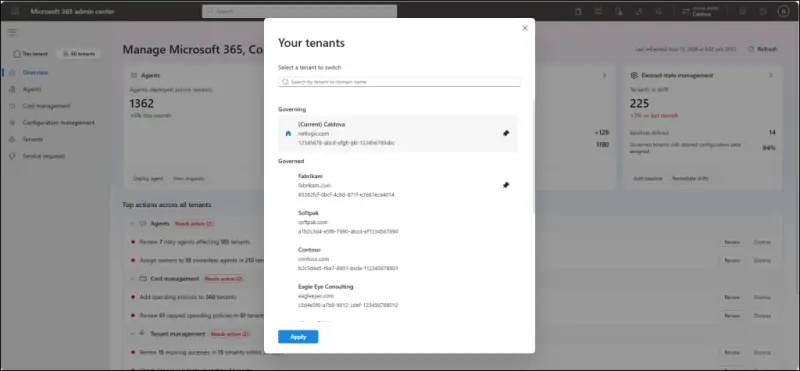
Of the four capabilities, tenant switching is the only one listed as generally available. Admins can view and manage their connected Microsoft 365 tenants under All tenants and move between them without signing out, signing back in, or keeping a separate admin account in each tenant.
The experience includes a consolidated tenant view of everything connected to the governing tenant, a search function to find a specific tenant quickly, and direct switching that moves an admin into a tenant's administrative environment without repeating sign-in. Delegated access boundaries stay in place for each tenant.
Agent management across tenants
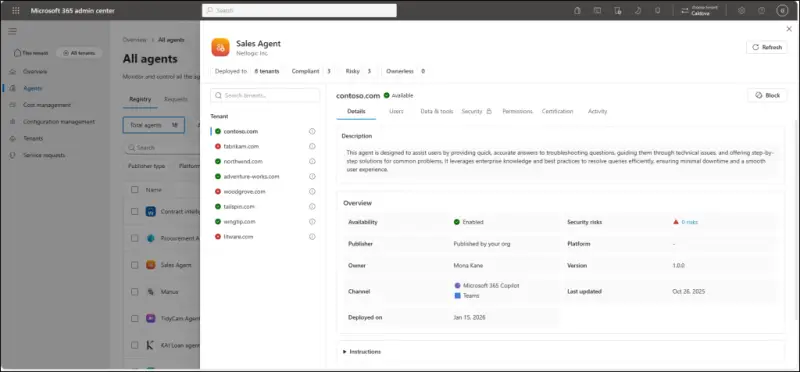
As organizations adopt more Copilot and AI agents, admins need to know where agents are deployed, who can reach them and how they're governed. Microsoft Agent 365 handles that job within a single tenant. For partners and enterprises running many tenants, repeating the same checks in each one adds real overhead. Multi-tenant agent management is Microsoft's attempt to pull agent inventory and governance into one view. It's in public preview.
With it, admins can:
- View agent inventory across connected tenants, including agents flagged as at risk or with no assigned owner.
- Add supported agents to the centralized inventory.
- Install approved agents across all eligible tenants or selected ones.
- Identify risky agents that have been flagged for security concerns and review the risk information.
- Find agents without owners that need administrative attention.
- Manage agent permissions across supported tenant environments.
- Block agents in selected tenants when they should no longer be available.
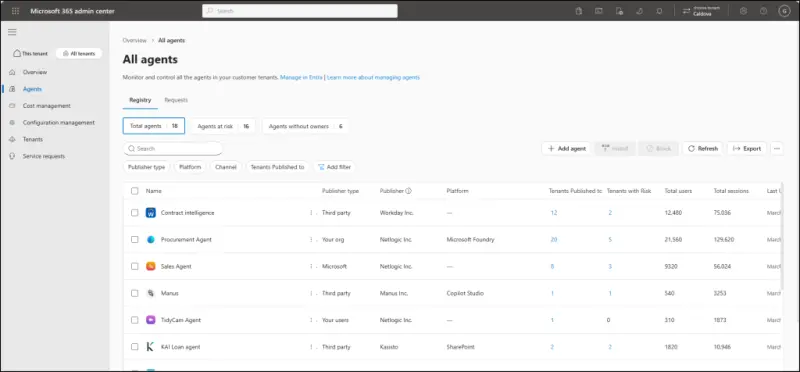
Opening an individual agent shows tenant deployments, users, data and tool access, security, permissions, certification and activity. That's the detail you'd need before deciding whether to block an agent everywhere or keep it in a subset of tenants.
Configuration baselines and drift
Configuration drift is the quiet problem in multi-tenant estates. Different teams and admins touch different tenants, and a setting changed in one may never be changed in another. Keeping common security and operational standards consistent becomes guesswork without a shared reference.
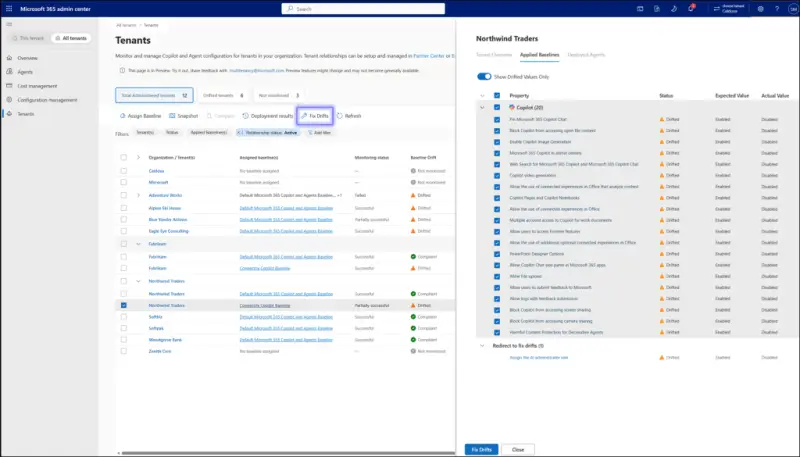
Microsoft's answer is desired-state configuration management, also in public preview. Admins define baselines and use them to monitor and maintain consistent settings across connected tenants. The workflow runs in four steps:
- Create baselines from Microsoft-recommended starting points or from custom sets of supported tenant-wide settings.
- Assign baselines to one or more tenants to define their desired state.
- Monitor drift by identifying settings that differ from the assigned baseline.
- Remediate deviations by reviewing differences and applying baseline values to bring tenants back into line.
The practical shift is from periodic manual checks across individual environments to a repeatable, systematic process. You still need to review what remediation will change before you approve it, especially in tenants where local teams have made deliberate exceptions.
Watching AI spend across tenants
Copilot and AI agents are becoming routine parts of business operations, and their consumption is becoming a cost line that someone has to watch. Each tenant has its own spending policies, limits and alerts. Setting those up one tenant at a time, and checking spend across dozens of tenants, is the kind of work that quietly eats an admin's week.
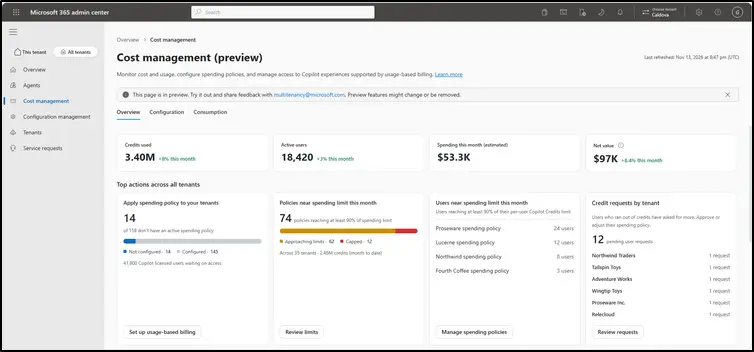
The multi-tenant AI cost management capability, also in public preview, gives admins a central view of AI consumption and spending controls across connected tenants. Admins can:
- View AI consumption across supported tenants.
- Review tenant-level usage by drilling into individual tenants.
- Create reusable spending templates that can be applied across tenants.
- Apply spending policies from those templates to selected tenants.
- Monitor spending limits and consumption to spot potential cost concerns.
- Review credit requests as part of spending oversight.
For partners, the appeal is moving from reacting to individual customer issues toward portfolio-level oversight. Reusable templates are the piece that makes that realistic, because they turn a one-off setup into something you can apply again.
Prerequisites before you start
The capabilities depend on setup you may not have yet, so check these first.
Tenant relationships. Enterprises establish a governance relationship between the governing and governed tenants using Microsoft Entra Tenant Governance. Partners and MSPs set up a Granular Delegated Admin Privileges (GDAP) relationship with customer tenants through Partner Center. The governing tenant needs an active supported relationship with at least one governed tenant.
Delegated permissions. A tenant relationship doesn't automatically grant access to every capability. Roles depend on the task:
- Tenant switching: a delegated admin role in each tenant you want to switch to.
- AI agent management: AI Administrator or Global Administrator to view and manage agents, or Global Reader for view-only access.
- Configuration management: delegated administrative rights to the governed tenant, plus the fine-grained permissions for every setting in the baseline.
- AI cost management: AI Administrator or Billing Administrator to manage policies, Billing Administrator or Global Administrator for billing setup, and AI Reader, Global Reader or AI Admin to view usage and reports.
Feature requirements. Viewing and managing the agent inventory doesn't need an extra license, but admins need a Microsoft Agent 365 license assigned to see agent risk and activity. Configuration management requires the workload permissions behind each baselined setting. AI cost management requires each governed tenant to meet the licensing, service, discovery and billing requirements for the Copilot experiences it uses, and admins who manage billing methods need access to an eligible Azure subscription and billing account for that tenant.
Getting into the multi-tenant view
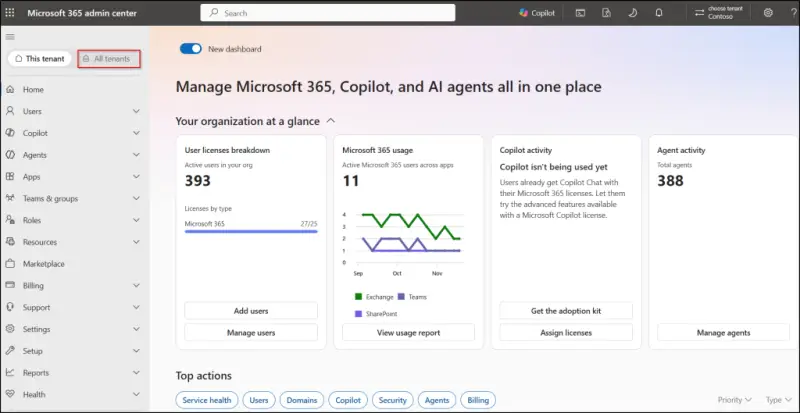
Once relationships and permissions are in place, sign in to the Microsoft 365 admin center with a governing tenant admin account, then select All tenants in the left navigation pane. The page gives you the consolidated tenant list. Search for a tenant, select it, and open the management experiences available for it.
What to do this quarter
The framing Microsoft uses, moving from "repeat it everywhere" to "decide once, apply broadly", is a fair description of the goal. Three of the four capabilities are still in public preview, so the details could change before general availability. If you plan to test them, start with your tenant relationships and delegated permissions, then trial the preview features in a small, controlled set of tenants. Pick a few tenants with known configuration differences and see how drift detection and remediation behave before you let baselines touch production settings.


