Vulnerability Shielding in Microsoft Defender Covers the Patching Gap
- AIMA
- 896 views
Microsoft's public preview Vulnerability Shielding applies temporary controls to unpatched systems. Here's how it works and what admins can manage.

Every patch cycle has a gap. A vulnerability gets disclosed, the fix ships, and then your team still has to test it, check it against line-of-business applications and schedule the change window. Until that's done, the system sits exposed. Microsoft says that 38% of critical Patch Tuesday exposures stay unpatched for more than five days. If that figure holds in your estate, the gap is where most of your risk lives.
At Ignite 2026, Microsoft introduced Vulnerability Shielding in Microsoft Defender as a way to cover that window. It's in public preview, and my read is that it's aimed at the awkward middle ground: the systems you can't patch this afternoon, but can't leave alone either.
What Vulnerability Shielding actually does
Vulnerability Shielding applies temporary security controls to a vulnerable system while the permanent fix is being prepared and deployed. The point is to avoid blunt instruments. Broad restrictions can break the business processes you're trying to protect, so Microsoft says the capability uses AI-driven threat intelligence and environment context to target specific attack paths instead.
Protection comes in two scenarios:
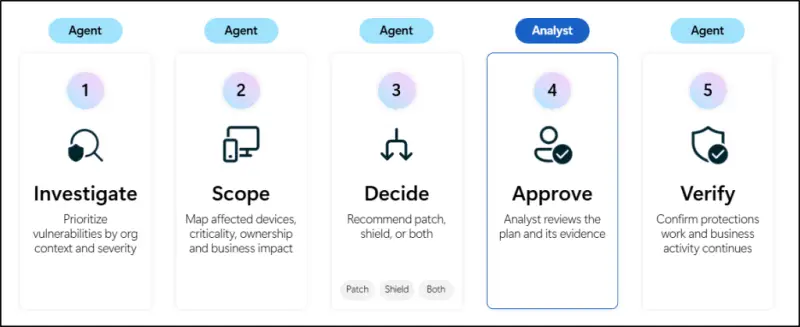
- Proactive protection, delivered through the Risk Reduction Agent in Microsoft Perception. The agent identifies vulnerabilities and recommends shielding plans, which administrators review and approve before anything is applied.
- Protection during active attacks, where Attack Disruption automatically applies shielding controls to stop an attacker from using additional paths.
Microsoft describes both protections as temporary and reversible. Once the permanent patch is deployed, the shields retire automatically. That matters for change control, because it means you aren't inheriting a pile of long-lived exceptions that nobody remembers to clean up.
Proactive reduction through the Risk Reduction Agent
The proactive side runs through what Microsoft calls green agents in Microsoft Perception. The Risk Reduction Agent uses the Reduce exposure risk playbook to identify and prioritize vulnerabilities. Its assessment considers exploitability, asset criticality, attack paths, patch readiness and business impact, and it then recommends actions based on that picture.

The recommendation depends on whether a patch exists yet:
- When a patch is available, the agent can coordinate patching through Microsoft Intune. IT teams keep control of the deployment itself.
- When patching is delayed, the agent can recommend Vulnerability Shielding for temporary protection until the patch can go out.
There's a scope limit to note. During the public preview, the Risk Reduction Agent supports shielding for server-side remote code execution (RCE) vulnerabilities only. If your exposure sits mostly on client endpoints or in other vulnerability classes, don't expect this path to cover it yet.
Responding during an active attack
The reactive side builds on Attack Disruption. Defender uses AI-powered analysis and threat intelligence to spot attacker activity and take containment action automatically, with the goal of stopping lateral movement through the environment.
Vulnerability Shielding extends that behaviour. Rather than only containing the attacker's current foothold, it applies targeted controls to the vulnerable systems involved and blocks the additional paths that would otherwise open up. Microsoft lists three enforcement controls:
- Reducing network reachability limits the network connections that can reach a vulnerable system.
- Restricting access paths blocks routes an attacker could use to move through the environment.
- Tightening permissions removes access that isn't needed, reducing what an attacker can do next.
How it plays out in Microsoft's example
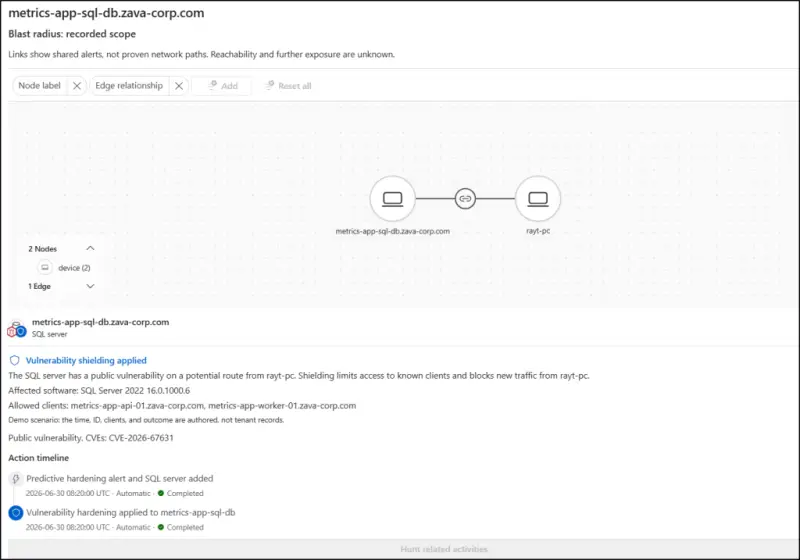
Microsoft's illustration involves a SQL Server affected by a known vulnerability. An attacker gets onto the server and tries to reach other systems on the network. In the scenario Microsoft describes, Defender restricts network connections and access to the affected server. Suspicious activity is blocked, and legitimate business traffic continues.
This is the part I'd test in a lab before trusting. The claim is that the restrictions stop lateral movement without disrupting normal operations. Whether that holds depends on how well your application dependencies are mapped, and a database server is usually where undocumented traffic hides.
What administrators keep control of
Shielding is automated, but Microsoft says administrators still decide how shields are applied and managed. The management options are:
- View active shields, including the vulnerability each one covers, the devices it affects and the reason it was applied.
- Configure exclusions for specific devices or applications through Microsoft Intune.
- Roll back protection by removing an applied shield with one click.
- Turn off shielding if the organisation doesn't want to use the capability.
- Extend protection to vulnerabilities beyond published CVEs, including those affecting in-house applications, legacy builds or AI-written code.
That last item is the one that will matter most to teams running homegrown or legacy software. Published CVEs are only part of the exposure in many estates, and an option that reaches into internal code is more useful than one limited to vendor advisories. Exclusions deserve the same attention. Every device or application you exclude is a place where the shield isn't doing its job, so the exclusion list should be reviewed like any other exception.
What to check before the next change window
Vulnerability Shielding doesn't replace patching. Microsoft is clear on that: patches remain the permanent fix, and the shields are a bridge. Here's the thing, though. For teams that already struggle to get critical fixes out within a few days, a bridge that's reversible and visible is worth evaluating.
Start with three questions. Which of your server-side workloads would fall under the RCE scope, and do you have Defender and Intune coverage on them? Which applications would break if their network reachability or permissions were tightened, and are those dependencies documented? And who in your team reviews shielding recommendations before they're approved?
Because the capability is in public preview, I'd treat it as something to pilot on non-critical servers first, watching how the controls behave against real traffic. If the preview holds up, the shields that retire automatically once a patch lands could make the gap between disclosure and deployment a lot less dangerous.


