Microsoft 365 Backup Extends to Teams Channels in Private Preview
- kanaga
- 322 views
Microsoft 365 Backup now covers Teams channels and their SharePoint files in Private Preview, with 30-day message restores and automatic protection for new channels.
 Teams channels are where project decisions, status updates and working files pile up. Teams already gives admins ways to recover deleted channels, files and messages, but getting back a single message that someone edited or removed has never been simple. That's the gap Microsoft is now trying to close.
Backup Extends Beyond Mailboxes and Sites
Microsoft 365 Backup already covers OneDrive accounts, SharePoint sites and Exchange Online mailboxes. Teams channels are a different case. A channel is a conversation thread and a file store at the same time, because the files shared in a channel live in SharePoint while the messages live in Teams. Protecting only one half leaves a mess behind.
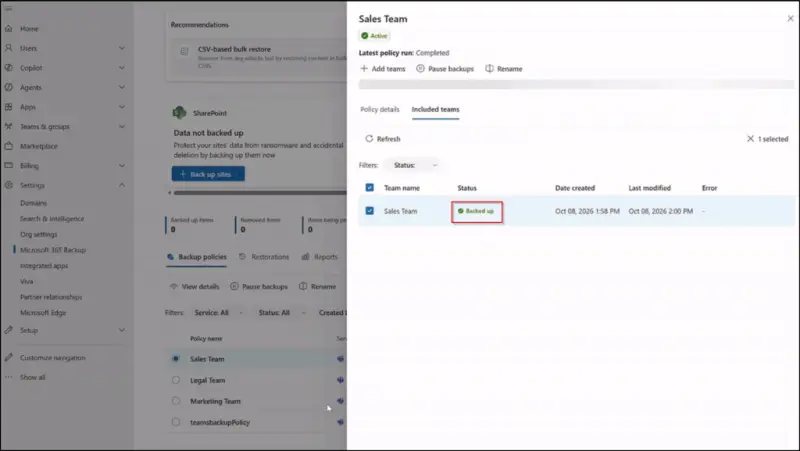
Restore the files in SharePoint without the conversations around them and the team loses the context for why a document changed. Restore the messages without the files and people can end up working from an older version while the discussion points at something that no longer exists. Teams Channel Backup is meant to treat the two as one unit. Admins can protect channels within a Team along with the SharePoint content that backs them.
Microsoft announced the extension at Microsoft Ignite '26. It's now in Private Preview as part of Microsoft 365 Backup, so this isn't a feature most tenants can switch on today.
Restoring Edited or Deleted Messages
This is the part most admins will care about first. Accidental deletions and unwanted edits are routine in busy channels, and the usual options have been clumsy. Microsoft 365 Backup lets admins restore deleted or edited channel text messages within a 30-day recovery window.
The workflow is straightforward as described. The admin selects the channels to restore, picks a date and time, searches the available backup restore points and confirms the restoration. That gives a clear point-in-time view to work from, which matters when someone is trying to recover a specific message from a thread that has moved on since.
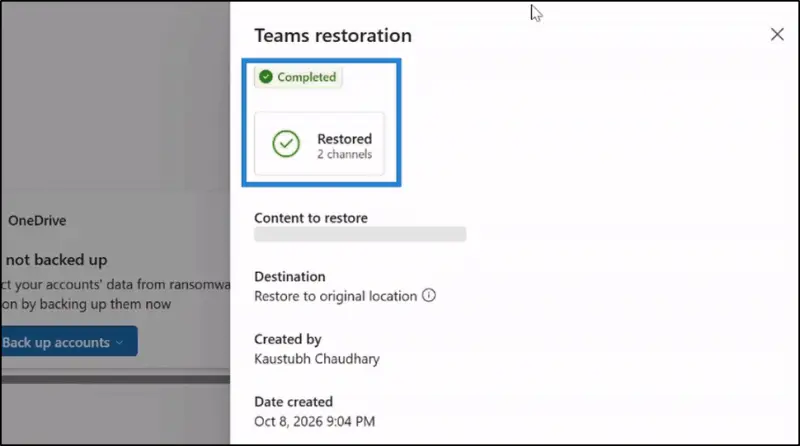
Here's the thing about a 30-day window: it's enough to cover most "someone deleted the thread last Tuesday" incidents, but not a problem that surfaces after a month-end review or a quiet quarter. Teams that rely on channel history as a record of decisions should check their retention settings alongside any backup plan rather than treating backup as a substitute for retention.
New Channels Are Covered Automatically
Protecting every new channel by hand is the kind of task that gets missed. In this design, new channels created within a protected Team are automatically protected. Admins don't need to configure backup channel by channel, and new channels join the existing protection setup without extra steps.
For organisations that create channels on a regular basis, such as project teams, customer-facing groups or temporary incident channels, that's the feature that matters most day to day. The protection scope follows the Team rather than depending on someone remembering a checklist.
The Limitation to Plan Around
Teams Channel Backup doesn't currently support recovery of hard-deleted content. That's the caveat to take into any planning discussion. A channel or message that has been hard-deleted can't be restored through this feature at the moment, so the recovery story for that scenario is unchanged.
Teams in this position typically test restore paths before they need them. Since hard-deletion recovery is out of scope for now, it's worth documenting what your current recovery process covers for that case and making sure owners know it.
Getting Access and What to Test
Teams Channel Backup is in Private Preview. Organisations that want to try it can sign up through Microsoft's preview registration link. Preview access will usually come with its own terms and may behave differently from the general release, so treat early testing as a way to learn the workflow, not a production deployment.
If you do get access, I'd start with three checks: how the channel and SharePoint file pairing looks in a test Team, whether auto-protection picks up a newly created channel as expected, and how long a restore takes on a realistic channel size. Those answers will tell you more about readiness than any feature list. Hands-on results will be the real test of how useful this gets for admins, and they're the data points I'd want to see before recommending it for a wider rollout.


