Entra's memberOf Operator Is Retiring, and MemberOf Next Takes Its Place
- Shanchana
- 1,004 views
Entra's memberOf rule operator is retiring, with Governance customers getting until March 31, 2027. MemberOf Next and Transitive Reports To arrive in preview.

 Microsoft has deprecated the memberOf rule operator in Microsoft Entra, effective November 3, 2026. After years in public preview, the operator never reached general availability, and Microsoft is now pulling it. The useful news for admins is the grace period: Microsoft Entra ID Governance customers can keep their existing configurations until March 31, 2027. Everyone else needs a plan sooner.

The timing is awkward but deliberate. Just as the old operator heads for retirement, Microsoft has introduced MemberOf Next in preview, announced at Microsoft Ignite. It keeps the same operator name and rule syntax but runs on a different processing model. Alongside it sits Transitive Reports To, a new operator that pulls in everyone across a manager's full reporting chain, not just direct reports. My read is that Microsoft is replacing a feature it couldn't scale with one that's designed around the scaling problem, and the migration path is meant to be mostly a priority change rather than a rebuild.
Why the original memberOf operator is going away
The legacy operator let administrators build dynamic membership rules from the members of existing groups, instead of relying only on user or device attributes. For tenants that needed to pull members from several groups into one dynamic group, especially where nested group membership wasn't supported, it was a practical shortcut.
The problem was performance. Microsoft found that even a single memberOf-based rule could slow dynamic membership processing across the whole tenant. Because the legacy operator shared processing with every other dynamic group, one expensive rule could hold up unrelated groups. That architecture is the reason it stayed in public preview and is now being retired rather than promoted.
Here's the thing: if your tenant uses memberOf rules, the retirement itself is less of a risk than the silent drift that can happen while you wait. Dynamic groups that look fine today may behave differently once the operator is withdrawn, so the deadline should drive your inventory work now.
How MemberOf Next changes the processing model
MemberOf Next runs on a dedicated processing architecture with a predictable schedule. Membership updates happen twice a day. Because that workload is separated from other dynamic groups, a heavy rule shouldn't stall the rest of the tenant. Microsoft says the redesign also allows Entra to support larger tenants.
One behaviour change matters for group design. MemberOf Next flattens the membership of the selected source groups. Entra adds the actual users or devices from those source groups to the target group, rather than adding the source groups as objects. Users who belong to several source groups appear only once in the target.

The flip side is latency. Twice-daily updates mean MemberOf Next is the wrong tool for any scenario where access has to be granted or revoked immediately. If a leaver's access depends on a group that's fed by a memberOf rule, that gap needs to be designed around, not discovered during an incident.
Rules that bite during migration
Before you touch a group, the source lays out a set of constraints that are easy to overlook:
- Standard priority is mandatory. Groups must be set to Standard priority to be included in the twice-daily schedule. Otherwise their membership isn't processed or updated.
- Same name and syntax. Existing rules keep the MemberOf operator name and syntax, so eligible groups can move over by switching priority to Standard without rewriting rules.
- Assigned membership only for sources. Source groups must have assigned membership. Dynamic membership groups can't be used as sources. Each rule supports up to 50 source groups.
- Users and devices. For user membership, security and Microsoft 365 groups are supported. For device membership, only security groups are supported.
- Combining conditions. MemberOf Next can be combined with other supported rule conditions in a single rule, which the legacy operator couldn't do.
- Direct members only. Members of nested groups inside a source group aren't included. Plan for that if your group design relies on nesting.
- Tenant-wide cap. During public preview, a maximum of 1,000 groups and administrative units can use MemberOf Next and Transitive Reports To combined. That count sits inside the overall 15,000 dynamic membership group limit.
- Deleted source groups pause the target. If a source group is deleted, updates to the target group are paused. Entra retries at each scheduled run until the problem is fixed, so a stale object ID can freeze membership quietly.
Legacy MemberOf versus MemberOf Next
| Comparison | Legacy MemberOf Operator | MemberOf Next |
| Availability | Public preview ended November 3, 2026 | Public preview introduced at Microsoft Ignite |
| Processing Architecture | Shared processing with other dynamic membership groups | Separate processing architecture designed for large tenants |
| Tenant-Wide Impact | Could slow dynamic membership processing across the tenant | Isolated processing prevents impact on other dynamic groups |
| Membership Updates | No predictable dedicated update schedule | Scheduled updates twice a day |
| Group Priority | High (default) | Standard (mandatory) |
| Rule Syntax | MemberOf operator with standalone rule expressions | Same MemberOf syntax |
| Rule Builder | Rule syntax box only | Supports the rule builder |
| Licensing | Microsoft Entra ID P1 | Microsoft Entra ID Governance |
| Tenant-Wide Limit | 500 groups | 1,000 groups, shared with Transitive Reports To |
| Combining Rule Conditions | The memberOf attribute couldn't be combined with other conditions or operators | Can be combined with other supported conditions using the rule syntax editor |
| Cloud Support | Public preview ended | Available only in the Microsoft Entra public cloud; not supported in national clouds |
The licensing row is the one to take to budget discussions. Moving from P1 to Governance licensing is a real cost question, not a checkbox, and it applies to every unique member user in MemberOf Next groups plus each administrator who creates or configures them.
Migrating existing MemberOf groups
The migration itself is mostly a priority change. Renaming, recreating groups or rewriting rules isn't required, because the operator name and syntax are unchanged. You do need the right roles: Groups Administrator, User Administrator, Intune Administrator (for security groups only), or Global Administrator. You also need Microsoft Entra ID Governance licences covering the member users and the administrators involved. Licences are counted once per unique user and don't have to be individually assigned.
Start with discovery. Microsoft Entra has no central view of every configuration that depends on memberOf, and that gap gets worse in large estates. The source describes a PowerShell report script, MemberOfRuleDeprecationReport.ps1, that scans the tenant and writes separate CSV reports for affected configurations. It covers dynamic groups, administrative units and entitlement management policies, and supports interactive sign-in as well as certificate-based unattended runs. By default it scans all supported types, and the -DynamicGroups, -AdministrativeUnits and -AutoAssignmentPolicies parameters let you scan them one at a time.
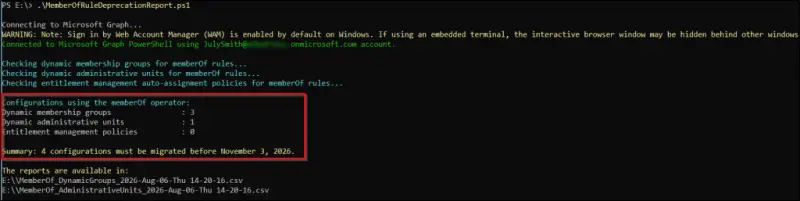
Before changing any priority, confirm that every source group referenced in a rule still exists. If one has been deleted, remove its object ID from the rule, or the target group won't update. Test the report script and the priority change in a non-production tenant first, and review the script's output before acting on it.
There are two ways to switch priority. The admin center route works group by group: go to Entra ID, Groups, All groups, open the dynamic membership group, choose Properties, set Group priority to Standard, and save. It's slow for large estates but low risk. The bulk route uses Microsoft Graph PowerShell modules at version 2.41.2 or later, with the Group.ReadWrite.All permission, to find dynamic groups whose rules reference memberOf and set their priority. The source also documents a Graph beta PATCH call that sets dynamicMembershipPriority to Standard on a single group. For bulk work, I'd want a dry run that lists the target groups and a read-back of each group's priority afterwards, which is the pattern the source's own sample follows.
Transitive Reports To: the hierarchy operator
Transitive Reports To extends dynamic membership rules so that a group can include everyone across a management hierarchy, not only those who report directly to a manager. The existing manager property only evaluates the direct relationship. This operator also picks up indirect reports, which removes the need to build separate groups for each management level.
The main points from the source:
- It includes the selected manager plus all direct and indirect reports, up to 99 levels below the manager.
- Membership updates during the next scheduled evaluation when people join, leave or change managers.
- It can be combined with other user attributes to narrow membership.
- It supports dynamic user groups only, not devices.
- Groups using it must have Standard priority and update twice daily.
- It is in public preview and shares the 1,000-group and administrative-unit limit with MemberOf Next.
That shared cap is the constraint I'd plan around first. A tenant that adopts both operators at scale can run out of headroom faster than the feature list suggests.
Creating a group with Transitive Reports To
In the Microsoft Entra admin center, go to Entra ID, Groups, All groups, and select New group. Choose the group type as Security or Microsoft 365, then enter a name and description. Under Membership type, select Dynamic User, and set Group priority to Standard. Select Add dynamic query, choose TransitiveReportsTo from the Operator list in the rule builder, and enter the manager's object ID in the Value field. The rule takes the form Transitive Reports To followed by the manager's object ID in braces. Save the membership rule, then save the group.
Where this leaves admins
The practical sequence is clear. Inventory memberOf dependencies now, because the operator's retirement doesn't wait for your change calendar. Decide which groups genuinely need near-real-time membership, since MemberOf Next and Transitive Reports To both run twice a day. Check that each source group has assigned membership and still exists. Then budget for Governance licensing and move priorities in controlled batches.
MemberOf Next and Transitive Reports To make dynamic group management more scalable and easier to govern. MemberOf Next consolidates users or devices from existing groups under a dedicated schedule, and Transitive Reports To builds membership from the full reporting chain. Both still depend on Entra ID Governance licensing, Standard priority and the twice-daily cadence. Watch the preview-to-general-availability path and the shared 1,000-group ceiling, because those two details will shape how far you can take either operator.


