WordPress.com Newsletters Can Now Start and Send From ChatGPT or Claude
- Rob Pugh
- 425 views
WordPress.com's AI connectors can build a newsletter site, import subscribers and send the first issue from one chat, but only after you approve each step.
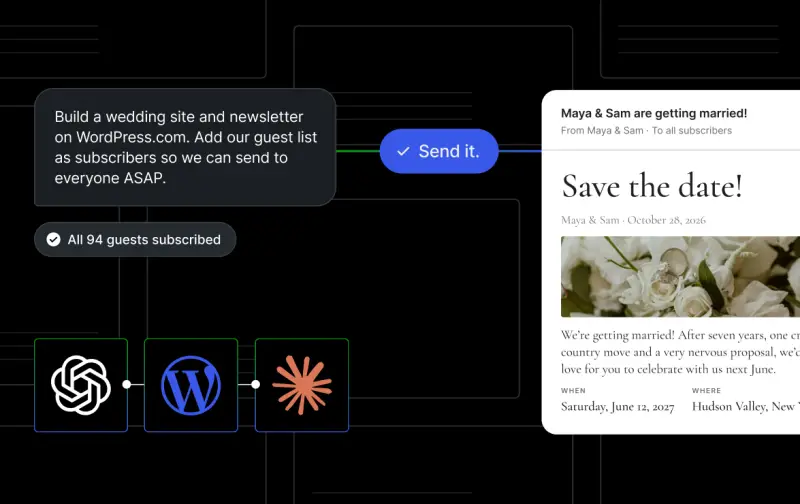
Setting up a newsletter has usually meant building a site, wiring up a sign-up form, importing a list, choosing a template and only then writing the first issue. WordPress.com now lets ChatGPT or Claude handle most of that from a single conversation, including sending the email. The speed is the obvious selling point. The detail I'd pay attention to is that the assistant asks before it changes anything or emails anyone.
One conversation, from site build to first send
The worked example is a wedding website where the couple wants to keep guests informed by email. The prompt is short: build a wedding site and newsletter on WordPress.com, and add the guest list as subscribers so everyone can be emailed quickly. You attach the list and confirm the site name. The agent then creates the site, asks you to confirm you have permission to email everyone on the list, and adds those people as subscribers.
It launches the site only when you say so and drafts the first email. The email goes out when you reply "Send it." That two-step pattern is the core of the workflow, and it's the part I'd expect most administrators to test first. The same approach fits a gardening newsletter, updates for a bakery's regulars or a weekly hiking guide.
What the agent can do in the same chat
The wedding example is one slice of a wider set of tasks. Here's how the pieces break down.
Building the site. The agent creates a new WordPress.com site, writes the homepage and launches it. You can ask it to switch to a different theme. It can also search for a .com domain and return a checkout link already tied to that site.
Welcoming subscribers. It drafts the welcome email, sets the address where replies go, adds sign-up forms and creates topics readers can choose from.
Importing subscribers. You can paste or attach a list, including exports from beehiiv, Kit, Ghost, Mailchimp, Medium or Patreon. The agent adds up to 100 people at a time. On a paid plan, a larger list can be uploaded from the Subscribers screen. The free plan caps imports at 100 subscribers, but new readers can still sign up on their own. That limit is the one to plan around. A club or small membership list will hit the paid upload path quickly, and the cap applies to imports rather than to sign-ups.
Publishing the issue. The agent can draft a post, generate a cover image and publish it. It can send the issue to subscribers when you give the word. It can also keep part of a post for subscribers only, or publish to the site without sending an email at all.
Checking delivery. Asking "Did my newsletter go out?" returns how many people it reached. If something is blocking delivery, the agent should say so and, where it can be fixed, explain the cause. The example given is a site that hasn't launched yet. You can also ask for views, visitors and subscriber counts.
How it compares with other newsletter platforms
Several newsletter services now connect to AI assistants, but the degree of control varies a lot. The sending step is where they diverge. Here's the comparison as set out by WordPress.com, which drew it from each company's own help pages and documentation, current as of November 11, 2026:
| Platform | Can AI start your newsletter? | Can you send your newsletter from chat? |
|---|---|---|
| WordPress.com | Yes, with your approval | Yes, with your approval |
| Substack | No | No, its agent is read-only |
| beehiiv | No | Partly. On its Max, Pro and Enterprise plans it can schedule a send after you take a final look. On Lite it saves drafts you send from beehiiv. |
| Kit | No | No, on a paid plan (Creator or Pro) you confirm each send inside Kit |
| Ghost | No, you set up the Ghost site yourself first | Yes, through a beta tool you run on your own computer, on the Publisher plan or above or your own server |
Read against each other, the differences are practical. Substack's agent can read but not send. beehiiv's Lite plan stops at saved drafts, and its higher tiers can schedule a send after a final review. Kit keeps the final confirmation inside its own interface. Ghost's route runs through a beta tool on your own machine or server, which suits teams already comfortable with self-hosting but is a different proposition from a chat-only workflow.
Where the newsletter lives and what it costs
The newsletter sits on a website you own. Readers can find posts through the web and subscribe there, and they can also follow you in the WordPress.com Reader. WordPress.com says there are no subscriber or sending limits on any plan, including free. The MCP connection that links your account to ChatGPT or Claude is included on all paid and free plans. The source doesn't give pricing for any tier, so check the current plan details before you commit to a migration.
Before you say "Send it"
Three things are worth settling before the first live send. First, confirm that everyone on an imported list has agreed to hear from you. The agent asks you to confirm permission for this, and that confirmation is yours to give accurately. Second, check the reply address and the welcome email, because new subscribers will see both right away. Third, make sure the site has launched. The agent flags an unlaunched site as a reason an email won't go out, so it's worth catching that before you hit send rather than after.
My read is that the approval step is the feature to protect. Letting an assistant draft, import and publish is useful, but a stray email to a full guest list is hard to undo. If you're piloting this for a team or a client, start with a small test list and a draft-only run, then widen the scope once you've seen how the agent reports delivery and what it does when something goes wrong.
The open question is whether other platforms close the sending gap. Right now WordPress.com is the only one in this comparison where chat can both build the site and send the issue, with your sign-off on each step. Watch whether competitors widen their agent permissions over the next few months, and whether the free-plan import cap changes, since that's the number most small publishers will run into first.
To connect, use the ChatGPT link or the Claude link, sign in, and describe what you want built. For more examples, see what you can do with newsletters and AI. If you need help with the connection, the WordPress.com MCP setup guide covers it.


