WordPress.com Adds Site Migration, Developer Tools on Paid Plans and AI Site Management
- WordPress.com Staff
- 425 views
WordPress.com's latest changelog moves Wix and Squarespace sites over, opens SSH, WP-CLI and GitHub deploys to every paid plan, and widens AI assistant control.
Three changes in this WordPress.com changelog matter most to admins: a managed migration path for sites coming from other platforms, developer access that now reaches every paid tier, and an AI assistant that can handle a much wider set of account and site tasks. Taken together, they shift more of the routine hosting work off your desk and onto the platform, and they widen the set of people who can do deeper administration without upgrading to Business.
Managed migration from Wix, Squarespace and other hosts
The migration flow is the simplest piece to explain. You paste your site's address into wordpress.com/move, choose a plan, and WordPress.com moves the site for you. The source describes sites on Wix, Squarespace, other AI site builders and other WordPress hosts as eligible. The move runs in the background and you get an email when it finishes, so the job doesn't need someone babysitting a import tool.
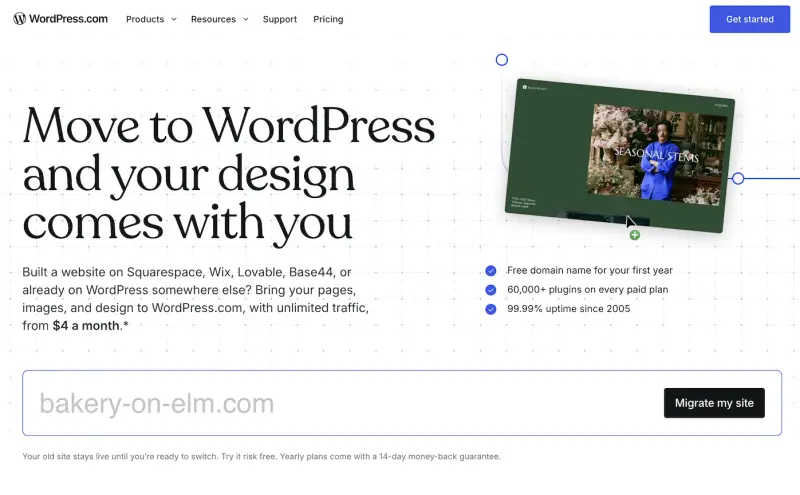
The part I'd flag for teams is the guarantee. WordPress.com says that if a move doesn't work, its team will move the site for free, or you get your money back. That's a useful fallback when you're handling a client site with a tight cutover window, but it's still worth checking your DNS, email and forms after the move rather than assuming everything came across intact. Domain and email configuration is exactly where migrations tend to surprise people.
For more detail, see the WordPress.com blog post Moving your site used to mean starting over. Not anymore.
SSH, WP-CLI, Git and GitHub deployments on Personal and Premium
This is the change with the biggest knock-on effect for small agencies and freelancers. Previously these developer tools sat behind Business plans and above. Now any paid plan can connect over SSH or SFTP, run WP-CLI and Git commands, and deploy from GitHub.
The practical benefit is self-service recovery. When a plugin breaks a site, a competent admin can roll it back from the command line rather than queueing a support ticket. That's a real saving on a Personal or Premium site, where support turnaround has typically mattered more to smaller operators. It also means more sites will have shell access and deployment pipelines, which makes access control and key hygiene more important, not less.
To start, the source says you need to turn on hosting features in your site's settings. Check that step before you promise a client a git-based workflow.
AI assistants can now handle much more of the back end
If you've connected ChatGPT or Claude to a WordPress.com site, the assistant can now reach well beyond content editing. The changelog groups the new abilities into six areas:
- Domains and email: update domain contact and privacy settings, set up domain and email forwarding, view SSL settings and update DNSSEC.
- Site management: change the site address, start an ownership transfer, delete or reset a site, import from an export file, view and change PHP and WordPress versions, and read server logs.
- Developer tools: list SSH keys on your account, deploy GitHub repositories, and migrate an existing WordPress site to WordPress.com.
- Growth and reach: turn on and manage WordAds, and connect a site to social services.
- Reader and notifications: search Reader feeds, and mark notifications read or unread.
- Account and privacy: update privacy preferences and reach account settings.
Here's the thing: the domain, ownership transfer, delete and reset actions are destructive or account-level. Being able to do them through a conversational tool is convenient, but it raises the stakes on who has access to the connected AI session. You control how much is exposed through your MCP AI settings at AI settings, and that's the first place I'd review on a shared account. The source also notes that any WordPress.com user can already work on their site with an AI, which is worth telling non-technical site owners before they start experimenting.
More detail is in the post on using ChatGPT and Claude with WordPress.com.
SEO and AI crawler controls consolidated
SEO settings now sit together under Jetpack → SEO on Premium, Business and Commerce plans. From there you can set site and author identity, spot missing SEO details, and choose which AI crawlers may access the site through a new GEO tab. The tab is where you decide crawler permissions individually, and you can generate an llms.txt file for AI tools.
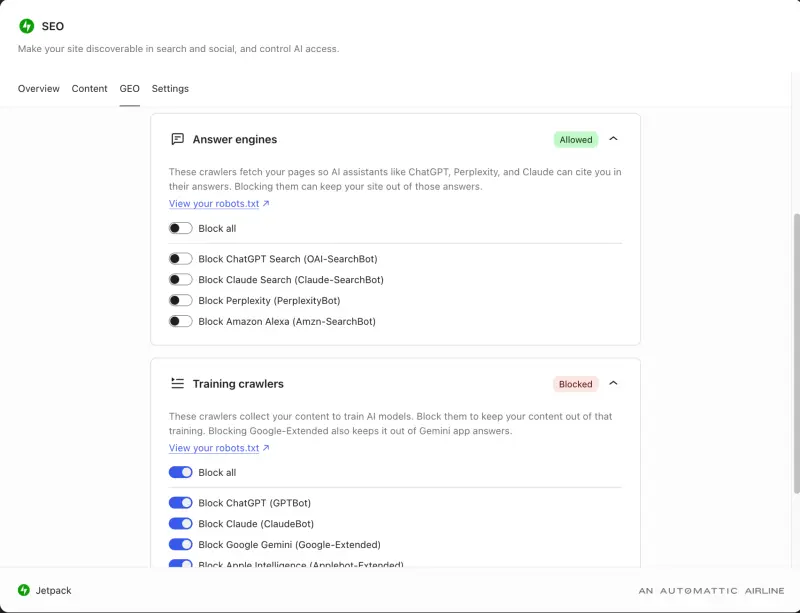
If you publish client sites with an AI-crawler policy, this is the consolidated place to set it. Review the GEO settings once per site rather than assuming defaults match your client's position on training data and search visibility. More background is in the blog post SEO tools for search and AI.
Smaller fixes
The changelog also lists reliability and interface updates:
- A fix for an editor crash on older browsers (GitHub PR).
- In the domains list, "Paid until" is now "Renews on", so it's clearer when the next payment will process (GitHub PR).
- A loading state while two-step authentication backup codes generate (GitHub PR).
- Image title, caption, description and alt text are kept if you revert to the original photo (GitHub PR).
What to check this week
If you manage WordPress.com sites, start with the plan question: confirm which clients now qualify for SSH and GitHub deployments on their current tier. Then audit your MCP AI settings before anyone connects an assistant to a production account. Migrations from Wix or Squarespace are the next thing to scope, but plan for post-move checks on DNS, email and forms. The direction is clear: WordPress.com is pushing developer-grade control and AI-assisted administration down to cheaper plans, and the teams that get the most from it will be the ones that set permissions before the convenience arrives.


