ThinkPad T14 Gen 7 Review: Serviceable LPCAMM2 Memory, Modest Core Ultra 5 Performance
- Dylan Bryan
- 371 views
Lenovo's ThinkPad T14 Gen 7 keeps LPCAMM2 memory, Gigabit Ethernet and vPro, but the six-core Core Ultra 5 332 trails on local AI and 3D work.
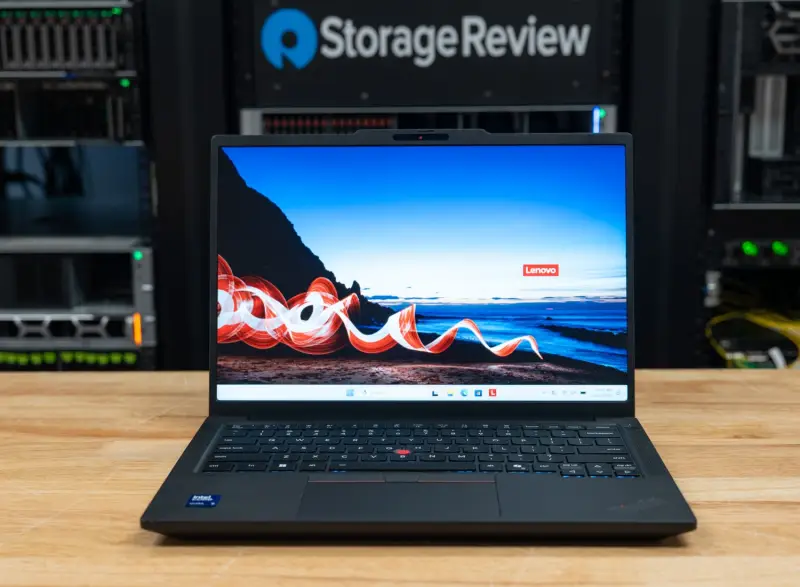
Most 14-inch ThinkPads are chosen for their keyboards and their paperwork. The T14 Gen 7 is different on one front that fleet buyers will notice quickly: its Intel model pairs Core Ultra Series 3 processors with a replaceable LPCAMM2 memory module, a Gigabit Ethernet port and two USB-A ports, in a chassis that starts at 1.37kg (3.02lb) with the 75Wh battery. The catch is which processor you get. The configuration we tested, model 21WN00C9US, runs the six-core Core Ultra 5 332, and that choice shapes almost every result that follows.
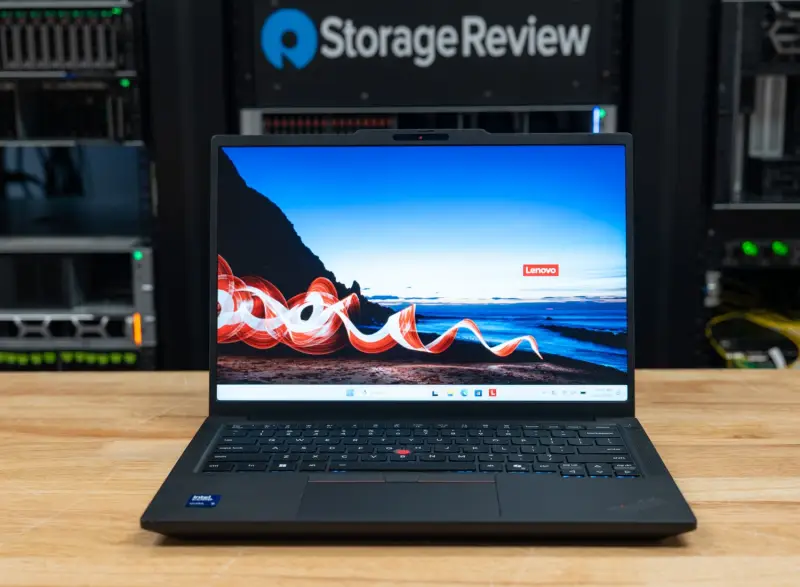
Our unit carries 32GB of memory, a 512GB SSD and the 500-nit WUXGA touch display. Here's the short version of what we found: the chassis and ports are good for a business notebook, the CPU holds its score under sustained load, and the smaller integrated graphics cost real ground on AI and 3D work. Lenovo.com also lists a faster T14 configuration for $90 less than the one we bought at retail, which changes the buying math considerably.
Where the T14 Gen 7 Sits in the Lineup
Lenovo positions the T14 Gen 7 as a Copilot+ business laptop built for productivity. It sits below the X1 and X9 families on price and above them on ports and serviceability. That trade-off is the whole point of the model, and it's worth keeping in mind when you compare it to the more expensive ThinkPads on your shortlist.
In North America, the Intel model comes with Core Ultra 5 and Core Ultra 7 processors: the 8-core Core Ultra 5 325 and 335, the 6-core Core Ultra 5 332, and the 8-core Core Ultra 7 355 and 365. Lenovo lists H-series chips up to the Core Ultra X7 368H with Arc B390 graphics for other regions. Those H-series parts aren't part of the North American lineup, so if your standard image has to match across regions, check which chip your country gets before you write the purchase order.
The Core Ultra 5 332 is the smallest chip on that list. It has two P-cores and four low-power E-cores, six threads, a 4.4GHz maximum P-core clock and 12MB of cache. Lenovo rates its integrated Intel Graphics at up to 18 TOPS, compared with up to 40 TOPS for the graphics in the 325, 335, 355 and 365. The 332 does carry vPro, and our unit pairs it with the vPro version of the Wi-Fi 7 card and the Intel I219-LM Ethernet controller for Intel vPro Enterprise management.
Pricing is where the configuration question gets interesting. Our configuration sold for $2,579 at CDW and B&H Photo and was in stock when we wrote this. Lenovo.com doesn't list that model. Instead, it lists two models, 21WN005SUS and 21WN00BUUS, with the Core Ultra 7 365 vPro, 32GB of LPDDR5X-7467, a 1TB SSD and the same 500-nit touch panel, for $2,489. The range starts at $1,609 for a Core Ultra 5 325 model with 16GB, 512GB and a 400-nit non-touch display.
Build, Ports and Serviceability
The chassis measures 313.6 x 221.7mm and tapers from 11.3mm at the front to 15.88mm at the rear, with a 21.95mm maximum. Lenovo lists 1.37kg (3.02lb) as the starting weight for WLAN models with the 75Wh battery, against 1.27kg (2.80lb) with the 60Wh pack. The top and bottom covers on WLAN models are polycarbonate with 20 percent carbon fiber, the keyboard frame is 90 percent recycled magnesium, and Lenovo tests the design against MIL-STD-810H.
Materials aside, the T14 doesn't feel like the premium end of the ThinkPad range. The lid flexes and the bottom cover comes across as fairly limp. If your users are used to X1-class hardware, expect a noticeable step down in rigidity, even if the machine does its job.
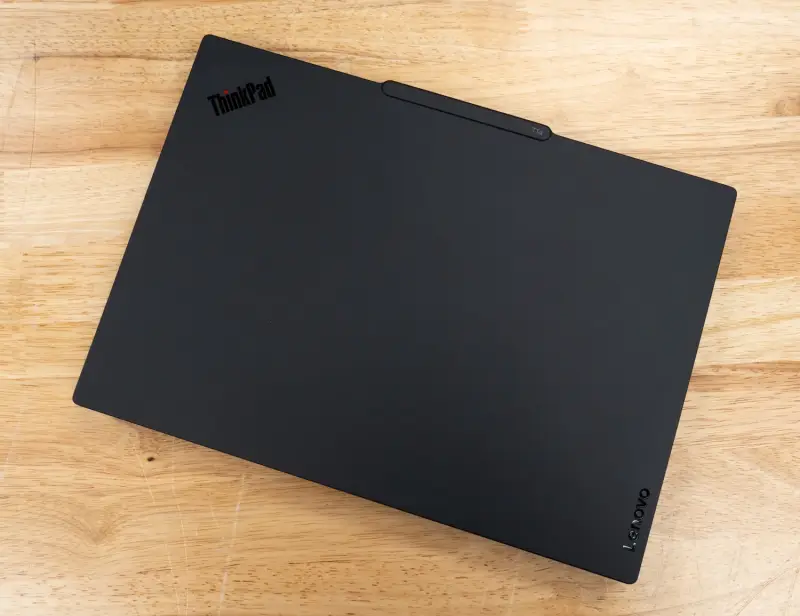
The port selection is the strongest part of the hardware story for IT teams. Lenovo specifies two Thunderbolt 4 connections with DisplayPort 2.1 and USB Power Delivery from 15W to 100W, two USB-A ports at 5Gbps with one always on, HDMI 2.1 at up to 4K and 60Hz, a 3.5mm combo jack, and an RJ-45 port for Gigabit Ethernet with Wake-on-LAN. On our unit, the left side carries both Thunderbolt 4 ports, HDMI and the always-on USB-A port. The right side carries the audio jack, the second USB-A port, Ethernet and a Kensington Nano lock slot.
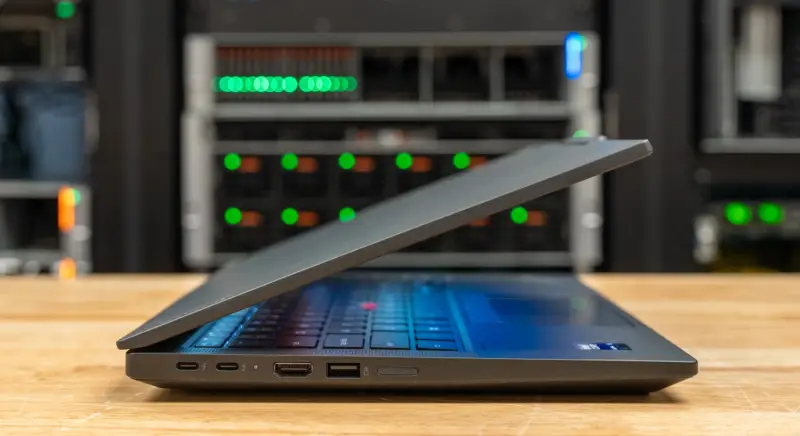
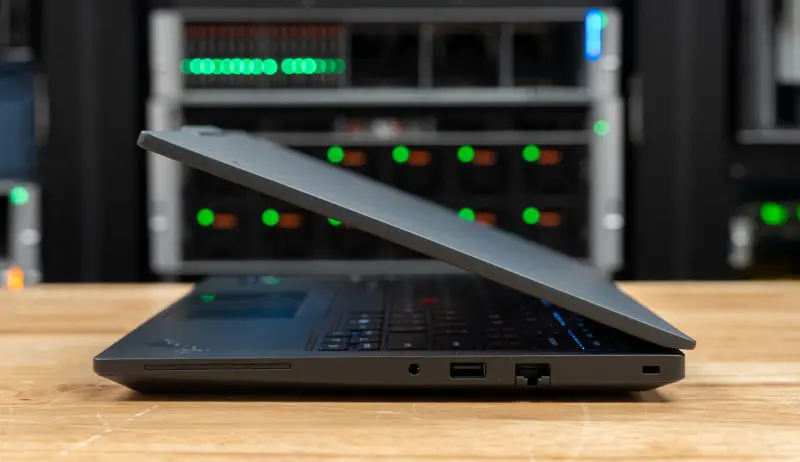
Wireless is Intel Wi-Fi 7 BE211 2×2 with Bluetooth 5.4. Our model has no WWAN and no NFC. Other configurations can add 4G and 5G modems, a smart card reader and a nano-SIM slot. The T14 has no card reader and doesn't support a pen. For display, the internal panel plus three external monitors are supported through HDMI and Thunderbolt, with Thunderbolt carrying up to 8K at 60Hz.
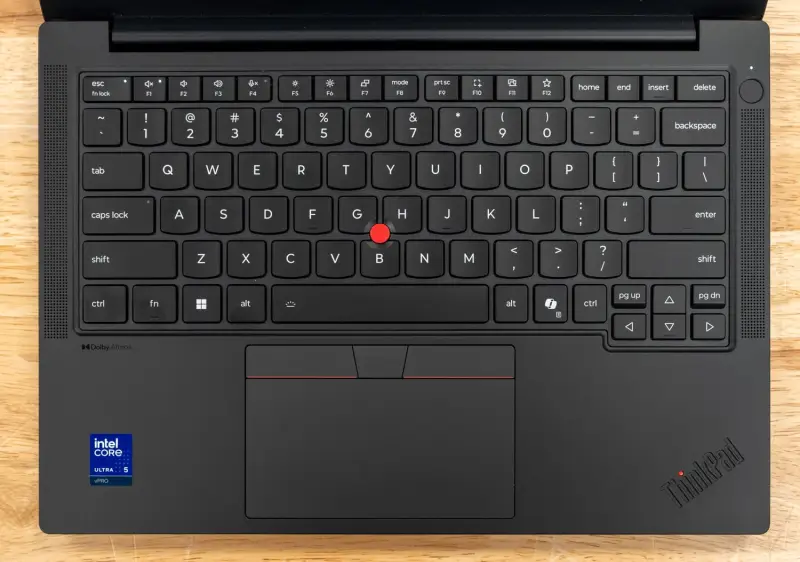
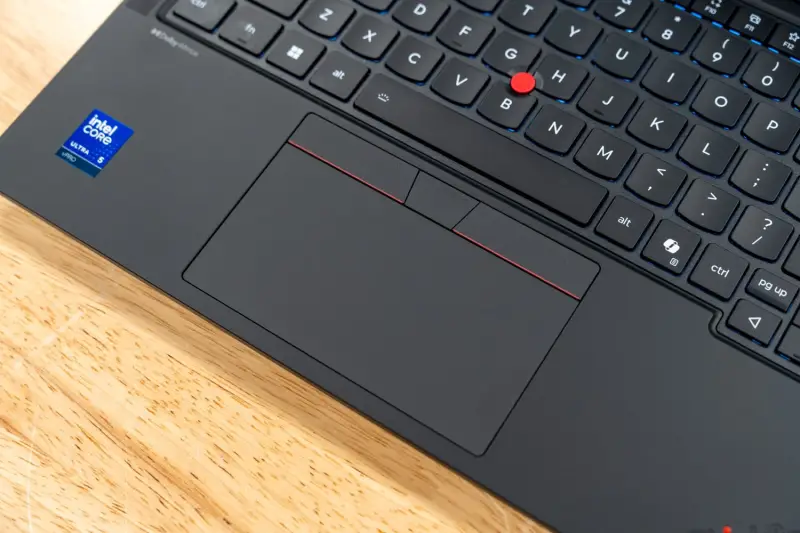
Input is the familiar ThinkPad layout: a six-row, spill-resistant keyboard with an LED backlight and a Copilot key, with 1.5mm of travel on most keys and 1.35mm on the Fn row and on the G, H and B keys around the TrackPoint. The trackpad measures 74.3 x 115mm with a glass-like Mylar surface and three buttons, and the fingerprint reader sits in the power button. Two 2W speakers with Dolby Atmos and a dual-microphone array with Dolby Voice handle conferencing audio.
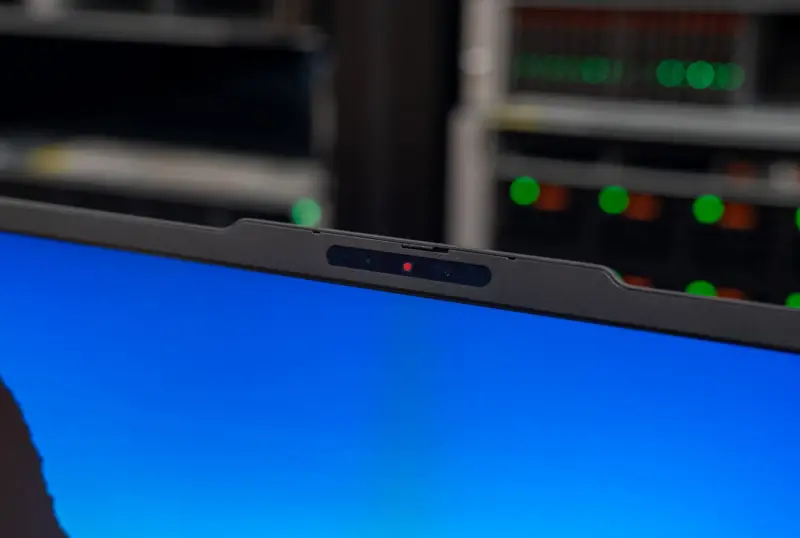
Our unit's display is a 14-inch, 16:10 low-power IPS panel at 1920×1200 with in-cell touch. It's rated at 500 nits, 1500:1 contrast and 100 percent sRGB, with an anti-glare surface and a 60Hz refresh. Lenovo also offers a 400-nit non-touch panel, a Privacy Guard touch panel and a 2.8K OLED at 120Hz. The camera above the panel is a 5MP sensor with IR for Windows Hello, vHDR, a privacy shutter and computer vision on the image signal processor for human presence detection.
Memory, Storage and Power Under the Lid
Memory is the headline here. The T14 uses a single LPCAMM2 module, 32GB in our unit, running at 6800MT/s. Lenovo says the module is LPDDR5X-8533 and runs at 6800MT/s on this processor, and that the T14 supports up to 64GB. That ceiling matters for anyone who plans to keep these machines for a few refresh cycles, because a module swap is a much simpler job than replacing soldered memory.
Storage is a single M.2 2280 slot wired for PCIe Gen5 x4 that accepts drives up to 2TB. Our unit ships with a 512GB Samsung Gen4 drive, which means the slot is faster than the drive you get out of the box. The 75Wh battery ships with a 65W USB-C adapter. Lenovo specifies the 100W adapter for Rapid Charge to 80 percent in one hour on that battery.
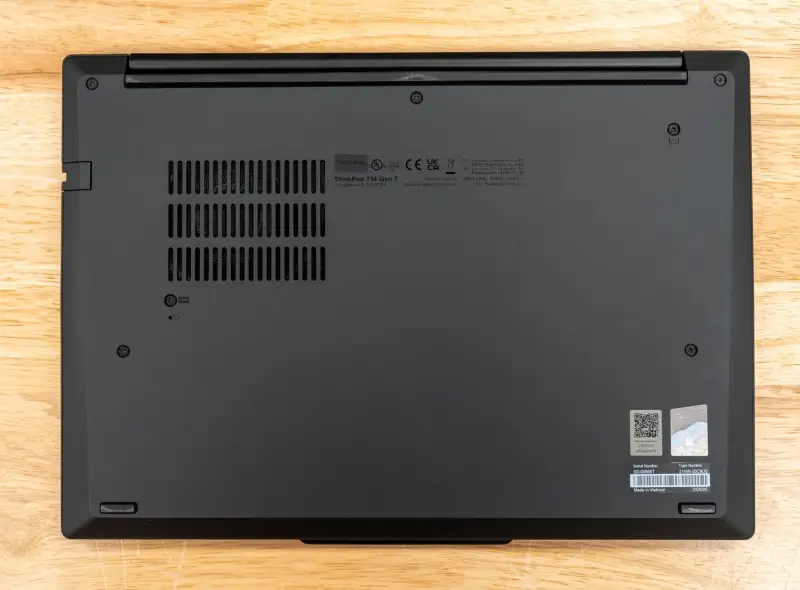
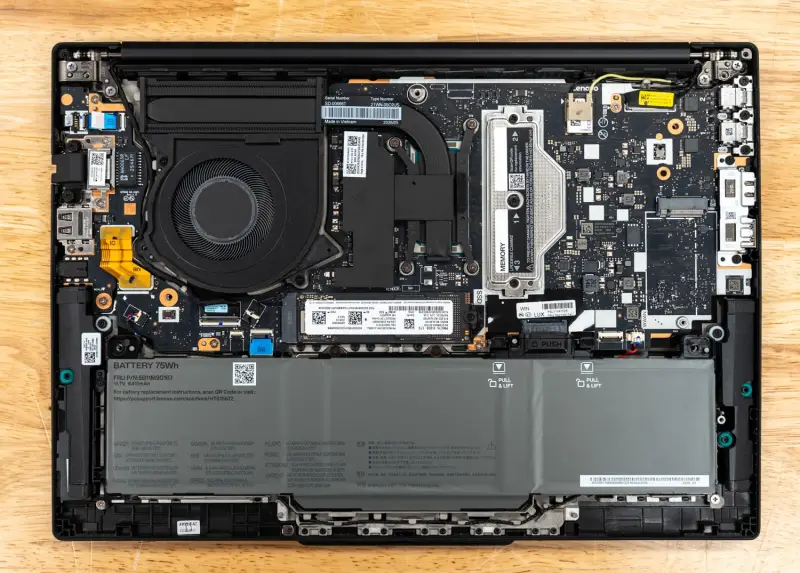
The bottom cover is held by seven screws and comes off without trouble. Inside, our unit shows a single fan and heat pipe over the processor on the left side of the board. The LPCAMM2 module sits under a metal retention bracket to the right of the cooler, held by three screws. The M.2 2280 SSD sits below the cooler, and an unpopulated M.2 slot marked WWAN sits at the right edge. The 75Wh battery spans the front of the chassis and has no screws. It releases with two clips and a lift. The USB-C ports are field-serviceable on this machine too, which is a useful detail for depot repair planning.
Lenovo quotes up to 19.8 hours in MobileMark 30 for a Core Ultra 5 332 configuration with 16GB of memory, the 60Wh battery and the low-power touch panel. That's Lenovo's figure for that specific setup, not our measurement. We haven't yet run battery life on this unit, and we'll add those results in a later update. The base warranty on our model is one year of courier or carry-in service.
Test Setup and Comparison Set
Our review unit runs the Core Ultra 5 332 with integrated Intel Graphics, 32GB of LPDDR5X at 6800MT/s and a 512GB Gen4 SSD on Windows 11 Pro. We ran benchmarks in the Best Performance power mode, plugged in, on BIOS 1.06 and Intel graphics driver 32.0.101.8826.
Results come from full, Peak-profile runs of sr-client, our scripted client benchmark suite. The three ThinkPads ran version 1.13 and the Dell ran version 1.12. The benchmark applications match across those releases, including Cinebench 2026, 7-Zip 24.09, Blender 4.5, Stockfish 19, GROMACS 2025.3 and MLPerf Client v2.0.
The suite applies the same settings on every system. Windows power mode is set to Best performance, display brightness sits at 50 percent, and all sleep and display timers are off. Windows Firewall and UAC prompts are disabled, and VBS and Memory Integrity stay as shipped. Each result is the median of repeated passes, and the suite reruns a test if its spread exceeds 2 percent before accepting it.
The comparison set includes two other ThinkPads and the closest Dell rival. The Lenovo ThinkPad X1 2-in-1 Gen 11 runs the 8-core Core Ultra 7 355 with the larger Intel Graphics, 32GB and the same Samsung SSD model. The Lenovo ThinkPad X9-15p Gen 1 runs the 16-core Core Ultra X7 358H with Arc B390 graphics. The Dell Pro 7 14 is a 14-inch business notebook with the 12-core Ryzen AI 9 HX PRO 470, Radeon 890M graphics and 64GB of memory.
| Configuration | CPU | Memory | GPU | Boot Drive | sr-client |
|---|---|---|---|---|---|
| Lenovo ThinkPad T14 Gen 7 (21WN00C9US) | Core Ultra 5 332, 6 cores | 32GB LPCAMM2 at 6800MT/s | Intel Graphics (integrated), 18.1GB usable | 512GB Samsung, PCIe Gen4 | 1.13 |
| Lenovo ThinkPad X1 2-in-1 Gen 11 (21V9001CUS) | Core Ultra 7 355, 8 cores | 32GB LPDDR5X-7467 | Intel Graphics (integrated), 18.1GB usable | 512GB Samsung, PCIe Gen4 | 1.13 |
| Lenovo ThinkPad X9-15p Gen 1 (21VV002AUS) | Core Ultra X7 358H, 16 cores | 32GB LPDDR5X-9600 | Arc B390 (integrated), 18.1GB usable | 1TB UMIS, PCIe Gen4 | 1.13 |
| Dell Pro 7 14 (P714265) | Ryzen AI 9 HX PRO 470, 12 cores | 64GB LPDDR5X-8000 | Radeon 890M (integrated), 47.8GB usable | 1TB Samsung, PCIe Gen4 | 1.12 |
Local AI Performance
The T14 runs local AI work on the Core Ultra 5 332's integrated graphics and shared system memory. On our 32GB unit, the suite measured 18.1GB of GPU-usable memory. That clears the 16GB floor for our tiered tests, so model loading and the coding agent both ran. The 332's graphics are rated at up to 18 TOPS against up to 40 TOPS for the 355 in the X1 2-in-1, and that gap sets the pattern for nearly every result in this section.
MLPerf Client v2.0
| MLPerf Client v2.0 | Lenovo ThinkPad T14 Gen 7 (Ultra 5 332, 32GB) | Lenovo ThinkPad X1 2-in-1 Gen 11 (Ultra 7 355, 32GB) | Lenovo ThinkPad X9-15p Gen 1 (X7 358H, Arc B390, 32GB) | Dell Pro 7 14 (Ryzen AI 9 HX PRO 470, Radeon 890M) |
|---|---|---|---|---|
| Llama 3.1 8B, time to first token (s, lower is better) | 1.13 | 0.53 | 0.20 | 3.15 |
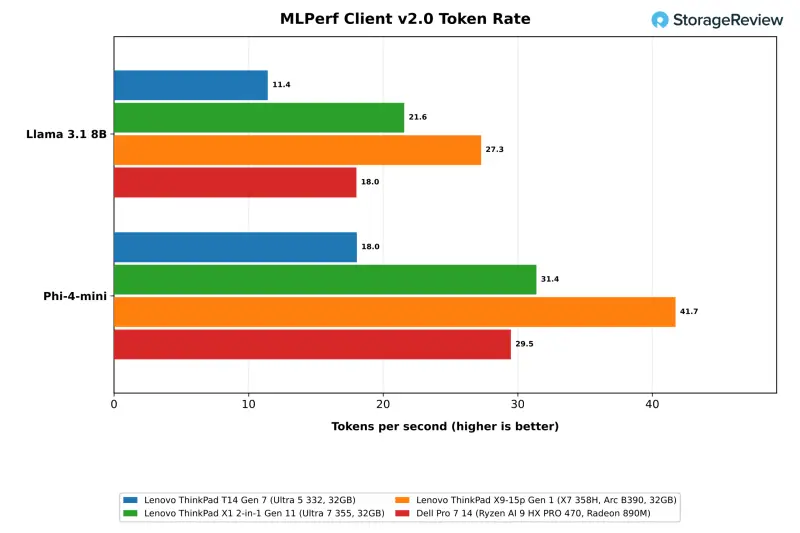
| Llama 3.1 8B, token rate (tokens/s) | 11.4 | 21.6 | 27.3 | 18.0 |
| Phi-4-mini, time to first token (s, lower is better) | 0.91 | 0.43 | 0.18 | 1.90 |
| Phi-4-mini, token rate (tokens/s) | 18.0 | 31.4 | 41.7 | 29.5 |
MLPerf Client runs through OpenVINO on the three ThinkPads and through Windows ML with DirectML on the Dell, so these columns compare software engines as well as hardware. The T14 generated 11.4 tokens per second on Llama 3.1 8B and 18.0 on Phi-4-mini, with a 1.13-second geometric mean time to first token on Llama. The X1 2-in-1 is 1.9 times faster at 21.6 tokens per second on the same OpenVINO path. The X9-15p reaches 27.3, and the Dell reaches 18.0.
Model Loading and the Coding Agent
| gpt-oss:20b (Ollama 0.40.3) | Lenovo ThinkPad T14 Gen 7 (Ultra 5 332, 32GB) | Lenovo ThinkPad X1 2-in-1 Gen 11 (Ultra 7 355, 32GB) | Lenovo ThinkPad X9-15p Gen 1 (X7 358H, Arc B390, 32GB) | Dell Pro 7 14 (Ryzen AI 9 HX PRO 470, Radeon 890M) |
|---|---|---|---|---|
| gpt-oss:20b cold load to first token (s, lower is better) | 11.03 | 10.40 | 8.63 | 10.94 |
| gpt-oss:20b warm load to first token (s, lower is better) | 10.54 | 9.80 | 8.01 | 5.14 |
| Coding agent, successful runs (of 3) | 0 | 2 | 3 | 2 |
| Coding agent, tests passing (of 11) | Failed | 11 | 11 | 11 |
| Coding agent, wall time (s, lower is better) | Failed | 392 | 374 | 1328 |
| Coding agent, generation rate (tokens/s) | 7.3 | 12.5 | 18.3 | 20.2 |
| Speedometer slowdown beside the agent (x, lower is better) | 1.11 | 1.18 | 1.26 | 1.91 |
The model-load test times Ollama from launch to first token on gpt-oss:20b, a 12.8GB model, both cold from the SSD and warm from the page cache. The T14 took 11.03 seconds cold and 10.54 seconds warm, against 10.40 and 9.80 seconds on the X1 2-in-1. None of the 32GB ThinkPads gained more than a second from a warm cache. The 64GB Dell dropped to 5.14 seconds warm, which suggests that 32GB leaves little page cache free once the model sits in shared memory.
The coding agent test runs Crush against gpt-oss:20b with a 64K context through a fixed programming task, three times, with up to three rounds each. The T14 failed all three runs. Two timed out after two rounds, and the third finished three rounds with 7 of 11 tests passing. Generation averaged 7.3 tokens per second, against 12.5 on the X1 2-in-1, which succeeded on two of three runs, and 18.3 on the X9-15p, which passed all three.
Run Speedometer beside the agent and the picture gets worse for the T14. The browser score fell from 35.5 to 31.9, a 1.11x slowdown, and the agent's generation rate dropped from 7.3 to 6.8 tokens per second. Larger models are out of reach on this configuration. The 27B serving model needs 30GB of GPU-usable memory and the 35B agent model needs about 40GB. Because memory is a replaceable LPCAMM2 module, a 64GB upgrade remains possible after purchase, though that only helps if the graphics can keep up with the larger model.
RAG and LLM Serving
| RAG (Ollama 0.40.3) | Lenovo ThinkPad T14 Gen 7 (Ultra 5 332, 32GB) | Lenovo ThinkPad X1 2-in-1 Gen 11 (Ultra 7 355, 32GB) | Lenovo ThinkPad X9-15p Gen 1 (X7 358H, Arc B390, 32GB) | Dell Pro 7 14 (Ryzen AI 9 HX PRO 470, Radeon 890M) |
|---|---|---|---|---|
| Ingest, passages per second | 22.9 | 43.1 | 83.6 | 52.3 |
| Ingest, embedding rate (tokens/s) | 3,703 | 6,980 | 13,543 | 8,465 |
| Answer, generation rate (tokens/s) | 17.1 | 34.9 | 48.7 | 42.2 |
| Answer, time to first token p50 (s, lower is better) | 2.81 | 1.52 | 0.84 | 1.43 |
| Question to answer p50 (s, lower is better) | 3.14 | 1.69 | 0.98 | 1.58 |
The RAG test embeds 20,963 SQuAD passages, retrieves the top five for each question and answers with Phi-4-mini through Ollama. The T14 ingested 22.9 passages per second and generated answers at 17.1 tokens per second, with a median of 3.14 seconds from question to answer. The X1 2-in-1 is 1.9 times faster on ingest at 43.1 passages per second and answers in a median of 1.69 seconds. The X9-15p ingests at 83.6 passages per second.
| llama.cpp server, Ministral 3 | Lenovo ThinkPad T14 Gen 7 (Ultra 5 332, 32GB) | Lenovo ThinkPad X1 2-in-1 Gen 11 (Ultra 7 355, 32GB) | Lenovo ThinkPad X9-15p Gen 1 (X7 358H, Arc B390, 32GB) | Dell Pro 7 14 (Ryzen AI 9 HX PRO 470, Radeon 890M) |
|---|---|---|---|---|
| Ministral 3 3B, 1 request, output (tokens/s) | 6.6 | 14.0 | 22.8 | 18.3 |
| Ministral 3 3B, 4 requests, output (tokens/s) | 11.8 | 25.2 | 39.1 | 45.3 |
| Ministral 3 3B, 1 request, time to first token (ms, lower is better) | 35,384 | 15,248 | 4,349 | 4,595 |
| Ministral 3 8B, 1 request, output (tokens/s) | 4.4 | 9.7 | 16.5 | 13.4 |
| Ministral 3 8B, 4 requests, output (tokens/s) | 6.7 | 14.3 | 25.6 | 29.0 |
| Ministral 3 8B, 1 request, time to first token (ms, lower is better) | 53,131 | 23,718 | 7,168 | 9,154 |
LLM serving runs the llama.cpp server with Ministral 3 models at 4,096 prompt tokens and 1,024 output tokens per request. The T14 delivered 6.6 tokens per second to one user on the 3B model and 11.8 across four concurrent requests. On the 8B model it managed 4.4 and 6.7. Prompt processing is where the smaller graphics show most. The T14's median time to first token was 35.4 seconds on the 3B model and 53.1 seconds on the 8B model. The X1 2-in-1 took 15.2 and 23.7 seconds, and the X9-15p took 4.3 and 7.2 seconds.
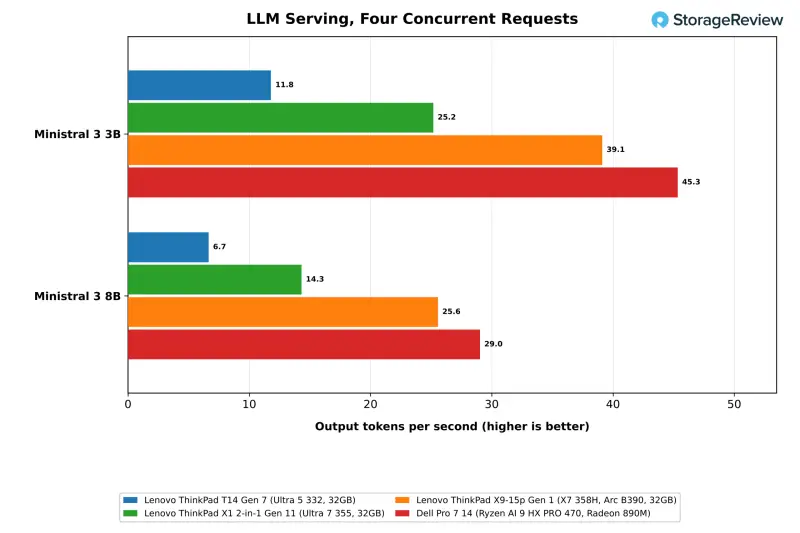
Image Generation
| stable-diffusion.cpp, 1024×1024 | Lenovo ThinkPad T14 Gen 7 (Ultra 5 332, 32GB) | Lenovo ThinkPad X1 2-in-1 Gen 11 (Ultra 7 355, 32GB) | Lenovo ThinkPad X9-15p Gen 1 (X7 358H, Arc B390, 32GB) | Dell Pro 7 14 (Ryzen AI 9 HX PRO 470, Radeon 890M) |
|---|---|---|---|---|
| FLUX.2 klein 4B Q4_0, images per minute | 0.10 | 0.14 | 0.20 | 1.79 |
| FLUX.2 klein 4B Q4_0, time per image (s, lower is better) | 612.38 | 445.29 | 302.39 | 33.51 |
Image generation with stable-diffusion.cpp is too slow on this graphics core for practical use. The T14 completed FLUX.2 klein 4B at Q4_0 in 612 seconds per image, or 0.10 images per minute. Z-Image Turbo at Q4_0 ran at 0.046 images per minute, close to 22 minutes per image. The BF16 Z-Image Turbo and every Qwen-Image 20B run needed more than the 18.1GB of GPU-usable memory. The Radeon 890M in the Dell produced 1.79 images per minute on FLUX.2.
CPU Performance
Cinebench 2026 and Sustained Load
| Cinebench 2026 (points, higher is better) | Lenovo ThinkPad T14 Gen 7 (Ultra 5 332, 32GB) | Lenovo ThinkPad X1 2-in-1 Gen 11 (Ultra 7 355, 32GB) | Lenovo ThinkPad X9-15p Gen 1 (X7 358H, Arc B390, 32GB) | Dell Pro 7 14 (Ryzen AI 9 HX PRO 470, Radeon 890M) |
|---|---|---|---|---|
| Single core | 457 | 475 | 511 | 465 |
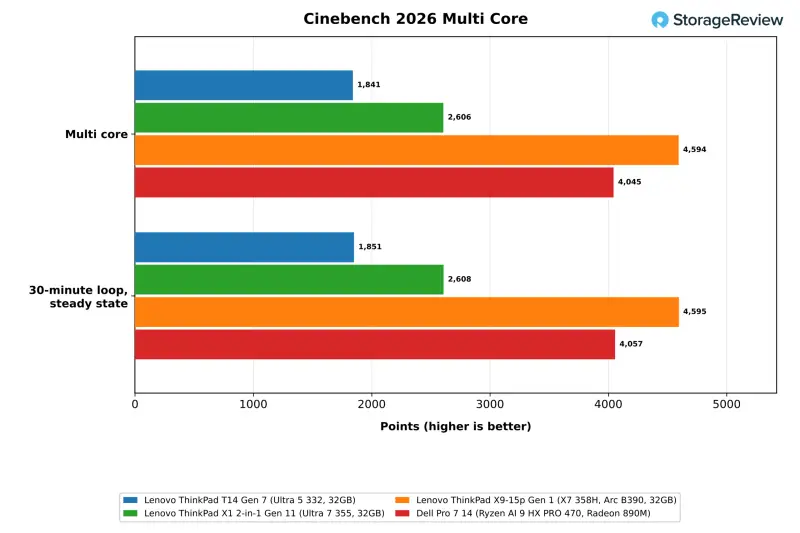
| Multi core | 1,841 | 2,606 | 4,594 | 4,045 |
| 30-minute loop, first pass | 1,845 | 2,602 | 4,614 | 4,029 |
| 30-minute loop, steady state | 1,851 | 2,608 | 4,595 | 4,057 |
| Steady state / first pass | 1.003 | 1.002 | 0.996 | 1.007 |
The Core Ultra 5 332 scored 1,841 in Cinebench 2026 multi-core and 457 single-core. The 8-core Core Ultra 7 355 in the X1 2-in-1 is 42 percent ahead on multi-core and 4 percent ahead on single-core. The Ryzen AI 9 HX PRO 470 in the Dell is 2.2 times faster on multi-core at 4,045, and the 16-core X7 358H in the X9-15p is 2.5 times faster at 4,594. Single-core results sit within 12 percent across all four systems, which tells you the gap is mostly about core count and sustained clocks rather than single-thread speed.
Over the 30-minute loop, the T14 opened at 1,845 and settled at 1,851, holding its first-pass score. The CPU averaged 91.6C with a mean clock of 3,591MHz. The single fan keeps this six-core chip at full output for the length of the test, and we saw no thermal throttling in our runs.
7-Zip, Blender, HandBrake and LLVM
| Test | Lenovo ThinkPad T14 Gen 7 (Ultra 5 332, 32GB) | Lenovo ThinkPad X1 2-in-1 Gen 11 (Ultra 7 355, 32GB) | Lenovo ThinkPad X9-15p Gen 1 (X7 358H, Arc B390, 32GB) | Dell Pro 7 14 (Ryzen AI 9 HX PRO 470, Radeon 890M) |
|---|---|---|---|---|
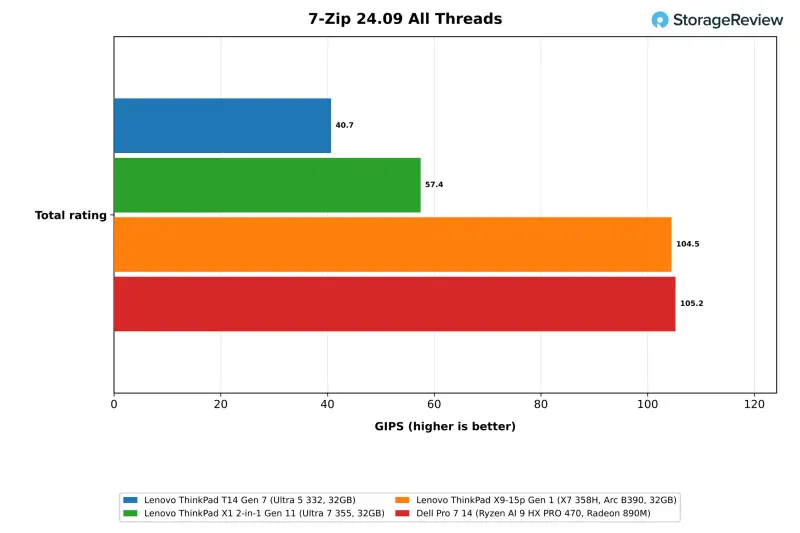
| 7-Zip, all threads, total (GIPS) | 40.7 | 57.4 | 104.5 | 105.2 |
| 7-Zip, one thread, total (GIPS) | 8.15 | 8.63 | 9.44 | 8.99 |
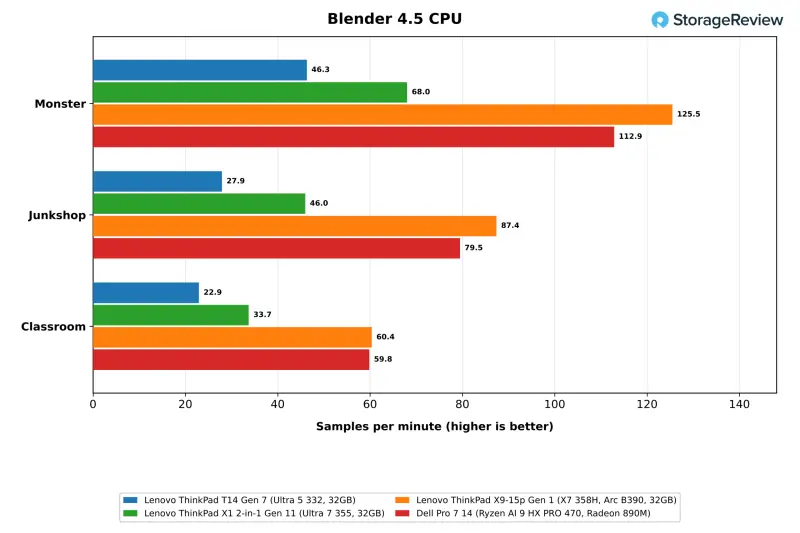
| Blender 4.5 Monster (samples/min) | 46.3 | 68.0 | 125.5 | 112.9 |
| Blender 4.5 Junkshop (samples/min) | 27.9 | 46.0 | 87.4 | 79.5 |
| Blender 4.5 Classroom (samples/min) | 22.9 | 33.7 | 60.4 | 59.8 |
| HandBrake x265 (fps) | 15.6 | 20.0 | 28.6 | 26.8 |
| HandBrake SVT-AV1 (fps) | 38.6 | 50.4 | 80.1 | 68.5 |
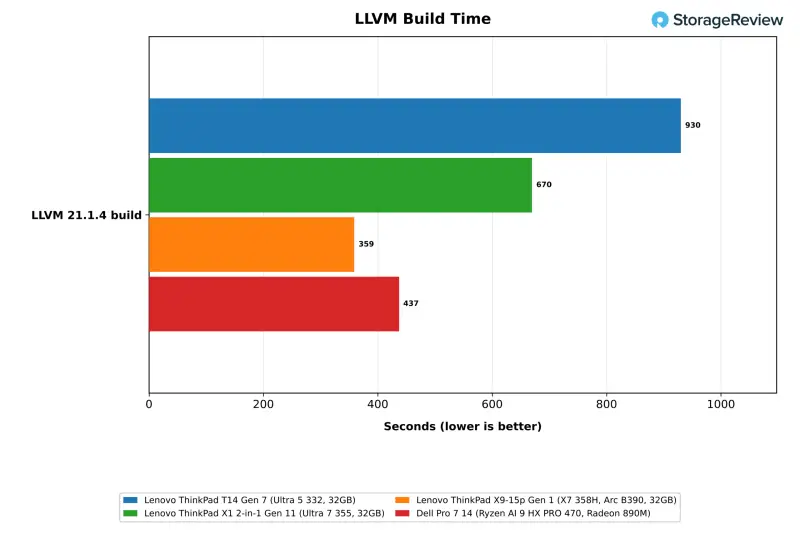
| LLVM build (s, lower is better) | 930 | 670 | 359 | 437 |
The content creation tests follow the Cinebench pattern. The X1 2-in-1 leads the T14 by 41 percent in 7-Zip, 47 percent in Blender Monster and 28 percent in x265, and it finishes the LLVM build in 670 seconds against 930. The X9-15p is 2.6 times faster than the T14 in 7-Zip at 104.5 GIPS and 2.7 times faster in Blender Monster, and its LLVM build takes 359 seconds. The Dell matches the X9-15p in 7-Zip and finishes the build in 437 seconds.
Stockfish, primesieve, Python and the Browser
| Test | Lenovo ThinkPad T14 Gen 7 (Ultra 5 332, 32GB) | Lenovo ThinkPad X1 2-in-1 Gen 11 (Ultra 7 355, 32GB) | Lenovo ThinkPad X9-15p Gen 1 (X7 358H, Arc B390, 32GB) | Dell Pro 7 14 (Ryzen AI 9 HX PRO 470, Radeon 890M) |
|---|---|---|---|---|
| Stockfish, one thread (Mnps) | 1.54 | 1.65 | 1.74 | 1.96 |
| Stockfish, all threads (Mnps) | 5.43 | 7.73 | 13.84 | 14.74 |
| primesieve to 10^12, all threads (s, lower is better) | 30.20 | 22.20 | 12.04 | 14.95 |
| primesieve to 10^11, one thread (s, lower is better) | 11.28 | 10.60 | 10.15 | 6.67 |
| PyPerformance go (ms, lower is better) | 81.2 | 76.9 | 73.2 | 76.5 |
| PyPerformance nbody (ms, lower is better) | 63.5 | 59.5 | 55.3 | 61.8 |
| Speedometer 3.1 (score) | 35.5 | 38.6 | 40.8 | 36.9 |
The gap narrows in lightly threaded work. The T14 scored 35.5 in Speedometer 3.1, 8 percent behind the X1 2-in-1 and 4 percent behind the Dell. It ran PyPerformance go in 81.2ms against 76.9ms on the X1 2-in-1. One-thread Stockfish reached 1.54 Mnps against 1.65 on the X1 2-in-1. All-thread Stockfish at 5.43 Mnps is where core count shows again, with the X1 2-in-1 42 percent ahead and the X9-15p and the Dell both above 13.8 Mnps.
GROMACS, OpenBLAS and Memory Bandwidth
| Test | Lenovo ThinkPad T14 Gen 7 (Ultra 5 332, 32GB) | Lenovo ThinkPad X1 2-in-1 Gen 11 (Ultra 7 355, 32GB) | Lenovo ThinkPad X9-15p Gen 1 (X7 358H, Arc B390, 32GB) | Dell Pro 7 14 (Ryzen AI 9 HX PRO 470, Radeon 890M) |
|---|---|---|---|---|
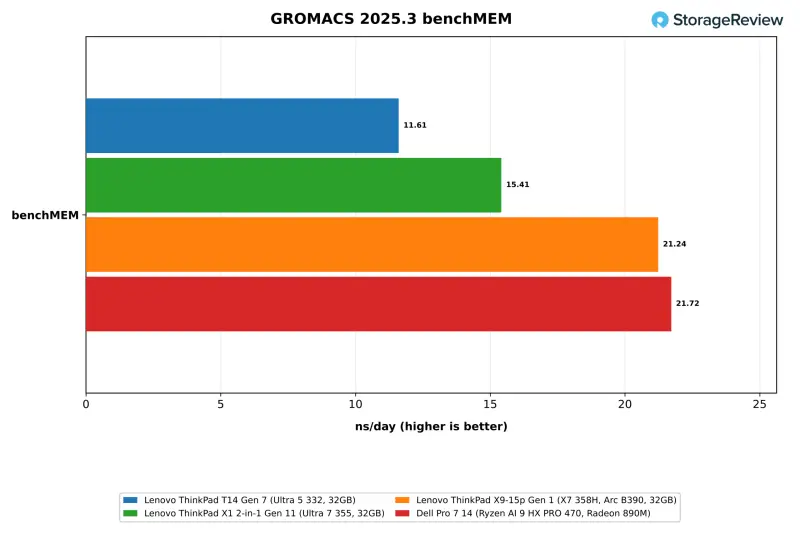
| GROMACS benchMEM (ns/day) | 11.61 | 15.41 | 21.24 | 21.72 |
| OpenBLAS DGEMM, all cores (GFLOPS) | 201.6 | 272.0 | 469.2 | 390.2 |
| OpenBLAS LU solve N=20000, all cores (GFLOPS) | 198.0 | 262.3 | 444.1 | 377.8 |
| STREAM Triad (MB/s) | 53,165 | 63,620 | 91,270 | 45,108 |
| Memory latency, 4KiB pages (ns, lower is better) | 155.4 | 142.8 | 109.9 | 148.3 |
GROMACS benchMEM ran at 11.61 ns/day. The X1 2-in-1 is 33 percent ahead, and the X9-15p and the Dell are about 1.8 times faster. OpenBLAS DGEMM reached 201.6 GFLOPS against 272.0 on the X1 2-in-1 and 469.2 on the X9-15p. STREAM Triad measured 53.2GB/s on the T14's LPCAMM2 memory at 6800MT/s. That's 18 percent above the Dell and below the 63.6GB/s of the X1 2-in-1's LPDDR5X-7467 and the 91.3GB/s of the X9-15p's LPDDR5X-9600. Memory speed is a real factor in these numbers, so the LPCAMM2 module's serviceability doesn't come free on bandwidth.
Graphics and GPU Encoding
| SuperTuxKart 1.5 and FFmpeg (higher is better) | Lenovo ThinkPad T14 Gen 7 (Ultra 5 332, 32GB) | Lenovo ThinkPad X1 2-in-1 Gen 11 (Ultra 7 355, 32GB) | Lenovo ThinkPad X9-15p Gen 1 (X7 358H, Arc B390, 32GB) | Dell Pro 7 14 (Ryzen AI 9 HX PRO 470, Radeon 890M) |
|---|---|---|---|---|
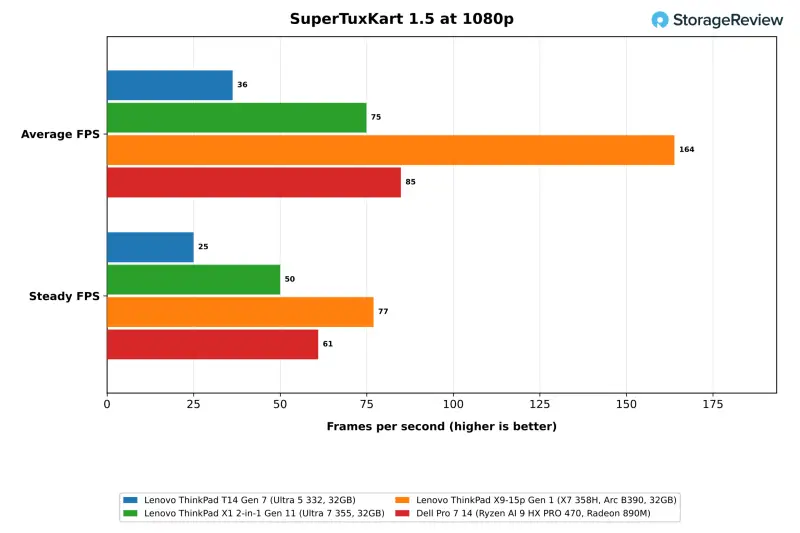
| SuperTuxKart 1080p, average FPS | 36.3 | 74.9 | 163.9 | 84.9 |
| SuperTuxKart 1080p, typical FPS | 35 | 73 | 161 | 84 |
| SuperTuxKart 1080p, mostly stable FPS | 29 | 61 | 132 | 70 |
| SuperTuxKart 1080p, steady FPS | 25 | 50 | 77 | 61 |
| FFmpeg HEVC Quick Sync (fps) | 126 | 128 | 128 | Not run |
SuperTuxKart at 1080p with the highest preset is the suite's one game test. The T14 averaged 36.3 fps with a 25 fps steady figure. The X1 2-in-1 averaged 74.9 fps on its larger Intel Graphics, the Radeon 890M in the Dell managed 84.9 fps, and the Arc B390 in the X9-15p hit 163.9 fps, or 4.5 times the T14. The panel tops out at 1920×1200, so the suite's 4K pass didn't run.
The encoder story is better. FFmpeg with HEVC Quick Sync ran at 126 fps on the suite's Big Buck Bunny clip, within 2 percent of the X1 2-in-1 and the X9-15p at 128 fps. The media engine isn't cut down the way the 3D and compute side of the graphics is. That covers the conferencing, screen recording and video playback a business notebook is most likely to handle every day.
Thermals and Clocks Under Load
| Lenovo ThinkPad T14 Gen 7 | CPU Max (C) | CPU Mean (C) | Mean CPU Clock (MHz) |
|---|---|---|---|
| Cinebench 2026 | 93.1 | 82.9 | 3,619 |
| 7-Zip | 93.1 | 80.4 | 3,621 |
| Blender | 94.1 | 87.2 | 3,590 |
| HandBrake | 94.1 | 91.0 | 3,572 |
| GROMACS | 93.1 | 92.6 | 3,559 |
| 30-minute Cinebench loop | 93.1 | 91.6 | 3,591 |
| MLPerf Client | 86.1 | 58.1 | 2,367 |
| LLM serving | 62.1 | 54.9 | 3,194 |
| SuperTuxKart | 77.1 | 60.1 | 3,526 |
| Storage | 73.1 | 58.4 | 3,034 |
The 332 reached 93C to 94C in every sustained CPU test and held there, with mean clocks between 3,559 and 3,621MHz and no decline across the 30-minute loop. GPU-led work ran cooler on the processor side. The CPU averaged 58C during MLPerf Client and 55C during LLM serving, and the storage run averaged 58C. Fan noise under those loads was unremarkable in our lab.
Storage Performance
| fio, 25GiB footprint (higher is better) | Lenovo ThinkPad T14 Gen 7 (Ultra 5 332, 32GB) | Lenovo ThinkPad X1 2-in-1 Gen 11 (Ultra 7 355, 32GB) | Lenovo ThinkPad X9-15p Gen 1 (X7 358H, Arc B390, 32GB) | Dell Pro 7 14 (Ryzen AI 9 HX PRO 470, Radeon 890M) |
|---|---|---|---|---|
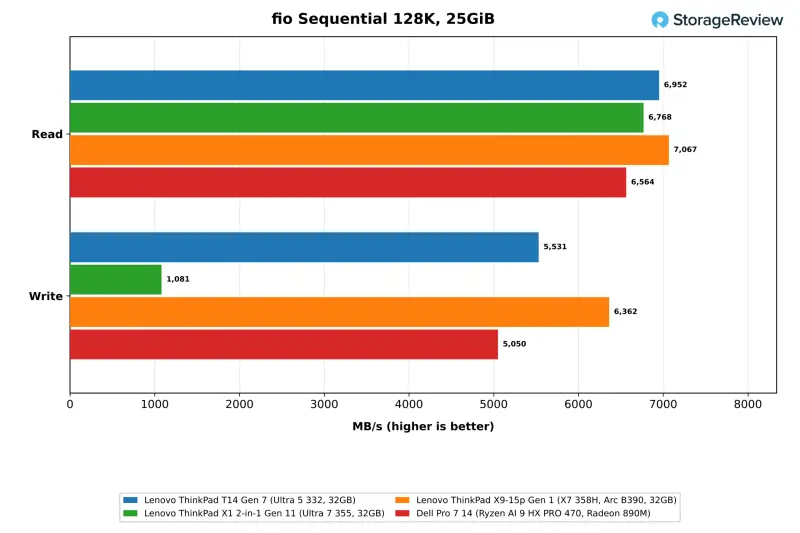
| Sequential read 128K (MB/s) | 6,952 | 6,768 | 7,067 | 6,564 |
| Sequential write 128K (MB/s) | 5,531* | 1,081* | 6,362 | 5,050 |
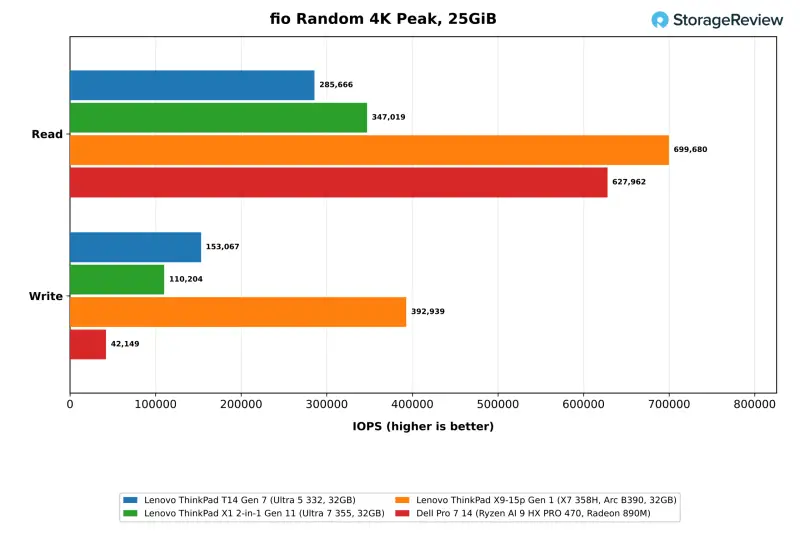
| Random read 4K, peak (IOPS) | 285,666 | 347,019 | 699,680 | 627,962 |
| Random write 4K, peak (IOPS) | 153,067* | 110,204 | 392,939* | 42,149* |
| Random read 4K, QD32 x 4 jobs (IOPS) | 233,143 | 266,188 | 364,397 | 274,615 |
| Random write 4K, QD32 x 4 jobs (IOPS) | 153,067* | 110,204 | 222,188* | 21,275* |
*Flagged by the suite for run-to-run variance after a rerun.
The 512GB drive in our unit is a Samsung PCIe Gen4 SSD, installed in a slot that supports Gen5. Sequential read measured 6,952MB/s on the 25GiB footprint, in line with the other Gen4 drives in this group. Sequential write held 5,531MB/s, a result the suite flagged for variance across passes. The X1 2-in-1 carries the same Samsung model and fell to 1,081MB/s on the same write test. We treat that as specific to the X1 2-in-1's drive rather than a model-wide trait.
Peak 4K random read reached 286K IOPS. That's below the 347K of the X1 2-in-1's drive and well under the 700K the 1TB drive in the X9-15p delivered, and random write peaked at 153K IOPS. Lenovo offers Gen4 drives up to 1TB and Gen5 Performance drives from 512GB to 2TB. With the slot reachable once the bottom cover is off, a storage upgrade after purchase is a simple swap, and the Gen5 slot gives you room to move up.
Verdict for Fleet Buyers
The ThinkPad T14 Gen 7 keeps the features fleet buyers ask for: replaceable LPCAMM2 memory, an M.2 slot that takes Gen5 drives, Gigabit Ethernet, two USB-A ports, HDMI 2.1, a 75Wh battery and vPro management, in a chassis that starts at 1.37kg. The Core Ultra 5 332 held its full Cinebench score through a 30-minute loop and stayed within 4 to 8 percent of the X1 2-in-1 in single-core and browser work. That's a solid base for standard office, conferencing and general productivity use.
The limits come from the six-core chip and its smaller graphics. The X1 2-in-1's Core Ultra 7 355 ran 41 to 47 percent ahead in 7-Zip and Blender. Its graphics roughly doubled the T14's results on Llama 3.1 8B in MLPerf Client and in SuperTuxKart. Our T14 failed all three coding agent runs and took 35 seconds to return a first token when serving a 3B model. Local AI isn't a reason to buy this configuration. The build doesn't feel premium either. Still, the screwless battery, the three-screw memory module and the field-serviceable USB-C ports put the T14 high on our list for fleet machines that need repair-friendly parts.
The purchasing decision is the one to make carefully. Lenovo.com lists a Core Ultra 7 365 vPro model with the same panel, 32GB of faster LPDDR5X-7467 memory and a 1TB SSD, for $2,489. That's $90 less than the $2,579 we paid at CDW and B&H for the Core Ultra 5 332 with 512GB. The 365 shares the 355's eight-core layout and 40-TOPS graphics, so the X1 2-in-1's results are a close guide to what that model should deliver. We haven't tested the 365 ourselves, so treat that as a reasoned expectation rather than a measured result.
For IT teams standardizing on a serviceable 14-inch ThinkPad with Ethernet, the T14 Gen 7 fits the brief. Before you order, check which processor your region offers, confirm the storage and memory you need, and decide whether you'll buy the Gen4 drive or upgrade it at build time. Battery life is still on our list for a later update, so if runtime is the deciding factor for your users, the MobileMark 30 figure Lenovo quotes is the only number we can point to for now. This model should be on the shortlist for general fleet work. Where AI workloads matter, look at the higher-tier chips before you commit.


