Dell Pro Precision 9 T4 Puts Two RTX PRO 6000 Cards and 86 Xeon Cores in One Tower
- Kevin OBrien
- 583 views
Dell's 86-core Xeon tower with two 96GB RTX PRO 6000 Max-Q cards doubles serving throughput and handles models too big for one GPU. Here's where it wins and where it doesn't.
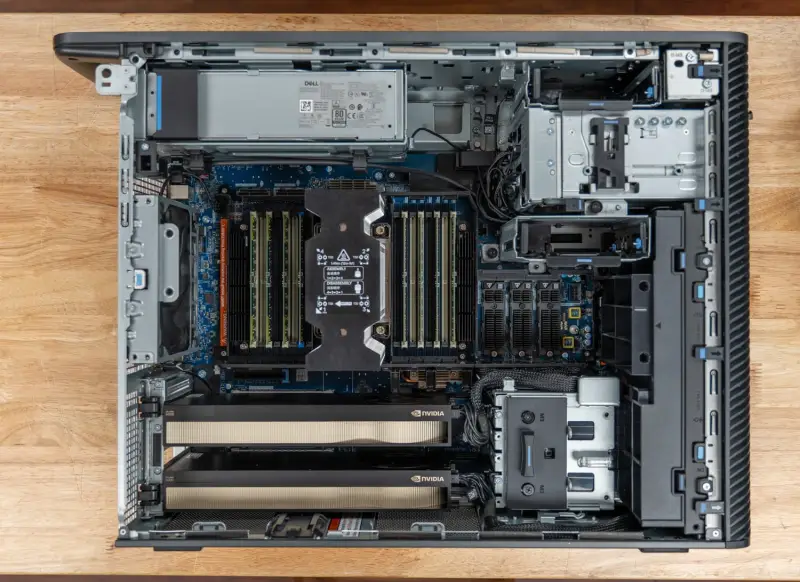
The interesting number on the Dell Pro Precision 9 T4 isn't the 86-core Xeon or the 2400W power supply. It's the 96GB of GDDR7 on the second card. Once a model outgrows one RTX PRO 6000, a workstation either splits it across GPUs or spills into system memory, and the difference between those two paths is what this tower is really built around. Our test unit pairs Intel's Xeon 698X with 256GB of DDR5-6400 ECC memory, two 300W RTX PRO 6000 Blackwell Max-Q cards with 96GB of GDDR7 each, two 2TB Gen5 SSDs, and a dual-port 25GbE adapter. Configured that way on Dell.com, it lists at about $66,600.
Where the T4 Sits in Dell's Line
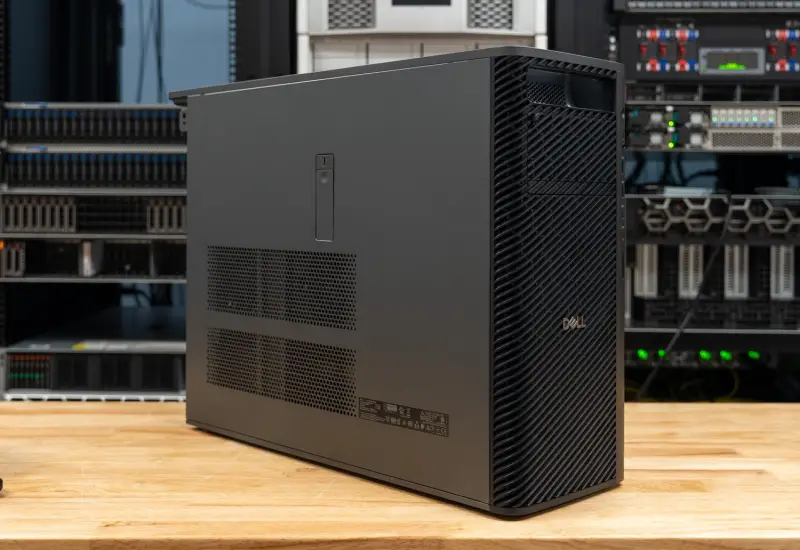
Dell positions the T4 as the flagship single-socket tower in the Pro Precision line, aimed at organizations that need maximum compute density and expandability. AI development, engineering simulation and scientific computing top its list of workloads. It sits above the Dell Pro Precision 9 T2, which uses the same Granite Rapids-WS Xeon 6 workstation platform in a smaller chassis with one GPU. The T4 adds the eight-channel processors at the top of the range, up to 86 cores, and room for up to four graphics cards depending on the model.
Processor options on Dell.com start at the 12-core Xeon 634, run through the 64-core Xeon 696X, and end at the 86-core Xeon 698X in our unit. That chip carries 336MB of cache, a 2.0GHz base clock, a 4.8GHz maximum and a 350W rating. Memory scales to 4TB of DDR5 RDIMM across 16 slots, and our unit fills eight of them with 32GB modules at 6400MT/s. Graphics start with a single RTX A400. Dell's configurator then offers four RTX A1000 cards, three RTX PRO 4000 Blackwell cards, two 300W RTX PRO 6000 Max-Q cards, or one 600W RTX PRO 6000, depending on the model.
The base configuration lists at $5,925. Our build adds $8,300 for the Xeon 698X, $15,000 for 256GB of memory and $30,820 for the pair of RTX PRO 6000 Max-Q cards. Storage, networking and the 36-month ProSupport upgrade that Dell automatically adds at this level come on top. That's where the roughly $66,600 total comes from.
Build, Power and Serviceability
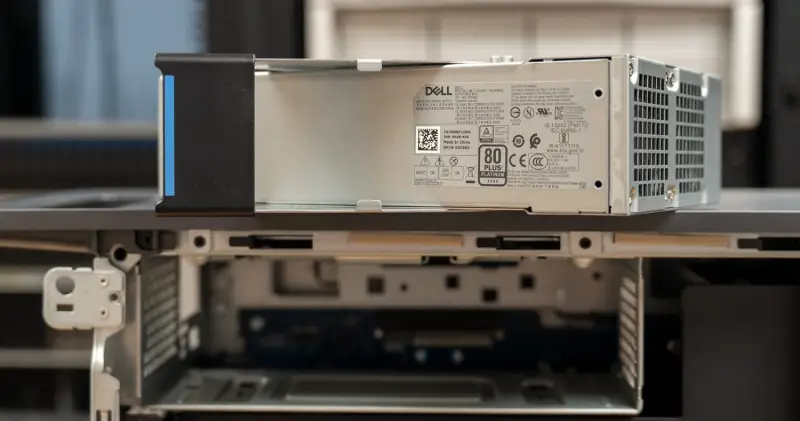
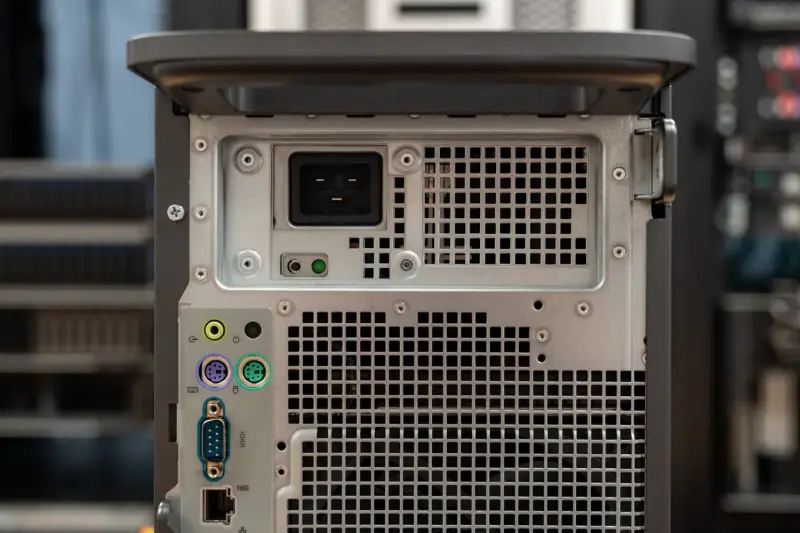
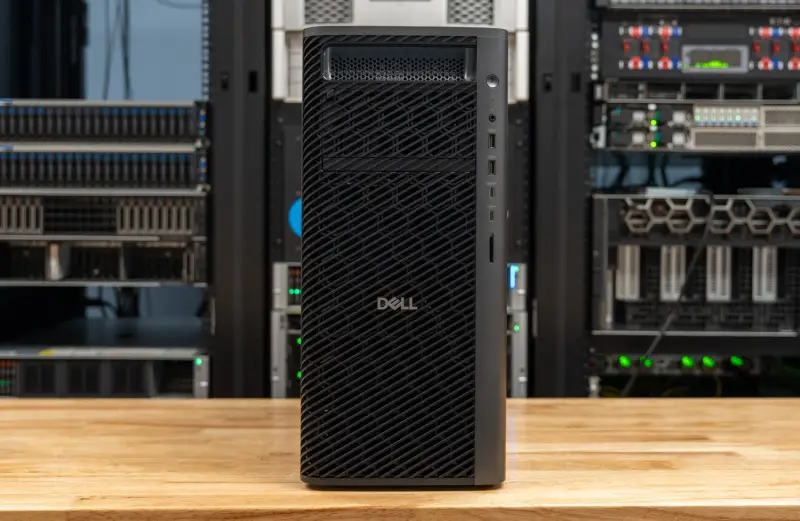
The T4 is a full tower measuring 449.8mm tall, 203.7mm wide and 617.5mm deep. Dell lists it at 24.1kg minimum and 33.6kg maximum, depending on configuration. Our unit uses the 2400W Platinum power supply, which Dell's configurator selects for the dual RTX PRO 6000 build. Lighter configurations default to a 1500W supply.
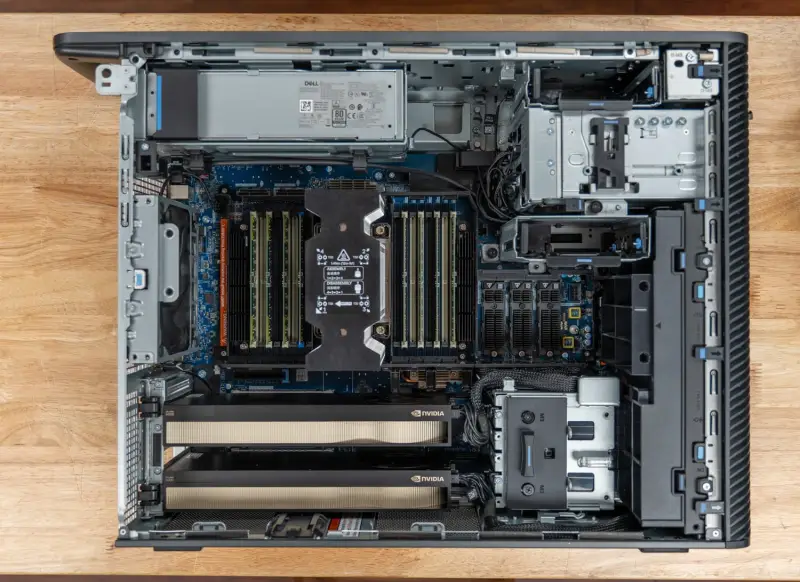
Serviceability is one of the chassis's strengths. The side panel opens through a tool-less latch, and the 2400W power supply slides out of the top rear by hand. The graphics cards and SSDs need a Phillips screwdriver, and Dell marks the parts that come out without tools with blue touch points. In our handling the platform was easy to repair in the field, which counts for more at this price than it would on a budget tower.
Cooling: The Part That Matters Most
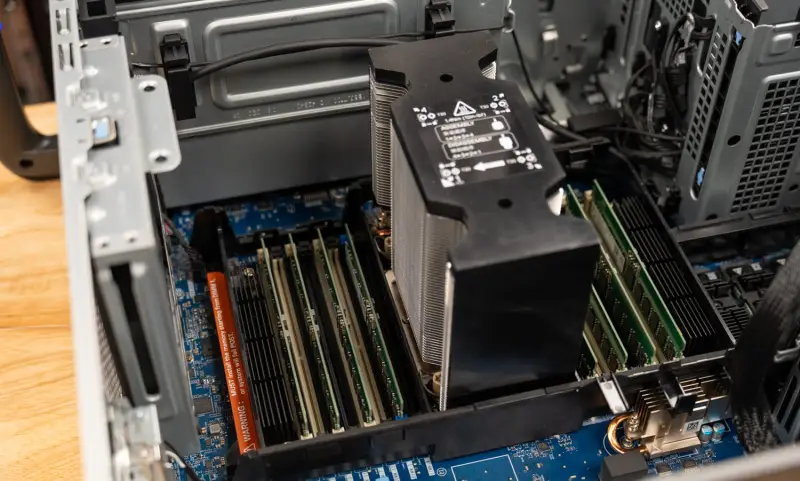
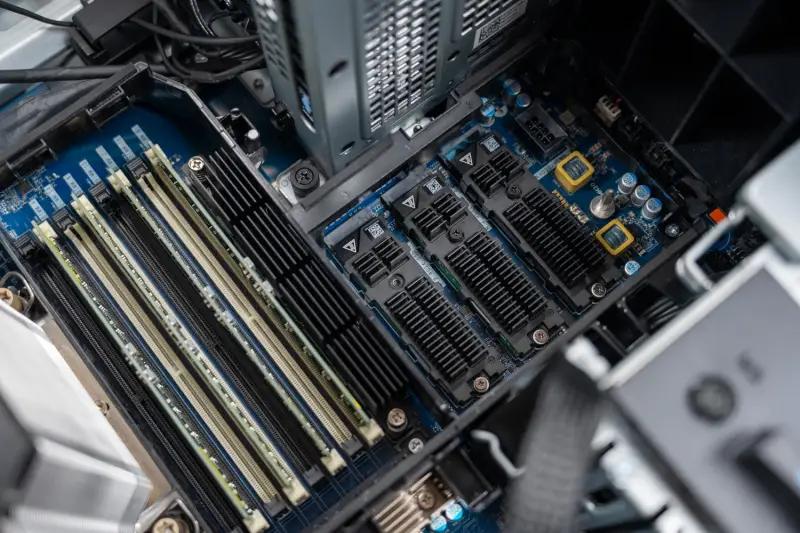
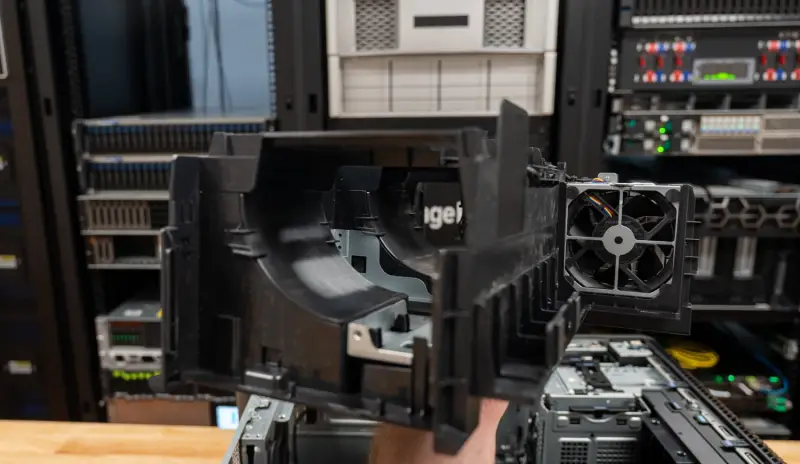
The cooling design is the best we've seen from Dell in this class. Air moves front to back. Large form-fitted cowls direct it across the processor and memory, and they keep that channel separate from the PCIe area. The two 300W graphics cards therefore get their own air stream and don't breathe air already warmed by a 350W Xeon. Two fans sit between the processor zone and the card bay, and the fan assembly lifts out for memory access using the same blue touch points.
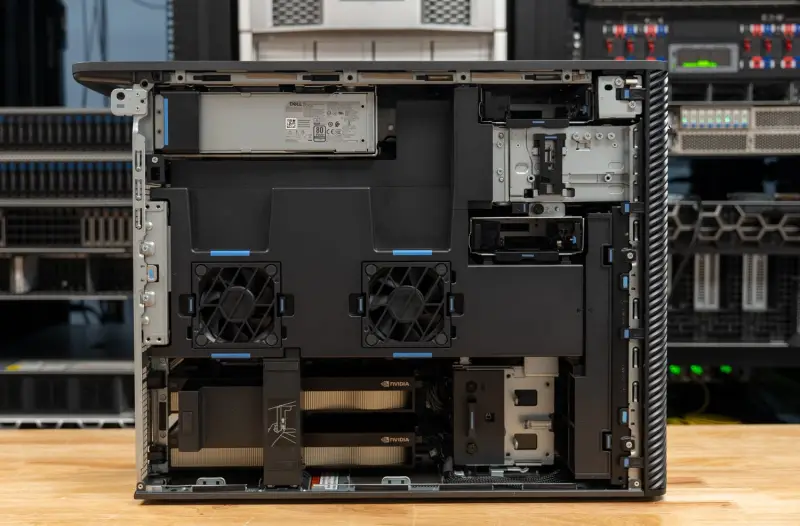
Thermal behavior under load comes back to this design, and we cover the numbers later. For now, the layout is the reason two 300W cards and a 350W processor can share a tower this size without the GPUs competing with the CPU for cool air.
Expansion, Storage and Ports
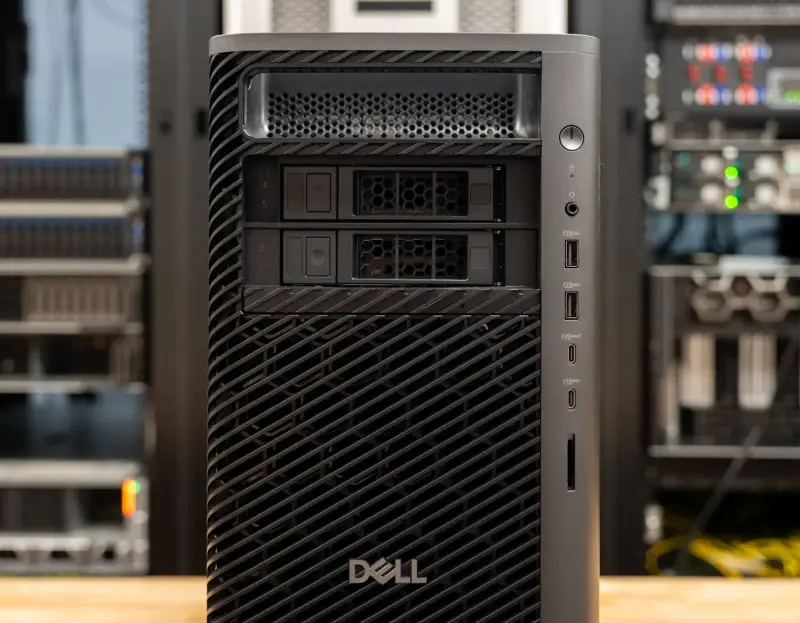
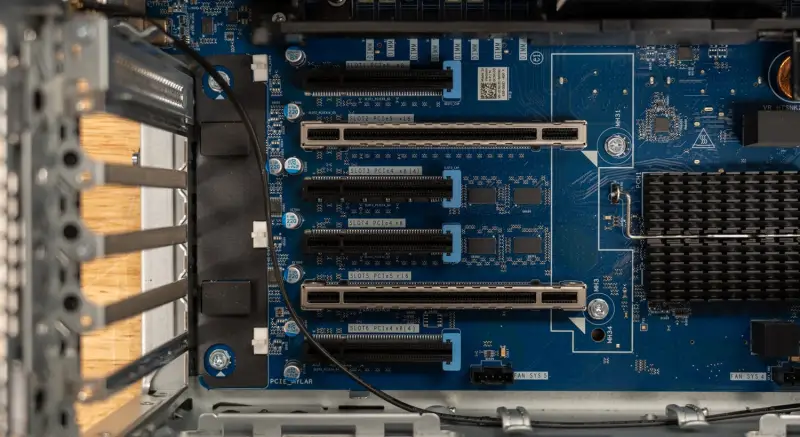
Expansion runs through six full-height PCIe slots. Two Gen5 x16 slots carry the GPUs, and the rest are a Gen5 x8, a Gen4 x8, and two Gen4 slots with x8 connectors wired at x4. Storage covers three internal M.2 Gen5 slots and one Gen4 slot, plus two internal 3.5-inch SATA bays. A front FlexBay holds up to four NVMe drives or two 3.5-inch drives, with an optional slim optical drive. Our unit boots from an internal 2TB Gen5 drive and carries a second 2TB Gen5 drive in an internal M.2 slot.
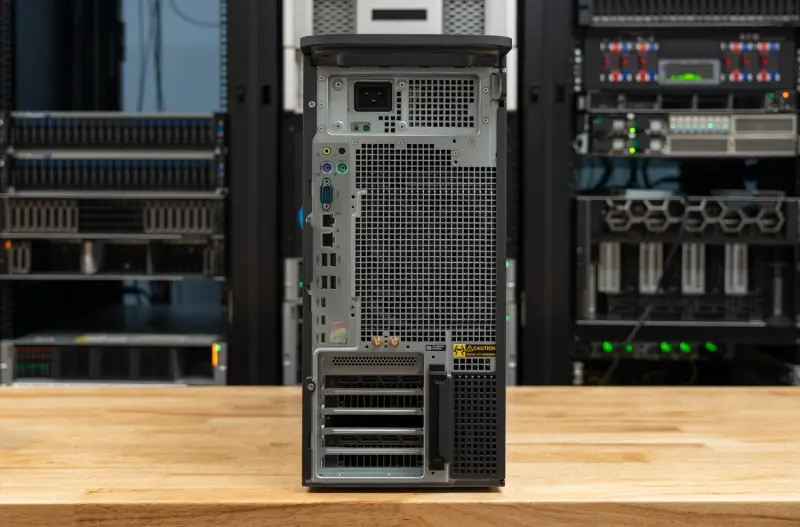
The front panel has a headset jack, two 10Gbps USB-A ports, a 20Gbps USB-C port with PowerShare, a 10Gbps USB-C port and an optional SD card slot. The rear adds 10GbE and 1GbE RJ-45 ports, four 10Gbps USB-A ports, two 10Gbps USB-C ports, a 20Gbps USB-C port, a serial port, two PS/2 ports and line-out. Our unit adds an Intel E810-XXV dual-port 25GbE SFP28 adapter, a MediaTek Wi-Fi 7 MT7925 card with Bluetooth 5.4, a media card reader and Dell's dual USB-C add-in card.
For admins, the 25GbE adapter matters most. A tower that will serve models to other machines or pull large datasets over the network needs that bandwidth, and the onboard 10GbE is the fallback if you don't need it.
Security, Management and Sustainability
Dell lists TPM 2.0, Dell SafeBIOS, chassis intrusion detection, self-encrypting drive support, BIOS secure erase and Intel vPro Enterprise. On the sustainability side, Dell says the T4 uses up to 85 percent recycled plastic in key components, 90 percent recycled aluminum in the handles and 11 percent recycled steel in the chassis. The configuration is ENERGY STAR qualified.
Specifications at a Glance
| Specification | Dell Pro Precision 9 T4 (as tested) |
|---|---|
| Model | Dell Pro Precision 9 T4 (PW9T4260) |
| Processor | Intel Xeon 698X, 86 cores, 172 threads, 336MB cache, 2.0GHz base, up to 4.8GHz, 350W |
| Memory | 256GB (8x 32GB) DDR5-6400 RDIMM ECC, 16 slots, up to 4TB |
| Graphics | 2x NVIDIA RTX PRO 6000 Blackwell Max-Q Workstation Edition, 96GB GDDR7 each, 300W each |
| Operating system | Windows 11 Pro for Workstations (tested on Ubuntu 26.04.1 LTS) |
| Storage | 2x 2TB M.2 2280 Gen5 x4 TLC SED; 3x Gen5 and 1x Gen4 M.2 slots; 2x 3.5-inch SATA; FlexBay for up to 4 NVMe |
| Expansion | 2x Gen5 x16, 1x Gen5 x8, 1x Gen4 x8, 2x Gen4 x8 (x4 electrical) |
| Networking | Intel E810-XXV dual-port 25GbE SFP28 (add-in), onboard 10GbE and 1GbE RJ-45, MediaTek Wi-Fi 7 MT7925, Bluetooth 5.4 |
| Power supply | 2400W Platinum (1500W option) |
| Dimensions | 449.8 x 203.7 x 617.5mm |
| Weight | 24.1kg to 33.6kg by configuration |
| Warranty | ProSupport with on-site service after remote diagnosis, 36 months |
| Price | $5,925 base; about $66,600 as configured (Dell.com) |
How We Tested
All four systems ran Ubuntu 26.04.1 LTS on kernel 7.0.0-43, with NVIDIA driver 595.99.02, CUDA 13, llama.cpp build b11716 and Ollama 0.40.3, under the Linux performance power profile. Results are medians of repeated passes. Three tools produced the data: sr-client for local AI and client workloads, sr-harness for compile, compression, crypto, web serving and y-cruncher, and sr-suite r5.28 for GROMACS, OpenFOAM, ClickHouse, Valkey and memory bandwidth. Every system used the BIOS thermal mode Ultra Performance, and the T4 ran BIOS 1.2.0. Harness versions differed slightly across machines (3.3 on the T4, 3.5 on the Precision 7875, 3.6 on both T2s), but the test lineup stayed the same.
The comparison field is all Dell towers with RTX PRO 6000 Blackwell graphics. The closest match is the Dell Precision 7875, which pairs a 96-core Threadripper PRO 9995WX with the same two Max-Q cards and 512GB of DDR5-5600. The Dell Pro Precision 9 T2 runs a 24-core Xeon 658X with one Max-Q card and 128GB of DDR5-6400 on four channels. The Dell Pro Max Tower T2 runs a 24-core Core Ultra 9 285K with a single 600W RTX PRO 6000 and 128GB of DDR5-4400 on two channels, which shows what the higher power limit adds per card.
Local AI: One GPU Is the Baseline
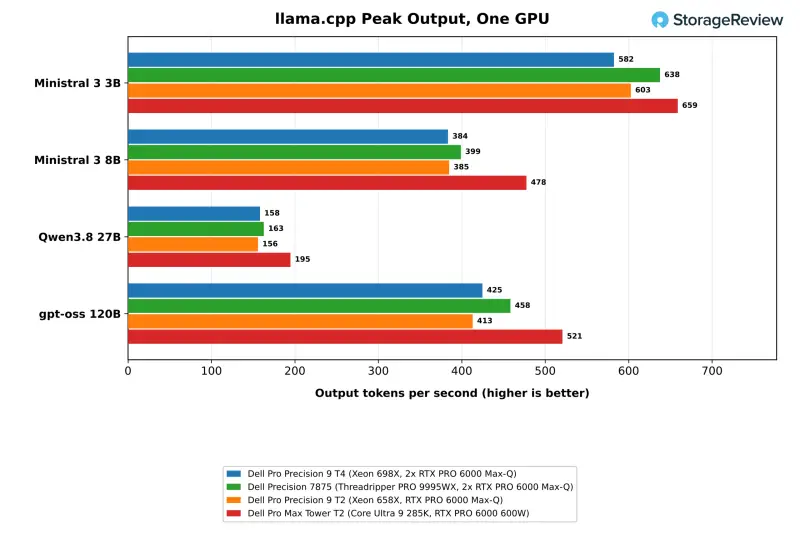
Every system here carries at least one 96GB RTX PRO 6000, so single-GPU results mostly measure the card, its power limit and how well the platform keeps it fed. The T4's two cards are what set it apart. Our two-GPU tests run each model in up to three configurations: two independent servers, one per GPU, for throughput; one model split by layer across both cards; and, for MiniMax M2.7, one card with the rest of the model in system memory.
On one GPU, the T4 lands where the card's 300W limit puts it. On gpt-oss 120B it produced 166.9 tokens per second for a single user and peaked at 424.8 across 64 concurrent requests. That's within 1 to 9 percent of the Precision 7875 with the same Max-Q card on all four models, and level with the Pro Precision 9 T2. The 600W card in the Pro Max Tower T2 is 13 to 25 percent faster at peak on every model, reaching 520.7 tokens per second on gpt-oss 120B.
Two GPUs: Replicas Scale, Splits Trade Throughput for Latency
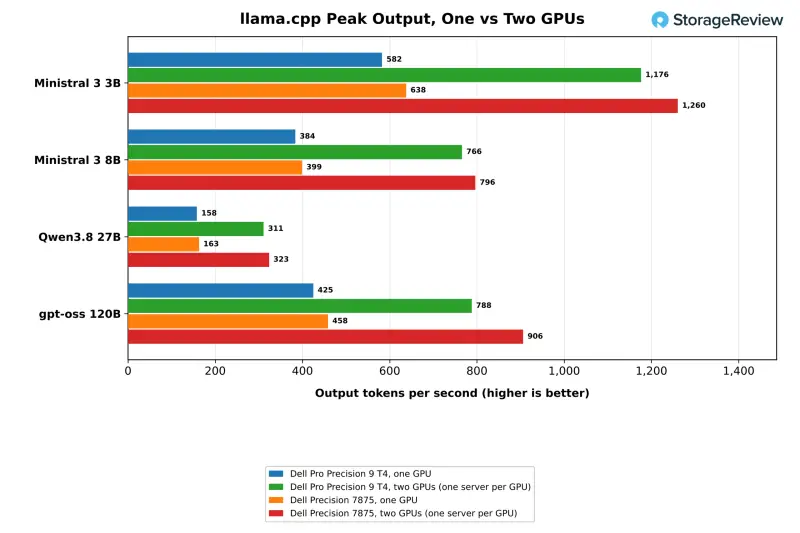
Running one server per GPU raised the T4's peak output by 1.85 to 2.02 times across four models. Peak throughput on Ministral 3 3B rose from 582.5 to 1,176.1 tokens per second. The 8B model went from 383.6 to 765.7, and Qwen3.8 27B went from 158.1 to 310.8. On gpt-oss 120B the T4 reached 787.9 tokens per second, a 1.85x gain, and the Precision 7875 reached 905.8, a 1.98x gain. The 7875 peaked at 128 concurrent requests on that model, and the T4 peaked at 64.
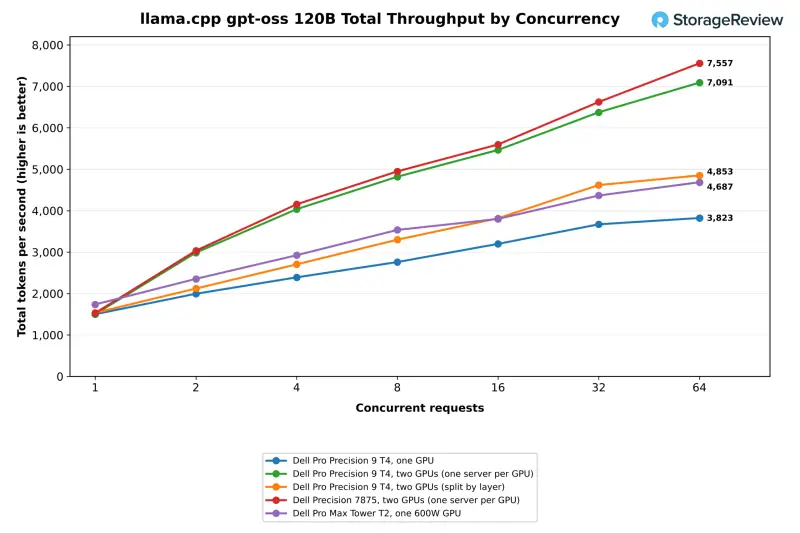
Splitting gpt-oss 120B by layer across both cards is the slower way to use the second GPU when the model already fits on one. It served a single user at 170.6 tokens per second, within 3 percent of one card. Peak output reached 539.2, which is 27 percent above one GPU but well short of the 787.9 that two replicas delivered. The split layout earns its place only when the model won't fit on one card.
The full concurrency sweep on gpt-oss 120B, with total throughput counting prompt and output tokens together, shows the trade-off more clearly. One GPU climbed from 1,502 tokens per second for a single request to 2,760 at eight and 3,823 at 64, where each user got 6.6 output tokens per second. With one server per GPU, total throughput reached 4,820 at eight concurrent requests and 7,091 at 64. At 64 requests that's 1.85 times the single-card result, with each user getting 12.3 output tokens per second. The split configuration peaked lower, at 4,853 total tokens per second, but it cut time to first token for a single user from 1,189ms to 719ms.
MiniMax M2.7: The Model That Doesn't Fit
MiniMax M2.7 is a 230-billion-parameter mixture-of-experts model. The 4-bit quantization used here, Q4_K_M, takes 129.3GB, which is more than one 96GB RTX PRO 6000 can hold. Run on one card with the remainder in system memory, the T4 generated 30.3 tokens per second for a single user and took 16.2 seconds to return the first token. Split across both cards, single-user output rose to 83.7 tokens per second, 2.8 times the one-card rate. Time to first token fell from 16.2 seconds to 3.1 seconds, and peak throughput climbed from 35.5 to 127.3 tokens per second.
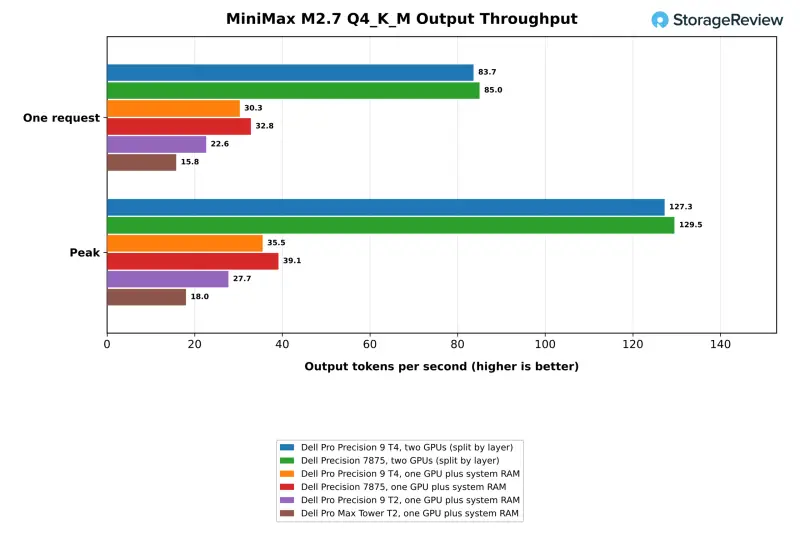
The one-GPU spill results show how much the host platform matters once a model moves into system memory. The T4's eight channels of DDR5-6400 put it 34 percent ahead of the four-channel Pro Precision 9 T2 at 22.6 tokens per second, and 1.9 times ahead of the dual-channel Pro Max Tower T2 at 15.8. The Pro Max Tower's 600W card is faster on every model that fits in VRAM, so this result comes from memory, not the GPU. The Precision 7875 edged the T4 here at 32.8 tokens per second despite lower memory bandwidth. Bandwidth alone doesn't explain that gap, and we haven't isolated its cause.
Model Loading and Storage Speed
Cold model loads favor the Gen5 drives. The T4 loaded gpt-oss:120b from its SK hynix Gen5 SSD in 15.16 seconds, matching the Pro Precision 9 T2 and well ahead of the 25.80 and 28.18 seconds on the Gen4-equipped Precision 7875 and Pro Max Tower T2. Warm loads from the page cache reverse that order. The 7875 loaded in 5.01 seconds against 7.49 on the T4. Loading one copy of gpt-oss:120b onto each GPU at once took 26.47 seconds on the T4, against 35.55 on the 7875.
For MiniMax M2.7 spilling into RAM, the T4 cold-loaded in 40.5 seconds on one GPU and 27.6 seconds split across two. The 7875 took 65.8 and 50.7 seconds. Warm loads flipped again, with the T4 at 28.6 seconds and the 7875 at 15.2. Teams that reload models often should weigh that warm-cache gap against the cold-start advantage, because the answer depends on how often the cache stays hot.
Retrieval-Augmented Generation at Scale
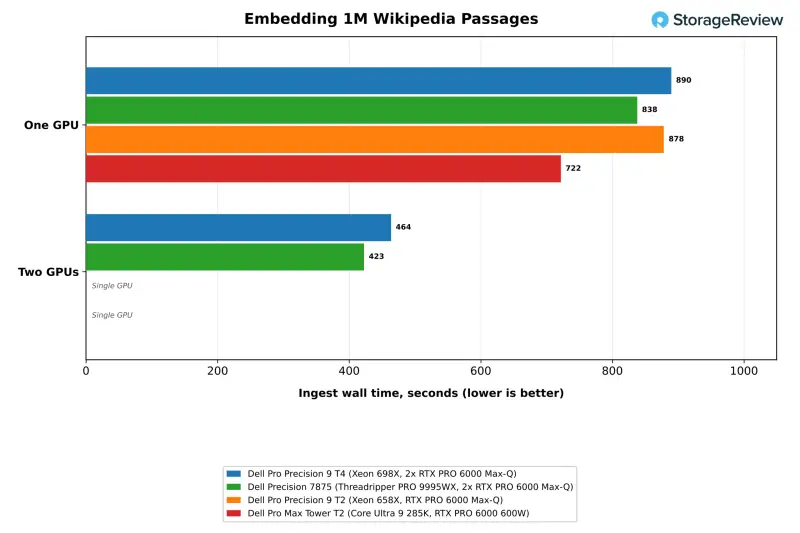
The RAG test hides SQuAD questions among 1,002,067 Wikipedia passages, embeds them with nomic-embed-text, builds an HNSW index and answers with Phi-4-mini. Using two GPUs cut the T4's embedding time from 890 seconds to 464, a 1.92x speedup. The Precision 7875 finished the same job in 423 seconds on two GPUs. On a single GPU, the 600W card in the Pro Max Tower T2 was fastest at 722 seconds.
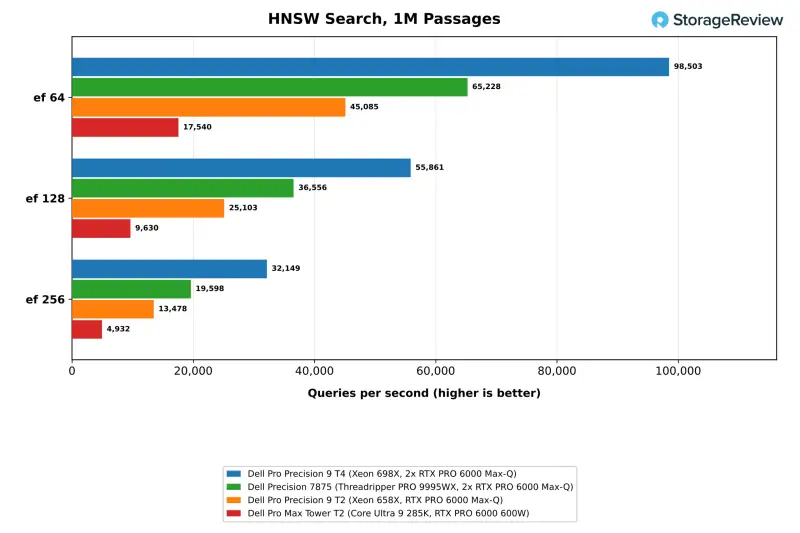
Index building and vector search run on the CPU, and that's where the T4 pulls ahead. It built the HNSW index in 27.3 seconds, against 34.8 on the Precision 7875 and 118.6 on the Pro Max Tower T2. At ef 64 it searched 98,503 queries per second, 1.51 times the 7875 and 5.6 times the Core Ultra system. At ef 256 it held 32,149 queries per second at 97.6 percent recall against exact search, and median question-to-answer latency was 0.123 seconds, against 0.082 on the 7875.
Fine-Tuning: Time Per Epoch Decides It
The one-epoch LoRA test fine-tunes Ministral 3 8B in BF16 on Dolly 15k across 1,849 steps, scoring 200 held-out examples every 100 steps. Every system started at a held-out loss of 1.534 and finished between 1.167 and 1.172, so the comparison comes down to speed. One T4 GPU finished the epoch in 31.5 minutes at 1,584 tokens per second, within 3 percent of the Pro Precision 9 T2 on the same card. The Precision 7875 took 27.2 minutes and the 600W card in the Pro Max Tower T2 took 22.3 minutes.
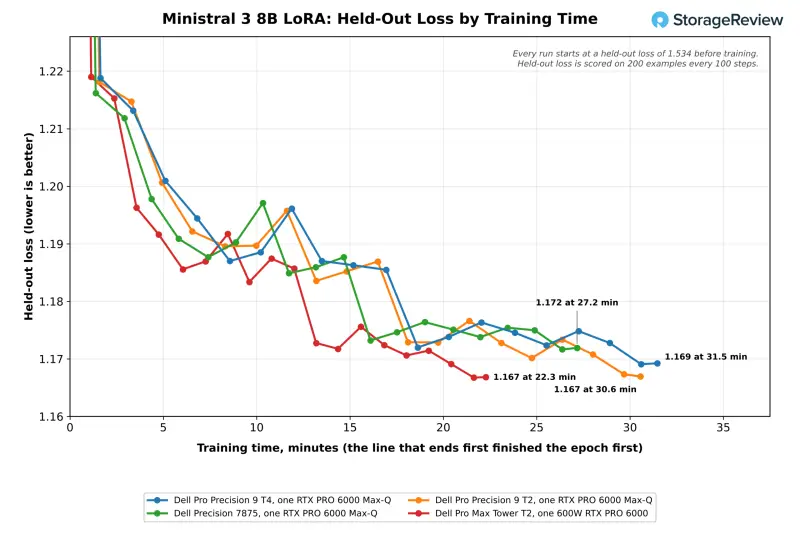
Held-out loss on the T4 fell from 1.534 to 1.219 in the first 100 steps, about 1.6 minutes into training, and eased to 1.169 by the end of the epoch. The second GPU cut the T4's epoch to 19.7 minutes at 2,528 tokens per second, a 1.60x speedup that beat the single 600W card. The Precision 7875 finished its two-GPU epoch in 18.1 minutes, a 1.50x speedup, and the two-GPU runs ended at held-out losses of 1.167 on the T4 and 1.168 on the 7875.
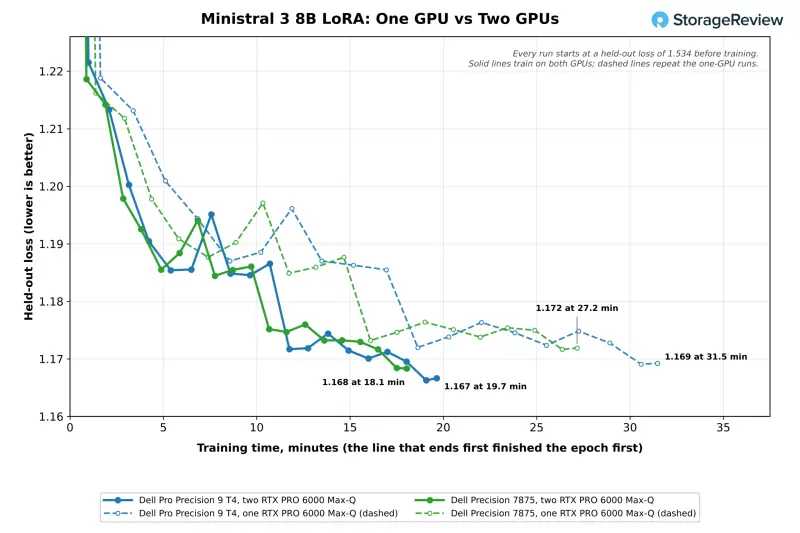
Both cards run data-parallel, with two examples per GPU and gradients accumulated to a global batch of eight. The one-GPU run takes four passes and the two-GPU run takes two, so both see the same examples at each step. With only two short examples per GPU in each pass, the second card has little work to absorb, and gradient exchange takes a bigger share of each step. The epoch peaked at 19.5GiB of GPU memory on one card and 19.7GiB per card on two. That's a fraction of the 96GB on each RTX PRO 6000, so for this workload, memory capacity isn't the constraint.
Coding Agent, Small RAG and Image Generation
The T4 passed every coding-agent run at every model tier. That included all three gpt-oss:20b runs at a 64K context, where the other three systems each passed two of three. It generated 161.5 tokens per second on gpt-oss:120b, slightly behind the 7875's 167.9 and the Pro Max Tower T2's 183.2. In the small RAG ingest test, the T4 managed 304.6 passages per second against 433.8 on the 7875, and answer generation with Phi-4-mini hit 372.5 tokens per second against 410.0.
Image generation uses one GPU, so the T4 sits with the other Max-Q systems. It produced 40.96 FLUX.2 klein 4B images per minute in BF16 at 1024×1024, against 43.03 on the 7875 and 54.25 on the 600W card. Z-Image Turbo and Qwen-Image followed the same pattern.
CPU Performance: Cores Versus Clocks and Bandwidth
The T4 has 86 Xeon cores with 172 threads, and the 7875 has 96 Threadripper cores with 192 threads. The Threadripper's extra cores and per-core speed win most throughput tests. The Xeon wins where memory bandwidth decides the result.
Compression, Rendering and Compiling
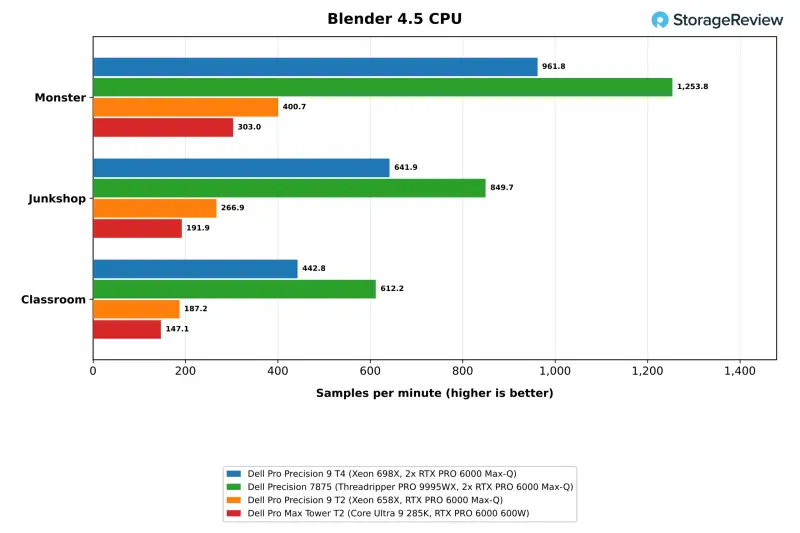
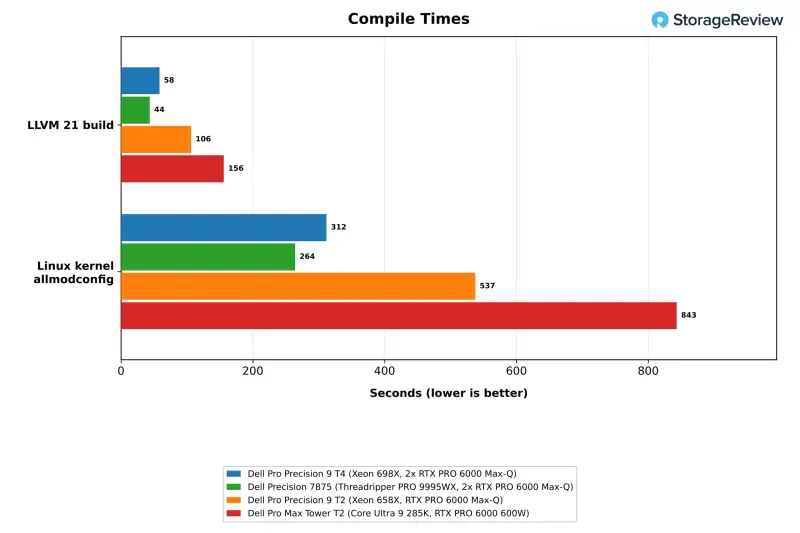
The T4 scored 619.8 GIPS in 7-Zip and 961.8 samples per minute in Blender Monster. That's 2.2 and 2.4 times the 24-core Pro Precision 9 T2. The Precision 7875 ran 37 percent ahead in 7-Zip and 30 percent ahead in Blender Monster. It also finished the LLVM 21 build in 43.7 seconds against the T4's 58.4, and the Linux kernel allmodconfig build in 264 seconds against 312. Per-core speed is the T4's weak spot, with the lowest one-thread 7-Zip score in this group at 8.85 GIPS.
HandBrake's x265 encode is the outlier, and the encoder seems to be the cause more than the processor. All four systems landed between 40.0 and 41.7 fps, so x265 at this preset doesn't scale with core count. The T4's 31.4 fps fits its lower per-core speed on the threads x265 uses. During that encode the T4 averaged about 1GHz across its 172 threads, which means most of the chip sat idle. SVT-AV1 scaled better: 159.4 fps on the T4 against 255.8 on the 7875.
Memory Bandwidth, Simulation and Math
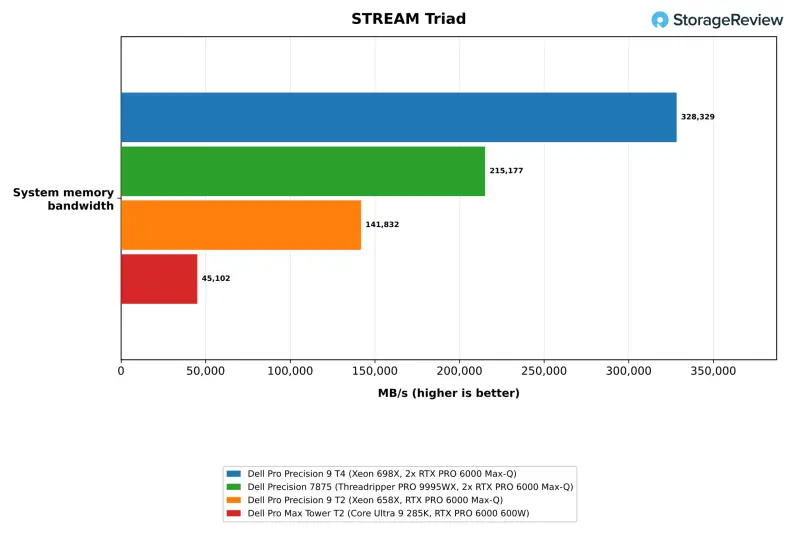
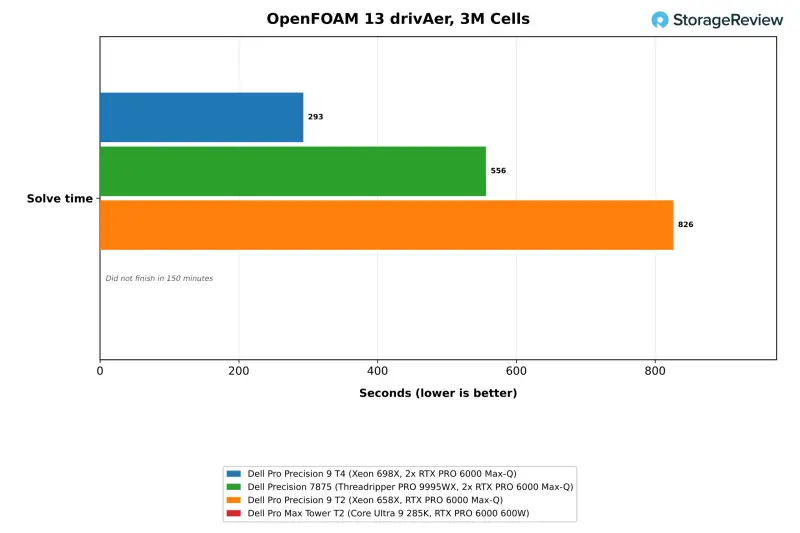
Eight channels of DDR5-6400 give the T4 328,329 MB/s in STREAM Triad. That's 53 percent above the Precision 7875's DDR5-5600 platform and 2.3 times the four-channel Pro Precision 9 T2. Bandwidth-bound work follows. The T4 solved the 3-million-cell OpenFOAM 13 drivAer case in 293 seconds, against 556 on the 7875 and 826 on the Pro Precision 9 T2. The Pro Max Tower T2 didn't finish within the suite's 150-minute limit. The T4 also ran the 22.6-million-cell case in 6,851 seconds.
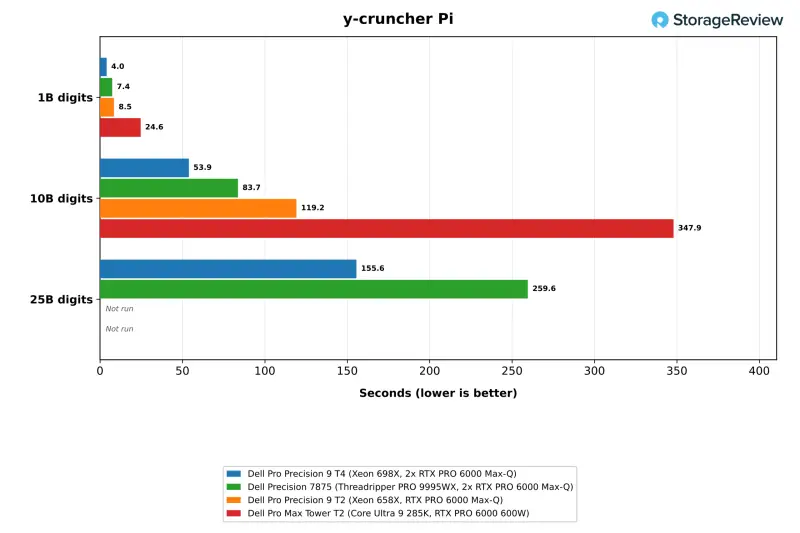
GROMACS benchPEP, the large all-core molecular dynamics case, ran at 1.243 ns/day on the T4 against 1.034 on the 7875. The OpenBLAS LU solve at N=20000 reached 1,660 GFLOPS against 1,172. y-cruncher computed 10 billion digits of Pi in 53.9 seconds on the T4 against 83.7 on the 7875, and 25 billion digits in 155.6 seconds against 259.6. Dense compute that stays in cache favors the Threadripper, which led OpenBLAS DGEMM at 4,745 GFLOPS against 3,664. GROMACS benchMEM on 16 cores went the other way too, at 84.94 ns/day on the 7875 against 68.09 on the T4.
Databases and Latency-Bound Services
ClickHouse ran the 43 ClickBench queries in 3.21 seconds hot and 6.45 seconds cold on the T4. That's 0.33 seconds behind the 7875 on the hot run and 0.64 seconds ahead on the cold run. Valkey tells a different story. The T4 managed 666,714 SET requests per second and 865,353 GET requests per second, trailing all three comparison systems. The Core Ultra 9 285K in the Pro Max Tower T2 led at 1.72 million SET. The pattern matches the T4's one-thread results, so it's worth weighing before you put latency-sensitive services on this box.
Stockfish with all threads loaded ran at 68.21 Mnps on the T4 and a 87C mean CPU temperature. That's 1.5 times the 24-core Pro Precision 9 T2 and well under half of the 7875's 168.27 on 192 threads. The T4's first full run timed out before a standalone retest produced the figure above. We report the retest as measured and haven't isolated the cause of the weak scaling.
Storage Performance
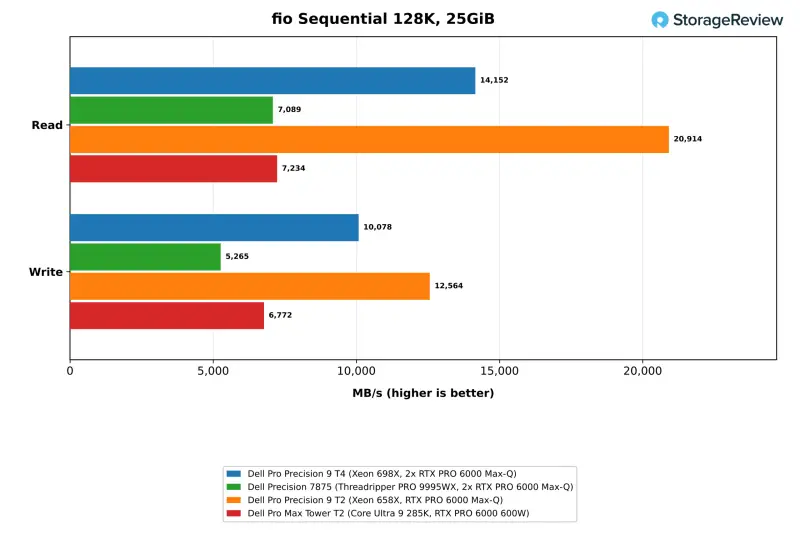
The T4's 2TB SK hynix Gen5 boot drive delivered sequential reads of 14,152 MB/s and writes of 10,078 MB/s in fio at a 25GiB footprint. Sequential reads were roughly twice the Gen4 drives in the Precision 7875 and Pro Max Tower T2. Random 4K performance peaked at 2.31 million read IOPS and 1.83 million write IOPS. The Pro Precision 9 T2 posted higher sequential figures, at 20,914 MB/s read on a striped array of Samsung PM9E1 Gen5 drives. That number is flagged for run-to-run variance after a rerun. We tested only the T4's boot drive in this run, so the second 2TB drive didn't factor in.
Thermals and Clocks Under Load
With the BIOS in Ultra Performance mode, the Xeon 698X peaked at 93C in 7-Zip and 96C in GROMACS. The clock figures below are averages across all 172 logical CPUs. Blender and Stockfish load every thread and held 2.5GHz to 2.6GHz, above the chip's 2.0GHz base. GROMACS and OpenBLAS load 64 and 86 physical cores and leave the remaining threads near 0.8GHz, which is why their averages read about 1.3GHz.
| Workload (Dell Pro Precision 9 T4) | CPU Max (C) | CPU Mean (C) | Mean CPU Clock (MHz) |
|---|---|---|---|
| 7-Zip | 93 | 80.6 | 1,967 |
| Blender | 91 | 85.7 | 2,587 |
| GROMACS | 96 | 81.3 | 1,313 |
| LLVM build | 83 | 74.5 | 2,127 |
| OpenBLAS | 80 | 62.9 | 1,325 |
| LLM serving | 84 | 65.0 | 924 |
| Fine-tuning | 71 | 61.2 | 854 |
| RAG at scale | 74 | 64.4 | 987 |
| Storage | 64 | 55.4 | 942 |
GPU-led work keeps the processor cooler. During LLM serving, fine-tuning and RAG, the CPU averaged 61C to 65C, since those tests lean on the cards. Those are the workloads this machine is meant for, so the thermal headroom is good news for sustained AI jobs.
The Verdict: Who Should Buy This Tower
The T4 is built for local AI, and the second RTX PRO 6000 is where it proves that. Two Max-Q cards raised peak serving throughput 1.85 to 2.02 times across four models and embedding throughput 1.92 times. They cut a LoRA epoch on Ministral 3 8B from 31.5 to 19.7 minutes, and they moved MiniMax M2.7 from 30.3 to 83.7 tokens per second for a single user. On gpt-oss 120B, one server per GPU reached 7,091 total tokens per second at 64 requests. Splitting the model across both cards returned a single user's first token in 719ms, against 1,189ms.
The Xeon's memory bandwidth is the other headline. Eight channels of DDR5-6400 gave the 698X a 53 percent lead over the Threadripper PRO 9995WX in STREAM Triad. That carried the T4 past the Precision 7875 in OpenFOAM, GROMACS benchPEP, y-cruncher and HNSW search, and its Gen5 storage loaded large models faster. The chassis earns credit too, with the best cooling layout we've seen from Dell in this class and tool-less access to the power supply.
The trade-offs are just as clear. The 7875 stays ahead on core-bound rendering, compression and compile work by 18 to 38 percent, and by 60 percent in SVT-AV1. The Xeon's per-core speed trails every system in this group, and that shows in Valkey and other lightly threaded services. Single-GPU fine-tuning is slower on the T4 too. The LoRA epoch took 31.5 minutes there, against 27.2 on the 7875 and 22.3 on the 600W card in the Pro Max Tower T2, although every system finished within 0.005 of the same held-out loss.
At about $66,600 as configured on Dell.com, the T4 suits teams that want to serve, embed and fine-tune models on-premises, including models that need more than 96GB of GPU memory. It also suits teams that want memory-bound simulation and analytics on the same box. If most of your work is rendering or compiling, the Threadripper platform will serve you better. If you need only one GPU, the same card comes in the smaller Pro Precision 9 T2.
Here's what I'd check before a purchase: the 2400W supply and dual 300W cards need a power and thermal plan for the rack or desk, the 25GbE adapter needs a switch port to match, and the Ubuntu-tested stack (driver 595.99.02, CUDA 13) should be validated against your own model mix. Watch for the Windows 11 Pro for Workstations configuration too, since our numbers came from Linux.

Leaderboard: The Dell Pro Precision 9 T4 holds Best Xeon Tower for Local AI on our Best Desktops for Local AI leaderboard.


