Entra Conditional Access Gets Agent Session Risk, Hidden in Template JSON
- Shanchana
- 589 views
Entra's raw template JSON exposes an undocumented agentSessionRiskLevels setting for AI agent sessions. Here's what it targets and how to test it safely.
AI agents now read sensitive data, run code and carry out tasks across organizational resources. An agent that's trusted on Monday can turn into a security problem within seconds if its identity or its activity is compromised or manipulated. Identity risk signals are built to catch compromised accounts, but they don't necessarily describe what an agent is doing in the middle of a session. That gap is why a quiet detail in Microsoft Entra Conditional Access deserves a close look.
A Parameter Hiding in the Template JSON
While reviewing the Conditional Access policy templates and their raw JSON payloads, I found a property that the admin center doesn't expose: agentSessionRiskLevels. Microsoft hasn't documented it, and it doesn't say which signals feed an agent session's risk level. Still, its presence is a clear sign that Entra is extending risk-based access controls from users and sign-ins into agent sessions.
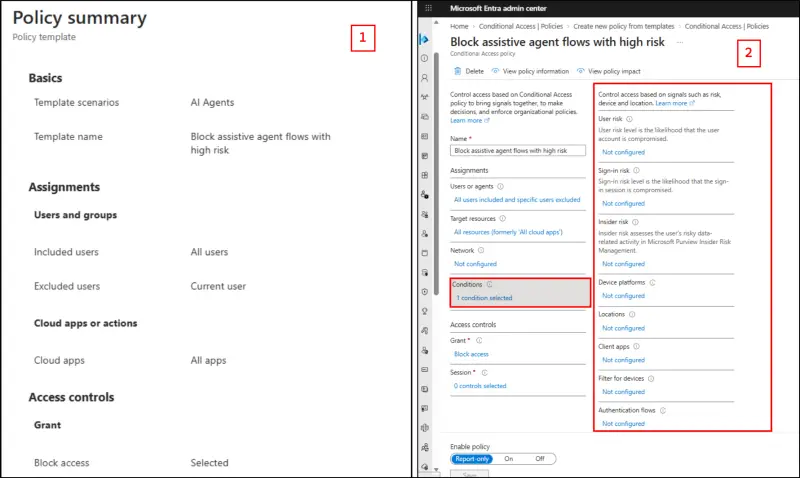
The template that caught my attention was Block Assistive Agent Flows with High Risk. The policy summary reported one condition, yet none of the visible condition pickers appeared to be selected. That mismatch was the starting point. I exported the policy and read the JSON directly, and that's where the hidden settings showed up.
Reading What the Exported Policy Actually Says
The conditions block in the export lists the familiar fields first: user risk levels and sign-in risk levels are empty, and client app types is set to all. After those comes agentSessionRiskLevels, set to high. A separate agentContext object sits alongside it, with includeAgentContexts set to allAgentAssistedFlows and an empty exclusion list. The grant control is a single block built-in control under an OR operator.
Two things follow from that. The session risk property sets the threshold the policy acts on, and the agent context property sets the scope. Together they explain why the summary showed one condition while the UI showed nothing selected: the setting lives in the schema but has no matching control in the editor.
I'd treat that as a sign of where the product is heading, not as a feature you can rely on today. A property existing in the schema doesn't tell you its evaluation logic, its reporting behaviour or how stable it will be in a future release.
Scope: Delegated Agents Only
It doesn't cover autonomous agent identities or standalone agent user accounts. Those follow different access patterns and need their own Conditional Access configuration, so don't assume one policy covers everything labelled "agent."
The value allAgentAssistedFlows narrows the policy to agent-assisted executions. It doesn't mean every AI agent authentication event in the tenant.
Here's the practical appeal. Session-level evaluation lets Conditional Access judge an individual agent-assisted session instead of treating all of a user's activity the same. If one session is rated high risk, a block can stop the agent's request without cutting off the user's own access. For teams that want people to keep working while risky automated actions get stopped, that separation matters.
Building the Policy: Template Route First
The Agent Session Risk condition isn't a selectable option in the Conditional Access policy editor, so you have two routes. The first is the built-in template.
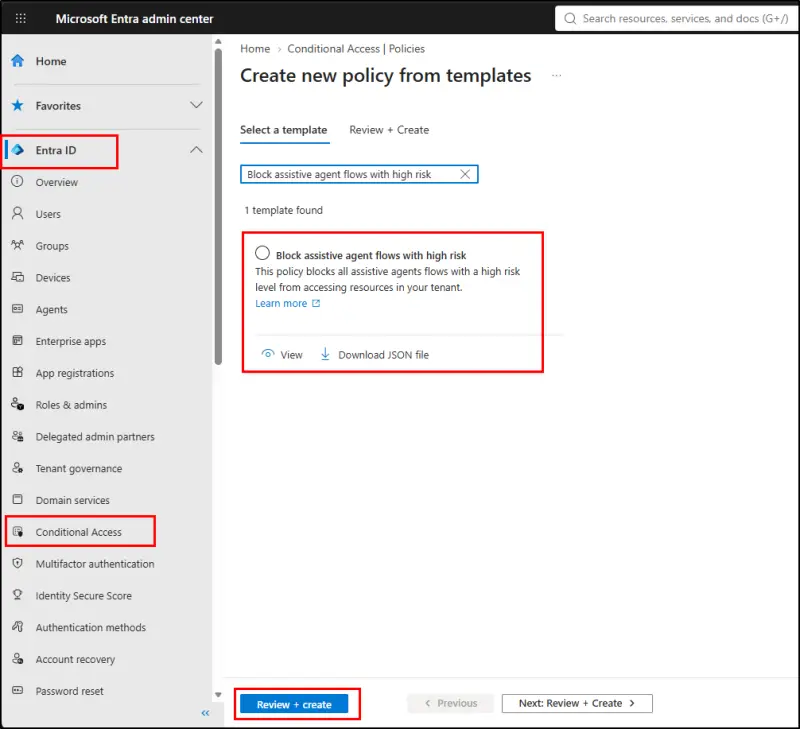
- In the Microsoft Entra admin center, go to Entra ID, then Conditional Access, then create a new policy from a template.
- Search for and select Block assistive agent flows with high risk.
- Select Review + create and check the configuration.
- Create the policy in Report-only mode. Once you've validated the results, switch it to On to block high-risk agent sessions.
After creating it, export the JSON and confirm that agentSessionRiskLevels reads "high" and that the scope is allAgentAssistedFlows. If those values aren't there, you're not looking at the policy you think you built.
Going Beyond High Risk with Microsoft Graph
The template only targets high-risk sessions. If you want medium-risk sessions covered too, you need to define the policy yourself. Microsoft Graph PowerShell lets you set the agent session risk levels and the agent-assisted flow scope directly, instead of accepting the template's fixed values. Connect to Microsoft Graph with the required permissions first. The permissions named in the source are Policy.Read.All and Policy.ReadWrite.ConditionalAccess.
The approach is a POST to the Conditional Access policies endpoint on the Graph beta API. The request body sets a display name that makes the report-only state obvious, uses the enabledForReportingButNotEnforced state, sets agentSessionRiskLevels to "medium", sets agentContext to include allAgentAssistedFlows, targets all users and all cloud applications, and uses a block grant control. Because the endpoint is beta and the property is undocumented, treat the body as a test artefact. Run it in a non-production tenant, check the created object against the exported JSON, and keep the policy in report-only mode while you watch the sign-in logs.
What Testing Has Shown So Far
In hands-on testing, the Agent Session Risk condition didn't trigger in any of the scenarios I evaluated, including sessions where malicious instructions were introduced. That's a negative result from a limited set of tests, not proof that the condition is inactive. Microsoft hasn't documented the signals behind the risk rating, so nobody outside the product team knows what should trigger it. Until that changes, I'd expect this to be one of the less predictable parts of your Conditional Access estate.
That leaves a planning question. Entra already offers risk-based protection for agent identities and agent user accounts. Those protections may not cover what happens when an agent acts through a user's delegated access. Session-level risk for agent-assisted flows looks like an attempt to close that gap, and the schema suggests it's already being built.
My read: don't deploy this as a control you're relying on. Do add it to a report-only test in a lab tenant, export the JSON, and log what happens when agent-assisted activity runs under your normal patterns. Compare that with what your sign-in and audit logs show. If you find behaviour that's surprising, Microsoft's documentation will eventually catch up, and your notes will be the ones that help your team respond quickly.


