SharePoint's 5,000-item view limit: why it still bites and how to design around it
- Gregory Zelfond
- 534 views
The 5,000-item view limit is about what a single view can return, not what a library can hold. Here's how to structure lists and libraries so it doesn't catch you out.
This limit has been around since SharePoint's on-premises days, and it still catches teams that move file shares or spreadsheets into SharePoint without a plan. Most of the confusion comes from one misreading: people assume the 5,000 figure caps how much a list or library can hold. It doesn't. It caps how many items a single view can display or query. Once you separate those two ideas, the design choices become much easier.
What the threshold actually measures
The 5,000-item view limit, also called the list view threshold (LVT), sets the maximum number of items that can be displayed or queried in one view of a SharePoint list or library. The storage ceiling is a separate matter entirely. Microsoft's documented limit for items in a library is 30,000,000, though in practice that's far from where you'd want to run a single library. Based on the author's experience, the practical ceiling for one library sits around 100,000 items, well before anything close to 30 million becomes realistic.
The reason this limit exists is operational. SharePoint Online runs on a shared database, and an unbounded query from one tenant could slow things down for everyone else. Microsoft applies the threshold to protect that shared environment. It's a hard limit, and you can't raise it inside your own tenant.
Two folder layouts, two different outcomes
Consider a library holding 15,000 files. Each file and each folder counts as an item in the library total, but the view limit applies only to what's rendered at a given level.
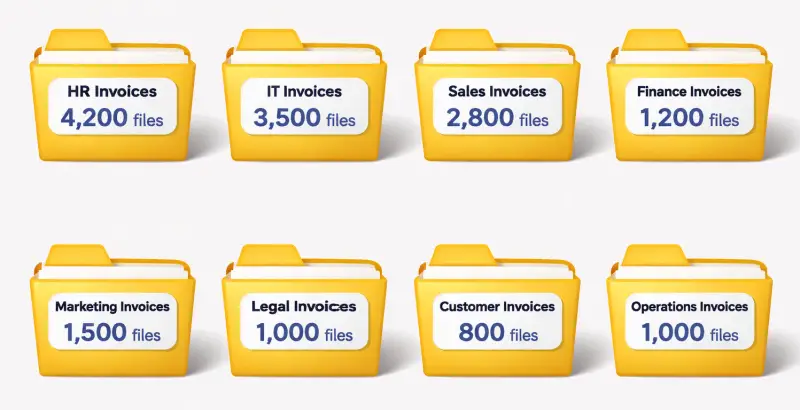
If those files are spread across many folders and subfolders, with each folder holding a few hundred files, navigating to any level shows only a few subfolders and their contents, perhaps around 200 files. That stays comfortably below 5,000, so nothing breaks. The library total is large, but no single view is.
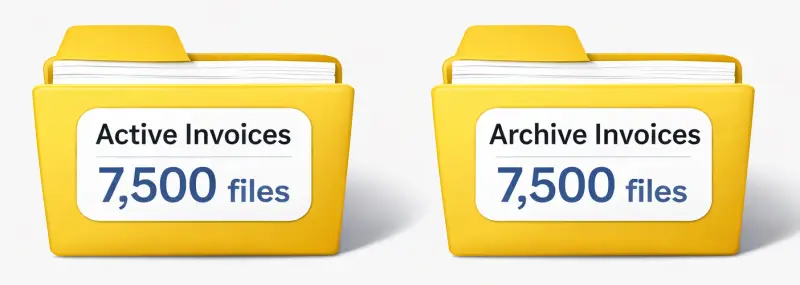
Now take the same 15,000 files stored flat in the root, or split across just two folders of 7,500 each. Opening either folder asks SharePoint to render 7,500 items at once, which is over the threshold. The library itself is no bigger, but the layout has pushed a single view past the limit.
Mitigating it in a document library
For libraries, there are two levers, and they work best together.
- Use folders as view containers. Because the limit applies to the view rather than the library, folders are the simplest fix. Structure them so that no single folder holds more than 5,000 items that would appear in one view.
- Use metadata with indexed columns and filtered views. If your library relies on metadata rather than folders, and you expect it to grow past 5,000 files, create indexed columns and build filtered views on them before the library approaches that size. Indexing after the fact is far harder than doing it upfront.
Mitigating it in a list
Lists don't have folders in the same way libraries do, which makes the choices narrower. Indexed columns paired with filtered views are effectively mandatory here. Without them, any sort, filter or grouping on a non-indexed column can trip the threshold.
If you find yourself building a true database application with hundreds of thousands of records, a SharePoint list is probably the wrong tool. Microsoft Dataverse is the platform the author points to for that kind of dataset. This is the point where a team should revisit the design rather than keep tuning indexes on a list that's outgrown its purpose.
Where the limit bites in practice
Infinite scroll in the modern SharePoint experience helps. Items load in batches as you scroll, so simply browsing a long list is fine. The trouble starts when you sort, filter or group by a column that isn't indexed, or when a view is set up to return more than 5,000 items. Those are the operations that surface the error, and they're the ones users tend to hit once a list is in active use.
My read is that the fix is mostly planning, not troubleshooting. Teams migrating from file shares or large spreadsheets often inherit a flat structure and only discover the problem when a folder crosses the line. Auditing the largest libraries and lists, checking which columns drive your common views, and indexing those columns before growth forces the issue will prevent most of the pain. The limit itself isn't going away, so the job is to make sure no view you care about ever needs more than 5,000 items at once.


