Proxmox VE 9.3 Adds Cluster SAN Controls and Production LVM Snapshots
- Lyle Smith
- 413 views
Proxmox VE 9.3 centralizes SAN path management and supports snapshots on shared thick LVM, alongside updates to HA, SDN and its Linux stack.
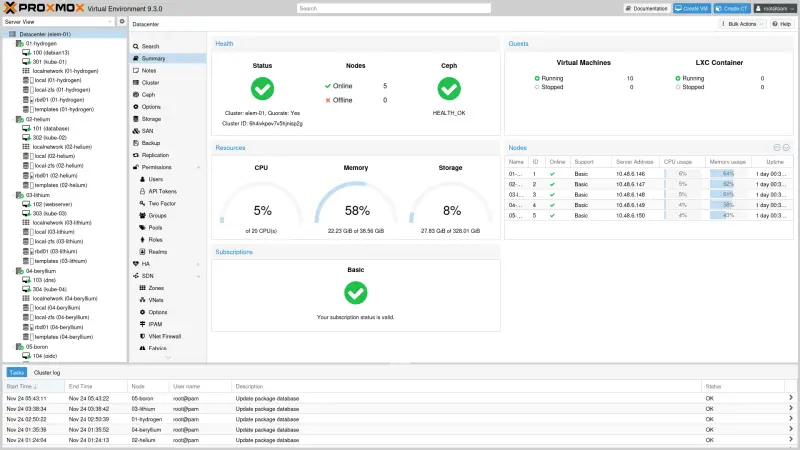
For teams running virtual machines on shared SAN storage, Proxmox VE 9.3 brings a practical change: administrators can configure multipath across a cluster and inspect LUN paths through the web interface. The release also moves snapshots on thick-provisioned LVM into full production support, including shared storage backed by iSCSI and Fibre Channel. Together, these changes put more routine storage administration within reach of the cluster interface.
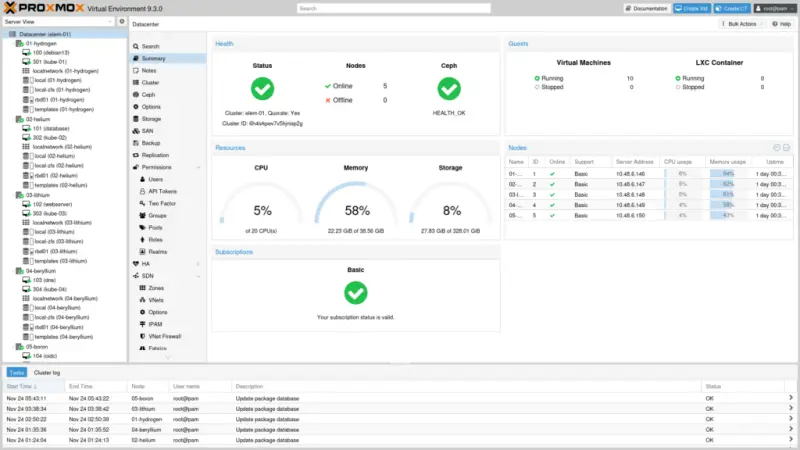
Version 9.3 also updates the platform base to Debian 13.8 “Trixie” and makes Linux kernel 7.0 the stable default. Other changes address guest identity, host maintenance, notifications, network installation and software-defined networking. For infrastructure teams assessing a move from VMware, shared block storage is one of the areas where the new release adds more web-based controls; Proxmox VE 9.2 previously introduced a dynamic load balancer. The migration context is covered in this overview of moving from VMware to Proxmox VE.
Cluster-wide SAN configuration and visibility
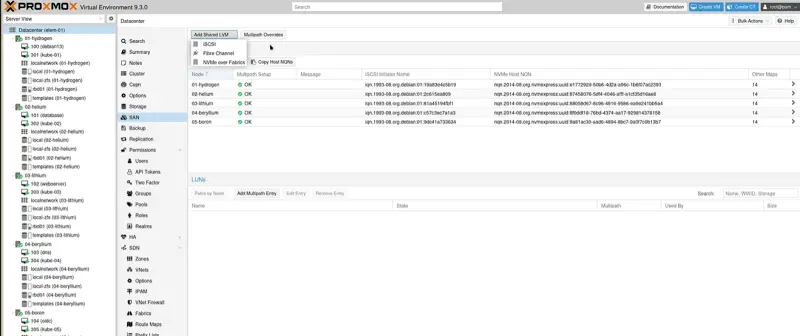
Multipath settings can now be managed centrally for the cluster. A guided workflow configures multipath across nodes and provisions shared LVM storage from the web interface. The supported connections include iSCSI, Fibre Channel and NVMe over Fabrics LUNs.
A new Datacenter > SAN view displays LUN path state across nodes in real time. Each node also has a SAN panel with its local LUNs, path information, usage and active iSCSI sessions. Administrators can use these views to find a failed path or identify configuration differences between hosts without signing in to each one individually.
Snapshots for thick-provisioned LVM now have full production support, including when the shared LVM storage sits on an iSCSI or Fibre Channel SAN. Proxmox implements the snapshots as volume chains. The feature first appeared as a technology preview in Proxmox VE 9.0, and administrators enable it with the Allow Snapshots as Volume-Chain option in advanced storage settings. Teams using this capability should check that the option is enabled on the storage they intend to snapshot.
Third-party storage plugins can also be added and edited through the interface at Datacenter > Storage. Proxmox builds each form from the plugin’s property schema and masks sensitive entries such as passwords and keys. The forms support any storage API version, including plugins such as the TrueNAS Proxmox plugin.
Guest identity, host maintenance and troubleshooting
Each guest receives a unique identity that persists through migration, backup and restore operations. It remains associated with the guest if its VMID changes or it is restored into another cluster. Backup products and external management tools can use that persistent identifier to follow a guest across those operations, where a VMID alone may no longer provide a consistent reference.
Host maintenance workflows get a web interface control as well. Administrators can put individual nodes into or take them out of HA maintenance mode from the Node Maintenance menu in the HA status panel. The same control is exposed through a new API endpoint, so existing management workflows can use that interface instead of invoking the ha-manager command-line tool.
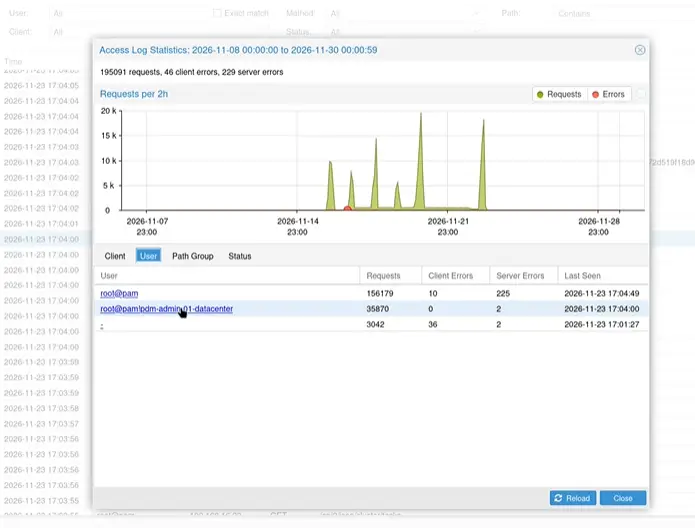
Several interface changes add useful detail when investigating cluster activity. The System Log is now color-coded and filterable, a separate API Access Log records access activity, and an APT History view lists previous package transactions with their changelogs.
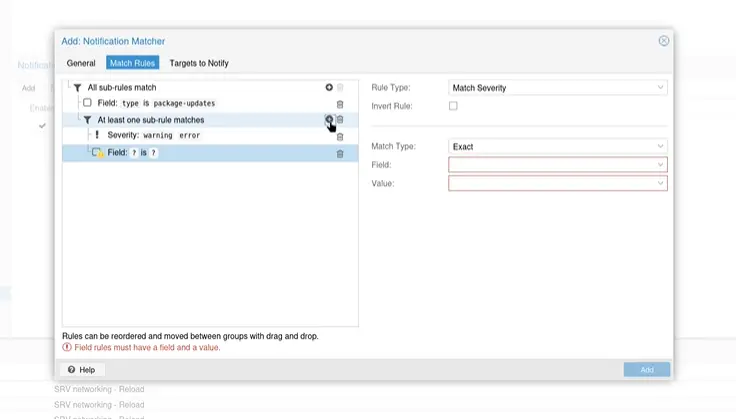
Notification routing has a redesigned, tree-based matcher editor with drag-and-drop controls. A single matcher can combine, invert and nest conditions, including weekday and time-range rules. That gives administrators a way to express more involved routing logic together rather than dividing it among separate matchers.
Installer networking and SDN controls
The installer can place the management network on a bond, a VLAN, or both. The setting is available in the graphical and text-based installers, as well as automated installations. This gives administrators another chance to match the management network design during deployment.
Simple SDN zones can now use a dedicated Virtual Routing and Forwarding (VRF) instance with custom static routes, keeping a separate routing table for the zone. WireGuard fabrics report interface and peer status in the management interface, allowing administrators to check whether tunnels are up and peers are connected.
Platform versions and availability
Proxmox VE 9.3 uses Debian 13.8 “Trixie” and Linux kernel 7.0 as its stable default. An optional Linux 7.3 kernel, based on the upstream stable branch, is available for users who need a newer kernel. The release also updates QEMU to 11.1, LXC to 7.0 and ZFS to 2.4.
Ceph Tentacle 20.2 remains the stable choice for hyperconverged storage. Ceph Umbrella 21.2 is available as a technology preview, with an optimized erasure-coding I/O path, hardened CephX authentication using a new default cipher, online daemon key rotation and an optional monitor database backup mechanism. Since Umbrella is a preview, teams evaluating it should account for that status when planning storage changes.
For disconnected environments, Proxmox Offline Mirror 0.8 adds automatic pruning of older snapshots, “last” snapshot symlinks and parallel package synchronization that uses less memory.
Proxmox VE 9.3 is available as an ISO for new installations. Existing systems can upgrade through the standard APT package management process, and the software can also be installed on an existing Debian system. Administrators planning a change should review their shared storage configuration, kernel choice and any preview components before scheduling the upgrade. See the Proxmox VE product page.