Microsoft Graph Beta Adds Tenant Quotas for Entra Agent Identities
- Blesslin Rinu
- 358 views
Admins can cap agent identities and blueprints as a percentage of directory capacity, including setting a quota to zero to block new objects.


Copilot Studio agent growth can now be managed against a tenant’s directory capacity. Microsoft has added the resourceQuotas property to Microsoft Graph beta, allowing administrators to set percentage-based limits for agent identities, agent identity blueprints and managed identities. A quota of 0 blocks creation of new objects of that resource type.
Every new agent built in Copilot Studio receives a Microsoft Entra agent identity automatically, either when it is created or when it is first published, depending on the agent type. Administrators can no longer opt out of that provisioning. Meanwhile, the standard limit of 250 agents per blueprint does not apply to Microsoft-owned platforms such as Copilot Studio and Foundry. For tenants with expanding agent use, the new control provides a way to limit how much directory capacity these identities can consume.
What the quota controls
Each Microsoft Entra tenant has a directory size quota that sets the maximum number of directory objects it can hold. The source figures cite a default of 300,000 objects for tenants with a verified domain and 50,000 for tenants without one. The resourceQuotas property allocates a percentage of that total capacity to supported resource types:
agentIdentity: Identities representing individual AI agents.agentIdentityBlueprint: Blueprints used to create and manage agent identities.managedIdentity: Azure-managed identities used by applications and services.
These quotas do not cover agent user accounts. Administrators configuring limits should account for that boundary when assessing identity growth across a tenant.
Each quota entry has a resourceType, a maxPercentage and a calculated total. The resource type identifies which objects the entry applies to, and only one quota entry is allowed for each supported type. The percentage sets the share of the tenant’s directory quota that resource type may use; accepted values range from 0 to 100, with 80 as the default. The total value is read-only and reports the resulting maximum object count.
For a tenant with a directory quota of 300,000 objects, an 80% setting allows up to 240,000 objects of the selected type. A setting of 50% allows 150,000; 10% allows 30,000. At 0%, the calculated maximum is zero, so new objects of that type are blocked. These are per-resource calculations based on the tenant’s overall directory quota.
Set limits through Microsoft Graph beta
Quota changes use the Microsoft Graph beta API. The update operation requires the Organization.ReadWrite.All permission. The following workflow uses Graph Explorer to read the tenant’s current values, apply limits and confirm the result.
- Sign in to Microsoft Graph Explorer.
- Choose GET, select the beta API version, and request the organization data:
https://graph.microsoft.com/beta/organization?$select=id,directorySizeQuota,resourceQuotas
Review the response for the tenant ID and the directory usage and total capacity shown under
directorySizeQuota. Keep the tenant ID for the update request. - Choose PATCH and enter the organization endpoint, replacing
{TenantID}with the ID from the response:https://graph.microsoft.com/beta/organization/{TenantID} - Submit a request body with the desired resource types and percentages. This example caps agent identities at 10% of directory capacity and sets the blueprint quota to zero:
{ "resourceQuotas": [ { "@odata.type": "#microsoft.graph.resourceQuota", "resourceType": "agentIdentity", "maxPercentage": 10 }, { "@odata.type": "#microsoft.graph.resourceQuota", "resourceType": "agentIdentityBlueprint", "maxPercentage": 0 } ] } - Check the updated values with another GET request:
https://graph.microsoft.com/beta/organization?$select=id,directorySizeQuota,resourceQuotas
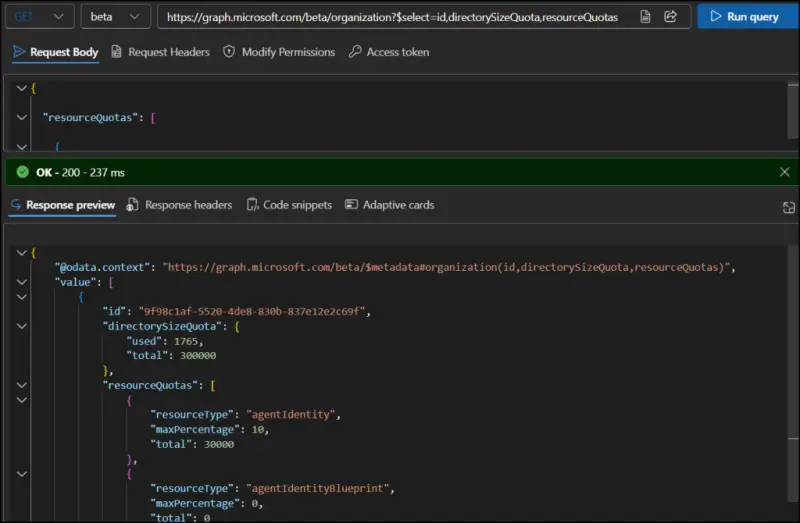
In this configuration, agent identities can use up to 10% of the tenant’s overall directory quota, while new agent identity blueprints are blocked. Administrators can choose other percentages to match their organization’s needs. A zero blueprint quota can also stop blueprint provisioning needed for legitimate agent deployments, so the setting should match the intended provisioning model.
What happens at the limit
When a resource type reaches its configured quota, Microsoft Entra blocks creation of additional objects of that type. An agent identity request that exceeds the limit can fail with an “Agent object quota exceeded” error.
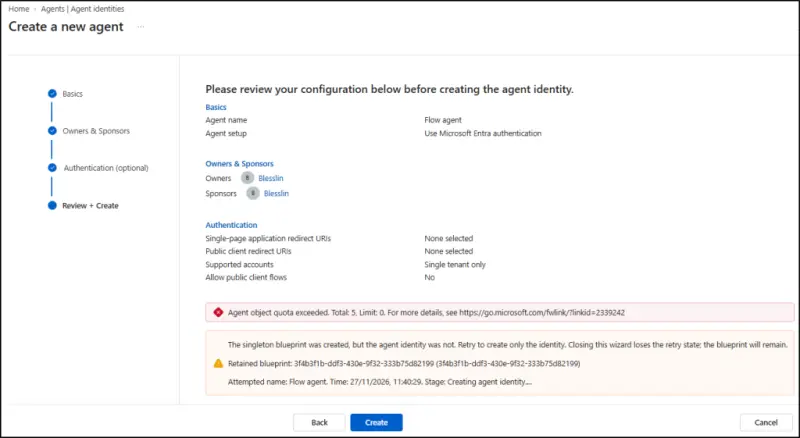
In the illustrated case, the agent identity quota was set to 0 while blueprint creation remained allowed. The wizard created the blueprint, then failed when it tried to create the associated agent identity. That distinction matters when diagnosing a deployment that gets partway through provisioning: a blueprint quota and an identity quota control separate object types.
Deleting an agent identity may not return its capacity immediately. Soft-deleted objects can continue to count against the quota during the 30-day retention period, until they are permanently deleted. Administrators should factor that retention period into capacity planning and troubleshooting after deletions.
Plan the change around agent deployments
Because this capability is in Microsoft Graph beta, test quota changes in a non-production tenant before applying them in production. Start by checking directory usage and existing resource quotas, then select limits that fit expected agent adoption and blueprint provisioning. After an update, read the organization data again to confirm the configured percentages and calculated totals.
The setting gives administrators a direct control over identity creation, while agent permissions management and regular identity reviews remain part of operating an agent environment. Watch for quota errors as teams deploy agents, and account for soft-deleted objects when a limit appears to remain reached after cleanup.