NFA Sharding and Replication: What the ClickHouse Cluster Changes for Flow and BGP Storage
- Administrator
- 944 views
NFA's sharded ClickHouse design spreads flow and BGP data across nodes and adds replicas. Here's how the key choices, upgrade path and monitoring work.
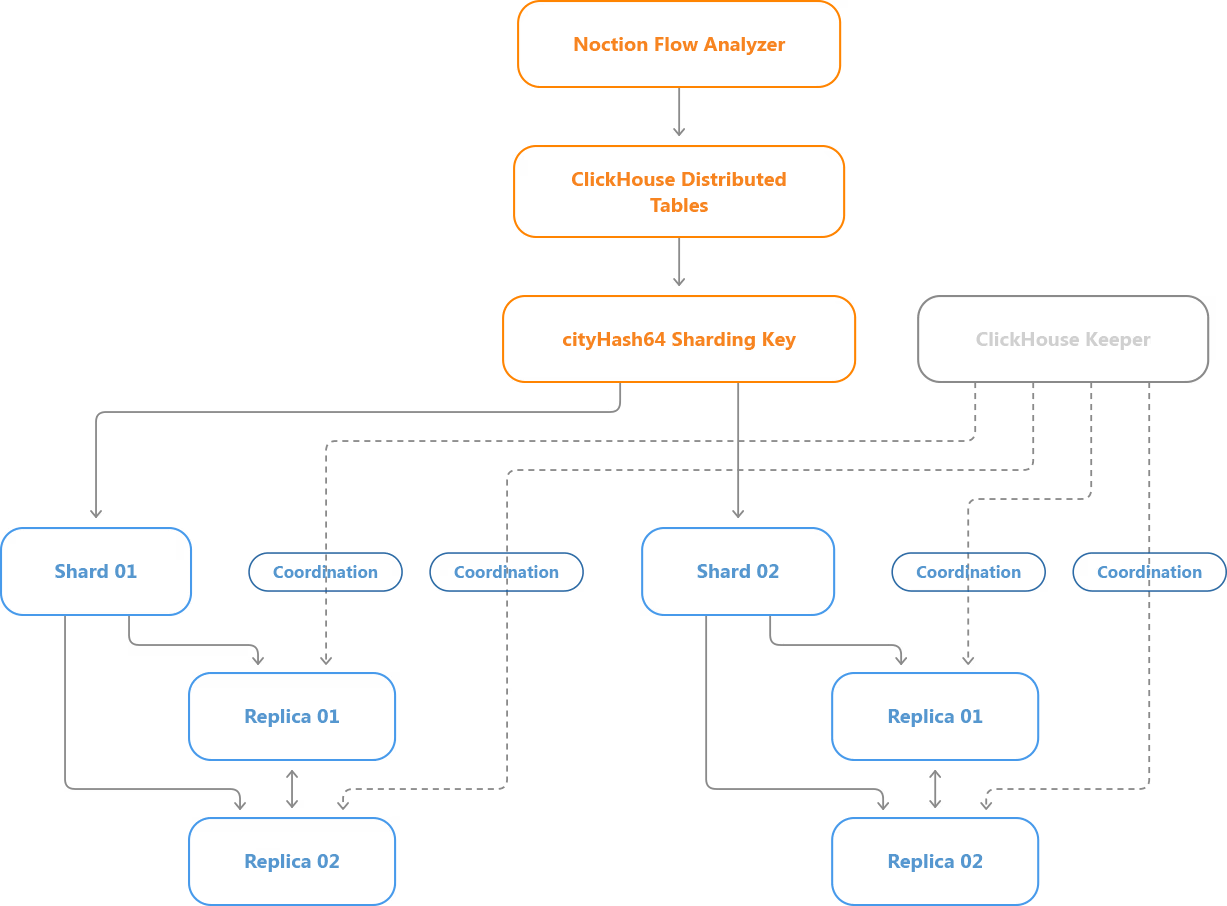
Most Noction Flow Analyzer (NFA) deployments start with ClickHouse on the same server as the application. That keeps the install simple and works fine until exporter counts climb, retention gets longer, or reports start taxing the box. The sharding-enabled architecture is NFA's answer to that growth curve. It adds multiple database shards and replicas, but it keeps the single-node layout as the default. My read is that the design matters less for the headline feature and more for how it changes the cluster you'll be running at 2 a.m. when a node misbehaves.
The architecture covers both flow data from NetFlow, sFlow, IPFIX, J-Flow and NetStream exporters, and BGP routing information. Each dataset gets its own sharding key based on its own record attributes. The storage and replication mechanics underneath are shared.
What's already in the database
NFA splits its state across two stores. MySQL holds application information. ClickHouse holds network traffic data and the analytical storage behind reporting. The ClickHouse side contains flow and BGP tables, including the aggregated datasets that drive NFA's reports and analysis views.
The sharding work extends the ClickHouse part of the installation. It doesn't change the flow collector's job, which is to receive and process exports before the results land in storage. That separation matters when you're sizing a deployment. If ClickHouse is the bottleneck, spreading storage and query work across shards should help. If the collector can't keep up with incoming exports, another database node won't fix that. Check the collector first.
BGP follows a different path. When the optional BGP Data capability is configured, NFA establishes BGP sessions with network devices, collects routing information, and makes it available for routing analysis and for correlation with traffic data. The storage design has to handle both datasets, even though their contents and sharding keys differ.
A one-node cluster, on purpose
A fresh install with the sharding-enabled architecture creates a ClickHouse cluster named nfa. It starts with one shard and one replica, running on the local server. The installation also sets up ClickHouse Keeper, the cluster definition and the identifiers that replicated tables depend on.
That can look like overhead for a single database instance. The point is that the structure you'll need later already exists. NFA doesn't begin with a non-clustered design that has to be torn out when a second node arrives. Distributed tables, replicated storage engines and the coordination paths are part of the install from day one. A single-node deployment still stays simple, with no extra database hardware required.
Where Keeper fits
ClickHouse Keeper coordinates replication and some distributed operations. The default install runs Keeper locally, next to ClickHouse Server. The database service is set to depend on Keeper and start after it. Keeper holds coordination metadata, not the flow or BGP data itself.
With one replica, there's no second physical copy to keep in sync. The replicated tables are still registered through Keeper, though, so they can be extended with more replicas later. It's worth keeping that distinction clear: a replicated table engine isn't the same thing as redundant storage. One shard with one replica still holds exactly one physical copy of the data.
How flow records get assigned to shards
NFA uses ClickHouse's Distributed table engine to spread both flow and BGP data across shards. Because the two datasets have different structures, each gets its own sharding key.
Flow tables follow a pattern. Local storage tables such as flows_data1 have matching Distributed tables, such as flows_data1_dist. The Distributed table points at the nfa cluster and the underlying local table. On insert, the sharding expression is:
cityHash64(
exporter_address,
exporter_id,
src_address,
dst_address
)
That expression combines four attributes:
exporter_address— the address associated with the exporter.exporter_id— the exporter identifier.src_address— the source IP address.dst_address— the destination IP address.
ClickHouse hashes those values and maps the result to a shard based on the cluster configuration.
Why not just shard by exporter?
Picture a provider collecting flow records from a fleet of routers. The obvious approach is to pin each router to a shard. That works if the routers produce roughly similar volumes. Often they don't. A handful of busy edge or core devices can account for most of the incoming records, while many others export far less. Route all of one busy router's records to a single shard and that server may carry a disproportionate share of the load.
Adding source and destination addresses to the key means the same exporter's traffic can land on different shards, depending on the address pairs it reports. That gives ClickHouse more room to spread the work than an exporter-only key would. It isn't a guarantee, though. A hash doesn't promise identical row counts or resource use across shards, and the real balance will depend on your traffic mix.
What the flow key leaves out
The key doesn't include transport ports or the IP protocol. Records sharing an exporter context and a source-destination address pair produce the same hash, even when they belong to different TCP or UDP conversations. Don't read the key as a conventional five-tuple flow identifier. It's a placement key, and it serves a different purpose.
Placement also depends on the cluster topology. If the number or weighting of shards changes, future inserts may route differently. Existing records don't move automatically as a result.
BGP data gets its own key
The distributed design isn't limited to IP flows. The optional BGP Data addon lets NFA collect routing information through BGP sessions with connected routers. That data supports examining prefix advertisements and withdrawals, analyzing routing changes, and associating BGP attributes such as AS_PATH with traffic records.
In practice, an engineer might check when a prefix was advertised or withdrawn, step through routing changes across a chosen time window, or look at traffic tied to particular AS paths. Those questions concern routing state rather than the flow records arriving through NetFlow, sFlow or IPFIX, so the BGP table uses a different key:
cityHash64(session, prefix)
Here, session is the address of the BGP session that supplied the routing information, and prefix is the network prefix the record describes. The hash of those two values selects a shard in the nfa cluster.
The corresponding Distributed table definition looks like this:
ENGINE = Distributed(
nfa,
currentDatabase(),
bgp,
cityHash64(session, prefix)
);
Records for the same session and prefix produce the same key value. Under an unchanged cluster configuration, they land on the same shard. That holds whether the record is an advertisement or a withdrawal. Say a session reports an announcement for 203.0.113.0/24 and later reports its withdrawal. Both records carry the same session and prefix, so they hash identically and map to the same shard, as long as the sharding configuration hasn't changed.
The flip side is that one BGP session's records won't stay on a single shard. Updates about different prefixes can spread across several storage nodes. Information about one prefix learned through different sessions may also end up on different shards. If you're collecting from several routers, expect the BGP data to be distributed in a way that follows the routing state rather than the device that sent it. As with flows, the hash doesn't promise an even split of BGP updates.
The local BGP table uses ClickHouse's ReplicatedMergeTree engine. When a shard has more than one replica, BGP data synchronizes between them through the same replication mechanism the flow tables use.
How the storage layout fits together
The clearest way to picture it is a two-shard deployment with two replicas per shard. Flow and BGP records enter their respective Distributed tables. Each table computes its sharding key and picks a destination shard. Inside that shard, the replicated storage engine keeps the data on each configured replica.
Queries that span shards
With more than one shard, traffic and BGP information live on several ClickHouse servers. A network-wide report may need data from all of them. The Distributed tables present the cluster as a single logical dataset. ClickHouse runs the necessary work on the relevant shards and merges the results.
Take an operator investigating traffic by destination IP over a set interval. They don't pull a separate report from each storage server and stitch it together. Routing questions work the same way. Information about a prefix seen through different BGP sessions may come from different shards, and the database handles the distributed execution.
Multi-shard queries carry one configuration detail. Some NFA queries use IN or JOIN subqueries against distributed tables. ClickHouse normally limits certain double-distributed query patterns through the distributed_product_mode setting. The NFA multi-shard configuration sets:
distributed_product_mode = global
That lets the relevant distributed IN and JOIN operations use global query execution semantics. The setting needs to be applied consistently across the ClickHouse nodes in the documented multi-shard configuration. It's an implementation requirement, not something a user would normally touch from the reporting interface.
Distribution isn't a free speed boost. Query performance still depends on data volume, available resources and communication between servers. Spreading a query across shards helps large analytical workloads, but not every query gets faster just because more nodes exist.
Replication: what gets copied, and how
Sharding decides where different slices of the dataset live. Replication keeps copies of the data belonging to one shard. NFA uses replicated variants of ClickHouse's MergeTree engines for its main flow and BGP tables:
| NFA table | ClickHouse storage engine |
|---|---|
| bgp | ReplicatedMergeTree |
| flows_data1 | ReplicatedAggregatingMergeTree |
| flows_data2 | ReplicatedAggregatingMergeTree |
| flows_data3 | ReplicatedAggregatingMergeTree |
| flows_data_1s_compact | ReplicatedAggregatingMergeTree |
The AggregatingMergeTree family is built for aggregation-heavy storage. The replicated variant adds the ability to keep matching data on several replicas of the same shard.
What happens on insert
The NFA cluster configuration sets internal_replication=true. When a block is inserted through a Distributed table, ClickHouse picks the destination shard and sends the block to one replica in that shard. The replicated table engine then synchronizes the block to the other replicas.
Take Shard 01 with two replicas. A new block lands on one of them. ClickHouse coordinates the replication so the other replica fetches the data parts it needs. The replicas eventually hold the same logical dataset, though a replica that's down or has a backlog will take longer to catch up. The NFA application doesn't write every record to every replica itself. ClickHouse handles that, and the same principle covers flow and BGP tables alike.
How Keeper tells replicas apart
Replicated tables use a coordination path built from the shard identifier and the table name. The flows_data1 table in Shard 01 uses:
/clickhouse/tables/01/nfa/flows_data1
The BGP table in the same shard uses:
/clickhouse/tables/01/nfa/bgp
A new replica added to Shard 01 shares those table paths but registers under its own replica identifier. A separate shard uses its own paths:
/clickhouse/tables/02/nfa/flows_data1
/clickhouse/tables/02/nfa/bgp
That's how ClickHouse separates replicas holding the same data from shards holding different slices of the dataset. NFA stores the shard and replica identifiers as macros in the ClickHouse configuration. Each node has its own values, and those values determine its Keeper paths. For the underlying mechanics, the ClickHouse documentation on replication is the reference.
Choosing a topology
The architecture supports several layouts. The default is one shard with one replica. Larger deployments can add shards, replicas or both. The right choice depends on whether you need more database capacity, another copy of the stored traffic and BGP data, or both.
One shard, one replica
This is the starting point. NFA and ClickHouse run on one local storage instance. There's no inter-node database traffic, and administration stays simple. If the server has enough resources for your exporter count, retention and query load, there may be no reason to expand. The limitation is that the shard has no second copy. If the only ClickHouse server fails, its stored data may be unavailable until service comes back.
Two shards, one replica each
Consider a hosting provider whose database is approaching its storage limits. The operator adds a second ClickHouse server as Shard 02. New flow and BGP records entering through the Distributed tables go to whichever shard their key selects. Each server holds a different portion of the datasets, which adds storage and processing capacity. Neither shard has a redundant copy, though. If one shard goes down, its slice of the data may be inaccessible.
The expansion has an operational catch. The new shard doesn't automatically take half of the historical records. Existing data stays on the original server unless a separate redistribution procedure is run. Expect the two servers to show very different disk utilization right after expansion.
One shard, two replicas
Now suppose capacity isn't the pressing problem, and the operator wants another copy of the traffic and routing data. A second ClickHouse server joins the existing shard as Replica 02. Unlike a new shard, it doesn't receive a different subset of future records. It joins the shard and synchronizes.
Once synchronization completes, both replicas hold the same logical dataset, including the replicated flow and BGP tables. This can help keep stored data reachable during certain node failures or maintenance windows. It doesn't increase the amount of unique history the shard can hold.
Two shards, two replicas each
A larger installation might need both capacity and redundancy. That configuration runs four ClickHouse instances. Shard 01 and Shard 02 each have two replicas. The shards split the datasets, and the replicas inside each shard hold matching data.
This combines the capacity of sharding with the redundancy of replication. It also means more infrastructure to maintain, and enough network, storage and processing headroom for both distributed queries and replication traffic. It doesn't remove every failure mode. If both replicas of one shard are lost, that shard's data can become unavailable, and shared dependencies such as Keeper still need attention.
Upgrading an existing installation
For an installation already in service, adopting sharding means more than adding a cluster definition. The database already holds history in local ClickHouse tables, and that history has to be converted to replicated engines without losing data. NFA's documented upgrade procedure handles that migration as part of preparing the installation for the cluster architecture.
Preparing the database services
The upgrade starts with the database services. ClickHouse Keeper is started and checked for availability. ClickHouse Server is then prepared and verified before the schema migration runs. If database preparation fails, the schema upgrade should not proceed. The package upgrade also stops NFA services that could write to the affected tables, so no new records are inserted while the storage structures are being changed.
Converting the tables
The existing BGP table moves from MergeTree to ReplicatedMergeTree. The main aggregated flow tables move from AggregatingMergeTree to ReplicatedAggregatingMergeTree.
The migration creates temporary replicated tables using the final Keeper paths. It then attaches partitions from the existing tables before swapping out the original table objects. When source and destination share the same ClickHouse storage, attaching partitions can reuse existing data parts instead of copying every row through a new logical insert. That matters a lot on installations with large historical datasets. After the swap, the data is available through the new table structure, and the upgrade creates the Distributed tables sharding requires.
The install stays on one server
The upgrade doesn't create additional ClickHouse instances on its own. The existing server becomes Shard 01, Replica 01 of the nfa cluster. Historical data stays put. If you don't need distributed storage, you can keep running the single-node setup. Shards and replicas can be added later, when capacity or availability justifies the work.
Adding database nodes
An additional ClickHouse server doesn't need its own NFA application installation. It does need a compatible ClickHouse version and the right cluster configuration. The nodes must resolve each other's configured hostnames, open the required database connections and reach Keeper. Each node also needs the correct shard and replica identifiers. Those decide whether the node opens a new shard or adds a copy to an existing one.
Adding a shard
A new shard gets its own shard identifier and becomes an independent storage partition in the cluster. Once the cluster configuration is updated and the required NFA schema is initialized, the shard starts receiving new distributed inserts.
Schema initialization is driven from the original NFA node through the nfaadm administration utility. The additional ClickHouse server runs database services only. It doesn't run another full NFA application instance.
Remember that adding the shard doesn't move existing partitions off the original server. Plan redistribution, if you need it, as a separate task.
Adding a replica
A new replica uses the shard identifier of an existing shard and registers a different replica identifier. After the replicated tables are initialized, ClickHouse synchronizes that shard's data to the new server. How long that takes depends on data volume and on network and storage performance. A replica with a large backlog can take a long time to catch up, so don't assume it's fully synchronized the moment it appears in the cluster configuration. The documented NFA setup includes checks that confirm the expected replicas are active and that their replication queues return to normal.
Monitoring a multi-node database
Once several database nodes are involved, watching the NFA frontend and collector isn't enough. You also need to confirm the ClickHouse servers can talk to each other, that distributed queries run correctly, and that replicas stay in sync.
ClickHouse exposes system tables for these checks. system.clusters reports the configured topology, including shards, replicas and their host information. system.replicas shows replicated-table status, including active replica counts, replication queues, delay and read-only state.
On a healthy replicated shard, the expected replicas are active, and backlogs clear once pending work is processed. You can also query the database across all configured replicas to compare stored data and confirm that new inserts land on the intended shards.
Don't expect physical part counts to match across replicas at every instant. Background merges run continuously, and replicas can briefly show different part layouts while holding the same logical data. Focus on replica health and logical consistency instead of a single part-count or row-count comparison.
Keeper availability
The documented NFA configuration runs ClickHouse Keeper on the NFA node, and the additional ClickHouse servers connect to it. That's a significant point for availability planning. Even with several replicas, replication-related operations still depend on Keeper. If Keeper connectivity drops, replicated tables can go read-only or other coordinated operations can stall.
If you're aiming for a more fault-tolerant deployment, evaluate Keeper alongside the database servers. Replication on its own shouldn't be treated as complete high availability for the NFA installation.
What to expect from the new architecture
The main gain from sharding is the ability to spread ClickHouse storage and analytical work across more servers. For an installation running into storage limits, that's an alternative to continuously growing one machine. Replication addresses a different need: keeping extra copies of a shard's data. That helps when a database server fails or goes down for maintenance, as long as the remaining replica and supporting services are running. Both flow and BGP data benefit. NFA picks shard placement based on each dataset's attributes and maintains copies through the replicated engines.
Neither mechanism changes the core requirements of flow collection. The collector still needs enough capacity to receive and process NetFlow, sFlow or IPFIX exports. Adding database nodes won't add collector instances or prevent records from being lost before they reach storage. Replication also isn't a backup. Unwanted changes can replicate to every copy, so independent recovery copies remain necessary.
A bigger cluster also demands more day-to-day attention. Inter-node connectivity, authentication, storage utilization, replica synchronization and Keeper all become part of what you monitor. None of that argues against distributed storage. It's simply the cost to weigh when deciding whether the added capacity or redundancy is worth it for your environment.
Growing NFA with your requirements
The sharding and replication architecture lets operators expand ClickHouse storage as their needs change. Additional shards spread growing flow and BGP datasets and database workload. Replicas keep redundant copies of stored data. A single-node setup remains a sound choice when the server has headroom, and existing installations can move to the cluster-aware architecture with their history intact, adding nodes when the numbers call for it. My advice is to start by measuring where your bottleneck really sits, whether that's the collector, the storage or the queries, before deciding how many nodes to add.


