Corsair FlexPrime V20C Tested: Arc Pro B70 Workstation on Linux
- Dylan Bryan
- 814 views
Corsair's V20C pairs a 24-core Core Ultra 7 270K Plus with a 32GB Arc Pro B70. It excels at llama.cpp serving but trails on Vulkan-backed image work. Tested on Linux.
The Arc Pro B70 has been a hard sell for Linux shops since Intel launched it, mostly because the software stack trailed CUDA and ROCm. Corsair's FlexPrime V20C is a useful test of that claim. It's a prebuilt micro-ATX tower that puts the 32GB card in front of a 24-core Core Ultra 7 270K Plus, ships with Ubuntu 24.04 LTS, and is aimed at teams that want to run AI models locally. My read after testing it on Linux: the hardware is a credible local inference box, but the result you get depends almost entirely on which backend you run.
Where the V20C Fits in Corsair's Lineup
CORSAIR PRO is the set of AI systems Corsair introduced in May 2026. FlexPrime is the workstation family and FlexGrid covers rack servers. Corsair pitches FlexPrime as a way for teams to develop, fine-tune, and deploy AI locally. The V20C is a fixed configuration in the V20 chassis, sold as SKU CSW-9040004-NA. The same chassis can be ordered through Corsair's configurator with NVIDIA RTX PRO Blackwell cards, the AMD Radeon AI PRO R9700, other processors, and up to 128GB of memory.
The V20C lists at $3,999.99 on Corsair's store and was in stock when we wrote this. That includes a three-year warranty and lifetime technical support. The price covers the Core Ultra 7 270K Plus, the Arc Pro B70, 32GB of DDR5 as two 16GB DIMMs, a 1TB M.2 NVMe SSD, and Ubuntu 24.04 LTS. Our review unit carried four 16GB DIMMs for 64GB, so every memory-sensitive number here reflects twice the listed configuration. In the US, Corsair sells the B70 system only as a predefined, validated configuration outside the configurator, which means the 64GB build we tested has no separate listed price.
The Arc Pro B70 is the reason this box exists. Intel launched it at $949 with 32GB of GDDR6, 32 Xe2 cores, 256 XMX engines, and 608GB/s of memory bandwidth. That's how a workstation at this price reaches 32GB of graphics memory. In our Intel Arc Pro B70 review, the hardware was ahead of its software stack, with driver and framework support trailing CUDA and ROCm. The V20C packages that card into a finished Linux machine, so this review also checks how far that software has come.
Corsair publishes token rates for the B70 on its product page, including about 55 tokens per second on Qwen3.8-27B, about 85 on Gemma-4-E4B, and about 20 on Qwen3.5-27B. The page doesn't state the quantization, inference engine, or context length behind those figures, so treat them as directional. Our numbers below use stated settings, which makes them easier to reproduce and compare.
Chassis, Cooling, and Power
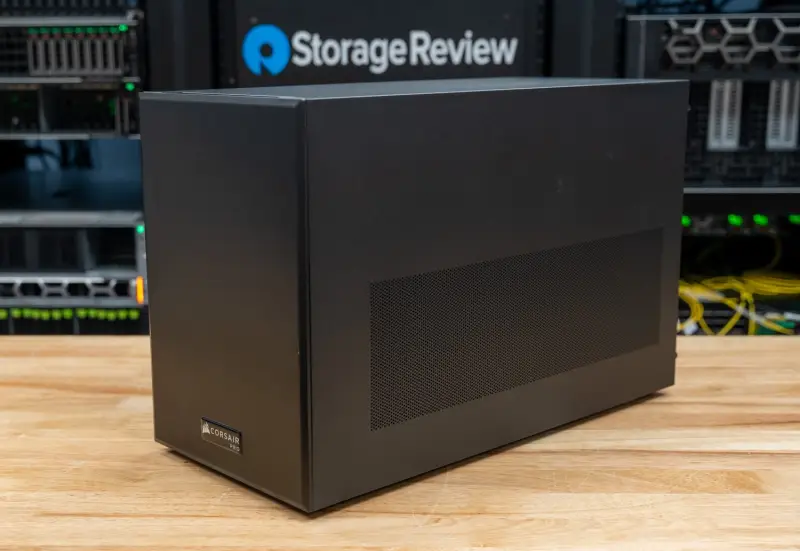
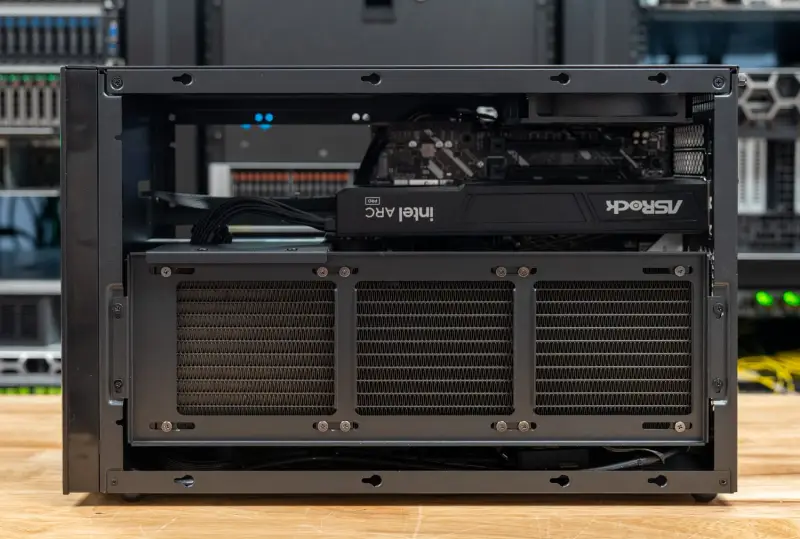
The V20C measures 202 x 451 x 286mm (7.95 x 17.76 x 11.26in) in width, depth, and height and weighs 14kg (30.9lb). For a tower that fits a full-size graphics card and a 360mm radiator, that's a compact footprint. Corsair puts the volume at 26.1 liters. The motherboard is rotated 180 degrees, so the graphics card pulls intake air from the top and exhausts out the side. The case accepts cards up to 400mm long and has a rear 120mm exhaust mount. The black micro-ATX chassis has a Corsair badge on its perforated side panel, though we couldn't match it to a case in Corsair's retail lineup.
Panel removal is tool-free, as Corsair specifies, and the side panel on our unit came off without fuss. Corsair describes the layout as component-focused cooling with dedicated airflow paths for individual parts. The configurator lists support for two 360mm radiators. Corsair also sells a display panel accessory for the chassis side. We didn't test it, and it's hard to see the use for one on a workstation.
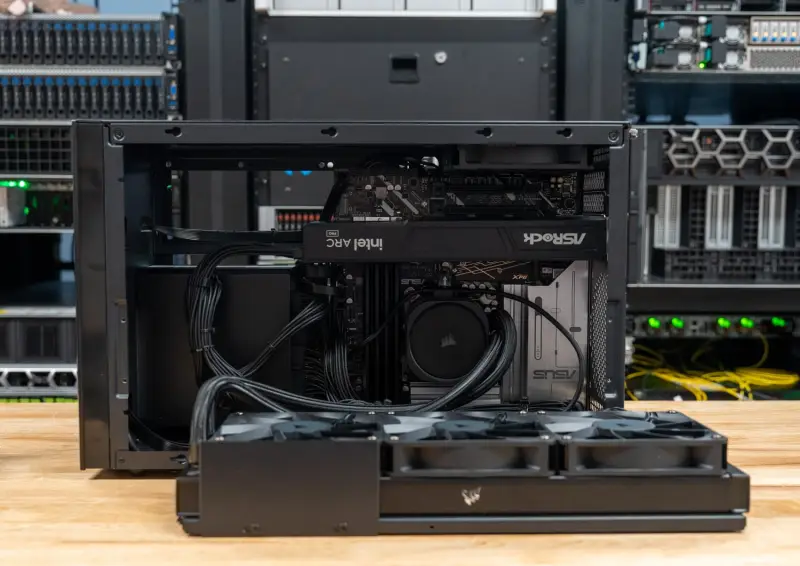
CPU cooling is a 360mm liquid cooler, and the system includes five 120mm fans. The cooler in our unit is a variant of Corsair's iCUE LINK TITAN 360 RX RGB with non-RGB fans. The radiator and three fans sit on a bracket along the side of the case. That bracket swings away with the tubes still attached, which exposes the motherboard. The graphics card is an air-cooled ASRock Arc Pro B70. Power comes from a Corsair RM850e, an 850W supply with an 80 PLUS Gold rating.
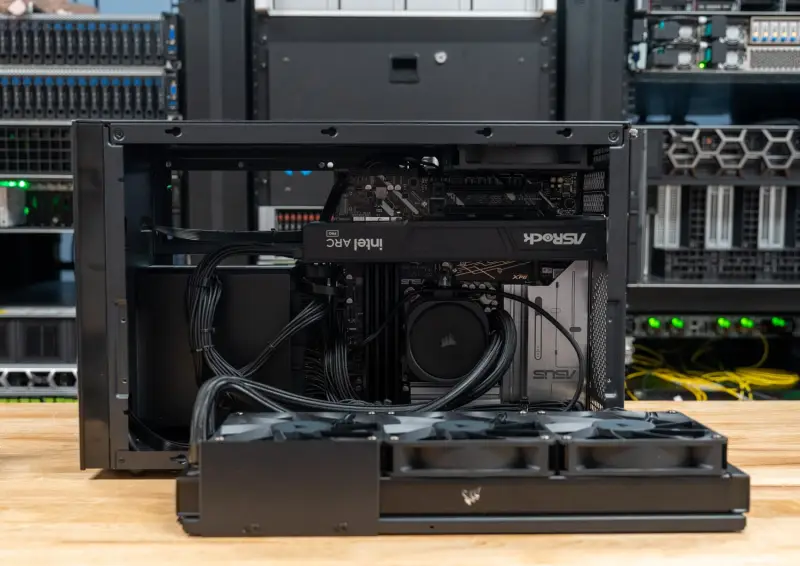
The fan behavior is the first thing to sort out if you buy one. Under Ubuntu, the fans ramped up and down irregularly as loads started and stopped. We didn't spend much time on the cause, so we can't say whether it's fixable in software or tuning. If it isn't resolved, it's a distraction in a machine that sits on a desk. The sustained GPU loads we ran later are also where steady airflow matters most, so this isn't a cosmetic issue.
Internals and Expansion
Our unit uses an ASUS PRIME Z890M-PLUS WIFI motherboard on BIOS 3012, a micro-ATX Z890 board with Wi-Fi 7. Memory is Crucial Pro DDR5-6400 in 16GB DIMMs, with all four slots populated. Storage is a 1TB XPG MARS 970 PLUS on a PCIe Gen5 x4 link. These are standard desktop parts, so memory, storage, the graphics card, and the power supply can all be swapped later without special hardware.
Corsair's configurator lists three M.2 2280 slots: one PCIe 5.0 x4 and two PCIe 4.0 x4. Storage expansion also includes six SATA ports, two 2.5-inch bays, and one bay that takes either a 3.5-inch or a 2.5-inch drive. The board offers four expansion slots: a PCIe 5.0 x16 slot for the B70, one PCIe 4.0 x4 slot, and two PCIe 4.0 x1 slots. With the boot drive in the Gen5 slot, the two Gen4 M.2 slots stay free for more storage.
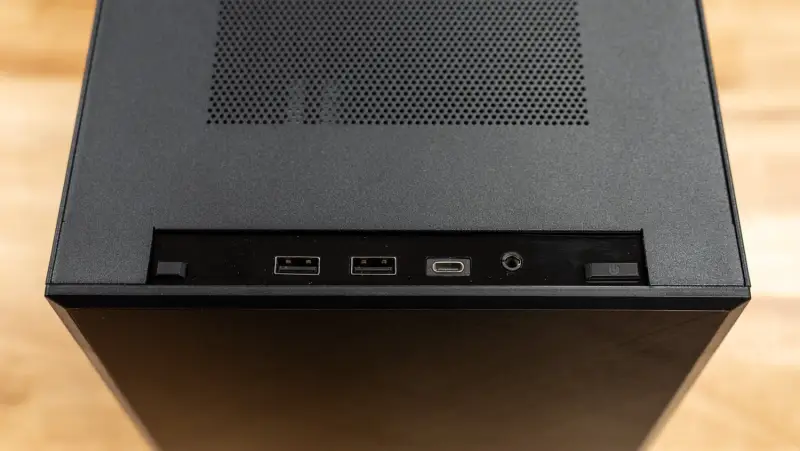
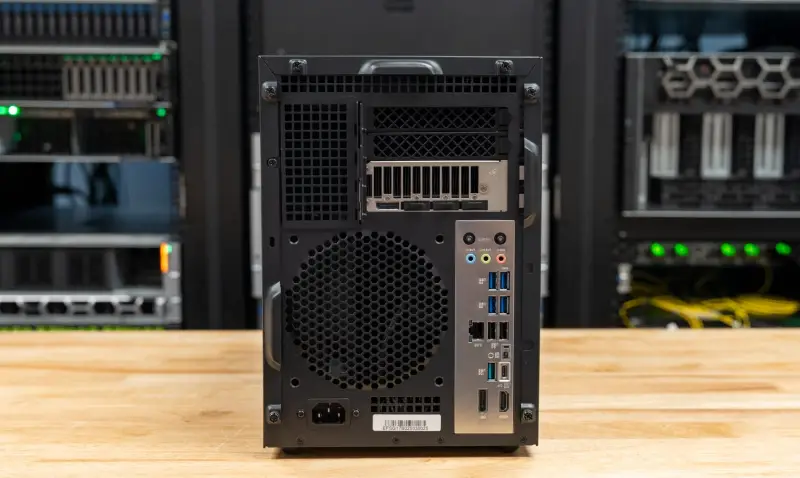
The front I/O strip on the top panel carries one 5Gbps USB Type-C port, two 5Gbps USB Type-A ports, and a combo audio jack beside the power button. Around the back, the motherboard supplies one 20Gbps USB Type-C port, one 10Gbps USB Type-A port, four 5Gbps USB Type-A ports, and two USB 2.0 ports. You also get 2.5GbE, Wi-Fi 7 antenna connectors, and three audio jacks. The B70 provides four DisplayPort 2.1 outputs, and the board adds DisplayPort and HDMI for the processor's integrated graphics.
Software Out of the Box
Corsair ships the V20C with Ubuntu 24.04 LTS and lists Windows 11 Pro as an alternative in the configurator. The company advertises a turnkey agentic AI software stack with integrated frameworks, GPU acceleration, containers, monitoring, and developer tools. Corsair describes a CORSAIR PRO dashboard on that image for downloading and switching local models, choosing between the PI Agent and Hermes agent harnesses, and managing apps. Its setup guide for this SKU walks through serving Qwen3.8-27B with llama.cpp in Docker at a 65,536-token context and connecting Hermes Desktop to that local endpoint.
The configurator describes the Ubuntu install as including the GPU driver and a compute runtime matched to the graphics card. An optional Corsair AI Stack adds Docker with a GPU runtime, monitoring tools, and Python. We replaced the factory image before testing, so none of the results below depend on Corsair's preloaded stack. If you're evaluating the box, plan on the same thing: the factory image is a starting point, and your stack choices will drive your numbers.
Specifications
| Specification | Corsair FlexPrime V20C |
|---|---|
| SKU | CSW-9040004-NA |
| Processor | Intel Core Ultra 7 270K Plus, 24 cores (8 P-cores, 16 E-cores), 24 threads, up to 5.5GHz |
| Graphics | Intel Arc Pro B70, 32GB GDDR6, 32 Xe2 cores, 256 XMX engines, 608GB/s memory bandwidth, ASRock card as tested |
| Memory | 32GB (2x 16GB) DDR5 as listed; 64GB (4x 16GB) Crucial Pro DDR5-6400 as tested |
| Storage | 1TB M.2 NVMe SSD; XPG MARS 970 PLUS on a PCIe Gen5 x4 link as tested |
| Motherboard | Intel Z890, micro-ATX; ASUS PRIME Z890M-PLUS WIFI as tested |
| Operating System | Ubuntu 24.04 LTS as shipped; Ubuntu 26.04.1 LTS as tested |
| CPU Cooling | 360mm liquid cooler; Corsair iCUE LINK TITAN 360 RX with non-RGB fans as tested |
| System Fans | 5x 120mm |
| GPU Cooling | Air |
| Power Supply | 850W; Corsair RM850e as tested |
| Front Ports | 1x USB Type-C (5Gbps), 2x USB Type-A (5Gbps), 1x combo audio |
| Rear Ports | 1x USB Type-C (20Gbps), 1x USB Type-A (10Gbps), 4x USB Type-A (5Gbps), 2x USB 2.0, DisplayPort, HDMI, 3x audio |
| GPU Outputs | 4x DisplayPort 2.1 |
| Networking | 2.5GbE; Wi-Fi 7, Bluetooth 5.4 |
| Expansion | M.2 2280: 1x PCIe 5.0 x4, 2x PCIe 4.0 x4; PCIe: 1x 5.0 x16, 1x 4.0 x4, 2x 4.0 x1; Bays: 2x 2.5-inch, 1x 3.5-inch or 2.5-inch |
| Dimensions (W x D x H) | 202 x 451 x 286mm (7.95 x 17.76 x 11.26in) |
| Weight | 14kg (30.9lb) |
| Color | Black |
| Warranty | 3 years, lifetime technical support |
| Price | $3,999.99 (Corsair, with 32GB of memory) |
How We Tested It
Corsair's factory image is Ubuntu 24.04 LTS. We test higher-end workstations on Linux with a current kernel, so the lab installed Ubuntu 26.04.1 LTS with the 7.0 kernel. That's the same release running on the Dell Pro Max Micro in this comparison. The V20C ran on the performance power profile with BIOS 3012, Mesa 26.0.8, and Intel's xe kernel driver. The suite measured 31.9GB of GPU-usable memory on the Arc Pro B70.
Results come from three in-house suites. The first is sr-client_linux 0.1, the Linux build of our client suite, which covers local AI, content creation, graphics, and storage. Cinebench, Geekbench, 3DMark, PCMark, and Procyon have no Linux builds, so those tests and our 30-minute sustained loop are absent. The second is our benchmark harness, which wraps Phoronix Test Suite workloads and y-cruncher. The third is our server suite, which runs ClickBench, OpenFOAM, STREAM, and Valkey. Client results combine three runs of the suite. Where a test ran more than once, we report the newest valid result, and each figure is the median of repeated passes.
Fine-tuning didn't run on the V20C. The suite's PyTorch builds cover CUDA and ROCm only, so we have no measured result for the fine-tuning part of Corsair's description. Image and LLM workloads that need 38GB or more of GPU memory didn't fit at all.
The comparison set covers three ways to buy local AI hardware. The Dell Pro Max Micro is a compact workstation with a 24-core Core Ultra 9 285, a 24GB RTX PRO 4000 Blackwell SFF, and 96GB of DDR5-6400. The Dell Pro Max with GB10 runs NVIDIA's 20-core GB10 with 128GB of unified memory on NVIDIA's Ubuntu 24.04 image. The AMD Ryzen AI Halo runs a 16-core Ryzen AI Max+ 395 with 128GB of unified LPDDR5X on AMD's Linux developer image.
The Halo ran sr-client_linux 0.1, harness v3.6, and server suite r5.28 on AMD's developer image. The GB10 ran earlier releases of the harness and server suite with the same application versions. The three operating systems carry different compilers, which matters for source-built tests such as the kernel compile.
| Configuration | CPU | Memory | GPU | Boot Drive | Operating System |
|---|---|---|---|---|---|
| Corsair FlexPrime V20C | Core Ultra 7 270K Plus, 24 cores | 64GB DDR5-6400 (4x 16GB) | Intel Arc Pro B70, 31.9GB usable | 1TB XPG MARS 970 PLUS, PCIe Gen5 | Ubuntu 26.04.1 LTS, kernel 7.0 |
| Dell Pro Max Micro (FCM2250) | Core Ultra 9 285, 24 cores | 96GB DDR5-6400 (2x 48GB) | NVIDIA RTX PRO 4000 Blackwell SFF, 23.9GB usable | 1TB Sandisk SN8050S, PCIe Gen5 | Ubuntu 26.04.1 LTS, kernel 7.0 |
| Dell Pro Max with GB10 (FCM1253) | NVIDIA GB10, 20 cores | 128GB LPDDR5X-8533, unified | NVIDIA GB10, 121.6GB usable | 4TB PCIe Gen4 | Ubuntu 24.04.5 LTS, NVIDIA kernel 7.0 |
| AMD Ryzen AI Halo | Ryzen AI Max+ 395, 16 cores | 128GB LPDDR5X-8000, unified | Radeon 8060S (integrated), 95.5GB usable | 2TB Micron 4600, PCIe Gen4 link | AMD Linux developer image, kernel 7.2 |
The software path matters as much as the silicon here. On the V20C, MLPerf Client ran through OpenVINO, and llama.cpp ran on its SYCL backend at fp16. Ollama and stable-diffusion.cpp ran through Vulkan, because Ollama's native path placed none of the model on the Arc card. The two NVIDIA systems used CUDA throughout, and the Halo used AMD's ROCm. One Ollama run on the V20C ended with a Vulkan device-lost error and passed on a rerun.
Local AI Performance
The B70 gives the V20C 32GB of dedicated graphics memory. That's 8GB more than the RTX PRO 4000 SFF in the Dell Pro Max Micro, and about a quarter of what the GB10 can address from its unified pool. The suite put the V20C's 31.9GB in the same memory tier as the 24GB Dell, so it ran the 20B agent model and the 27B serving model. The larger tiers that the 128GB systems qualify for did not run on the V20C.
LLM Serving with llama.cpp
| llama.cpp server (higher is better unless noted) | Corsair FlexPrime V20C (Ultra 7 270K Plus, Arc Pro B70 32GB) | Dell Pro Max Micro (Ultra 9 285, RTX PRO 4000 SFF 24GB) | Dell Pro Max with GB10 (128GB unified) | AMD Ryzen AI Halo (Ryzen AI Max+ 395, 128GB unified) |
|---|---|---|---|---|
| Ministral 3 3B, 1 request (tokens/s) | 84.9 | 80.7 | 53.2 | 43.0 |
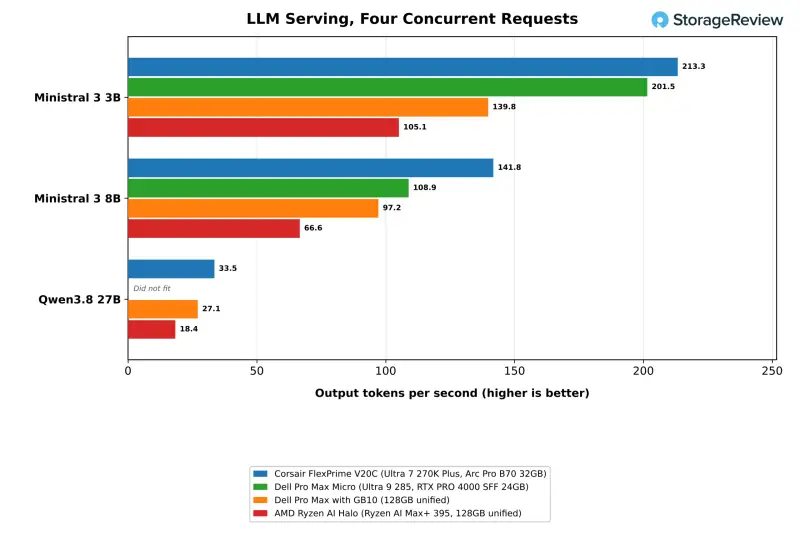
| Ministral 3 3B, 4 requests (tokens/s) | 213.3 | 201.5 | 139.8 | 105.1 |
| Ministral 3 3B, 1 request, time to first token (ms, lower is better) | 590 | 666 | 572 | 1,659 |
| Ministral 3 8B, 1 request (tokens/s) | 63.7 | 52.0 | 37.0 | 30.6 |
| Ministral 3 8B, 4 requests (tokens/s) | 141.8 | 108.9 | 97.2 | 66.6 |
| Ministral 3 8B, 1 request, time to first token (ms, lower is better) | 1,362 | 1,477 | 1,398 | 4,602 |
| Qwen3.8 27B, 1 request (tokens/s) | 19.8 | Did not fit | 11.2 | 9.1 |
| Qwen3.8 27B, 4 requests (tokens/s) | 33.5 | Did not fit | 27.1 | 18.4 |
| Qwen3.8 27B, 8 requests (tokens/s) | 35.4 | Did not fit | 35.6 | 20.1 |
| Qwen3.8 27B, 1 request, time to first token (ms, lower is better) | 9,005 | Did not fit | 9,207 | 24,024 |
The LLM serving test runs the llama.cpp server with 4,096-token prompts and 1,024-token outputs on the Ministral 3 models. On those models, the V20C led both NVIDIA systems. It served the 3B model to one user at 84.9 tokens per second, which is 5 percent ahead of the RTX PRO 4000 SFF and 60 percent ahead of the GB10. On the 8B model it managed 63.7 tokens per second, 22 percent and 72 percent ahead of the same two systems. With four concurrent requests, it delivered 213.3 and 141.8 tokens per second, 6 percent and 30 percent ahead of the Dell Pro Max Micro.
The Halo's integrated Radeon 8060S, running llama.cpp on ROCm, trailed all three. It served the 3B model at 43.0 tokens per second for one request and the 8B model at 30.6, roughly half the V20C's rates on the 8B model. On Qwen3.8 27B it generated 9.1 tokens per second, with a median first token at 24.0 seconds against 9.0 seconds on the V20C.
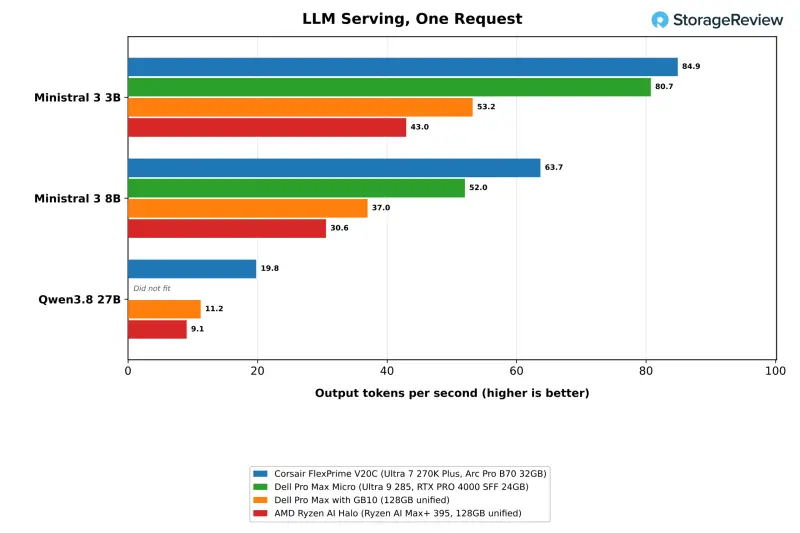
The 27B model is where 32GB earns its keep. Qwen3.8 27B at Q4_K_M needs 30GB of GPU-usable memory for its weights and one request's KV cache. The 24GB RTX PRO 4000 SFF couldn't run it, while the V20C's 31.9GB cleared the bar at every concurrency level. With a single request, the V20C generated 19.8 tokens per second, 77 percent faster than the GB10's 11.2. That lead narrowed to 24 percent with four concurrent requests. At eight, the V20C and the GB10 were effectively tied at 35.4 and 35.6 tokens per second.
Time to first token on the 27B model's 8,192-token prompts was 9.0 seconds on the V20C and 9.2 seconds on the GB10. Prompt processing is level between them, so the B70's advantage shows up in generation. Corsair lists about 55 tokens per second for this model without stating its settings. Under our conditions, a single V20C user sees about 20 tokens per second, and total output tops out near 35 as requests are added. That's a useful machine for a small team sharing one endpoint, not a replacement for a multi-GPU server.
MLPerf Client Through OpenVINO
| MLPerf Client v2.0 (OpenVINO, GPU) | Corsair FlexPrime V20C |
|---|---|
| Llama 3.1 8B, time to first token (s, lower is better) | 0.08 |
| Llama 3.1 8B, token rate (tokens/s) | 105.4 |
| Phi-4-mini, time to first token (s, lower is better) | 0.07 |
| Phi-4-mini, token rate (tokens/s) | 130.0 |
MLPerf Client v2.0 ran through OpenVINO on the Arc Pro B70 and returned the highest single-stream token rates the V20C produced in any test. Llama 3.1 8B generated 105.4 tokens per second with a first token in 0.08 seconds, and Phi-4-mini reached 130.0 tokens per second. The benchmark's Linux release ships only Intel OpenVINO configurations and has no arm64 build. None of the other three systems could run it, so the V20C stands alone in this table. It's a good reminder that Intel's own runtime is the path where this card is most at home.
Backends Decide the Result
This is the section that changes how you should read the rest of the review. The same card produced very different results depending on whether the model ran through llama.cpp on SYCL, Ollama on Vulkan, or OpenVINO. If your team standardizes on Ollama, you're not testing the same machine that our llama.cpp numbers describe.
Model Loading and the Coding Agent
| gpt-oss:20b (Ollama 0.40.3) | Corsair FlexPrime V20C (Ultra 7 270K Plus, Arc Pro B70 32GB) | Dell Pro Max Micro (Ultra 9 285, RTX PRO 4000 SFF 24GB) | Dell Pro Max with GB10 (128GB unified) | AMD Ryzen AI Halo (Ryzen AI Max+ 395, 128GB unified) |
|---|---|---|---|---|
| gpt-oss:20b cold load to first token (s, lower is better) | 6.29 | 5.11 | 6.86 | 4.20 |
| gpt-oss:20b warm load to first token (s, lower is better) | 3.18 | 3.12 | 6.36 | 4.03 |
| Coding agent, successful runs (of 3) | 3 | 1 | 3 | 2 |
| Coding agent, median wall time (s, lower is better) | 368 | 80* | 221 | 282* |
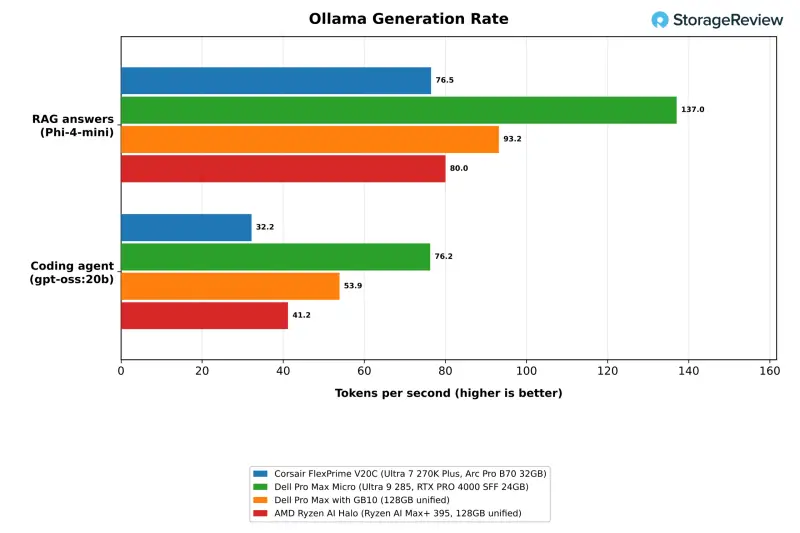
| Coding agent, generation rate (tokens/s) | 32.2 | 76.2 | 53.9 | 41.2 |
| Speedometer slowdown beside the agent (x, lower is better) | 1.03 | Not run | 1.54 | 1.16 |
*The Dell Pro Max Micro completed one of three agent runs and the AMD Ryzen AI Halo completed two of three. The times shown are for the completed runs.
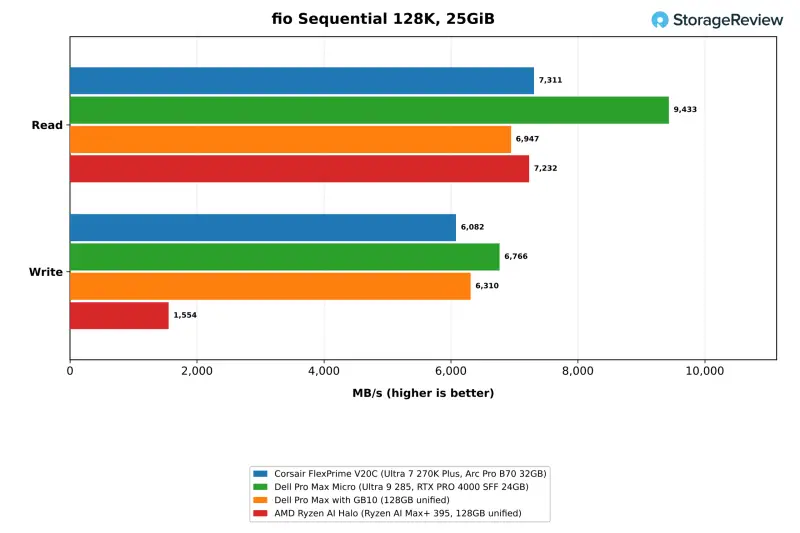
The model-load test times Ollama from launch to first token on gpt-oss:20b, a 12.8GB model, cold from the SSD and warm from the page cache. The V20C took 6.29 seconds cold and 3.18 seconds warm. The Dell Pro Max Micro took 5.11 and 3.12, the GB10 6.86 and 6.36, and the Halo 4.20 and 4.03. During the cold load, the V20C read at 4,040MB/s against the 7,311MB/s ceiling we measured for its drive in fio. The runtime sets the pace more than the SSD does.
The coding agent test runs Crush against gpt-oss:20b with a 64K context, working through a fixed programming task three times with up to three rounds each. The V20C passed all three runs with 11 of 11 tests, as did the GB10. The Halo passed two of three, and the Dell Pro Max Micro passed one. The V20C's runs took 102, 368, and 530 seconds. Its 32.2 tokens per second through Ollama on Vulkan trailed the Halo at 41.2, the GB10 at 53.9, and the RTX PRO 4000 SFF at 76.2. The gap is the backend story again: this is the same Ollama layer that left the Arc card with almost none of the model in its native path.
The GB10 also ran the agent on qwen3.6:35b-a3b at 64K and 128K contexts, finishing those tasks in a median of 90 and 70 seconds. That's well under its 221 seconds on gpt-oss:20b. Those tiers didn't run on the V20C. With Speedometer running beside the agent, the V20C's browser score moved from 51.8 to 50.4, a 1.03x slowdown. The Halo's score fell by 1.16x and the GB10's by 1.54x under the same test. The V20C was the least disruptive of the three for a desktop user sharing the box with an agent.
RAG at Two Scales
| RAG, 20,963 passages (Ollama 0.40.3) | Corsair FlexPrime V20C (Ultra 7 270K Plus, Arc Pro B70 32GB) | Dell Pro Max Micro (Ultra 9 285, RTX PRO 4000 SFF 24GB) | Dell Pro Max with GB10 (128GB unified) | AMD Ryzen AI Halo (Ryzen AI Max+ 395, 128GB unified) |
|---|---|---|---|---|
| Ingest, passages per second | 87.5 | 268.2 | 211.4 | 95.5 |
| Ingest, embedding rate (tokens/s) | 14,162 | 43,430 | 34,227 | 15,468 |
| Answer, generation rate (tokens/s) | 76.5 | 137.0 | 93.2 | 80.0 |
| Answer, time to first token p50 (s, lower is better) | 0.30 | 0.16 | 0.15 | 0.42 |
| Question to answer p50 (s, lower is better) | 0.39 | 0.22 | 0.22 | 0.50 |
The smaller RAG test embeds 20,963 SQuAD passages, retrieves the top five for each question, and answers with Phi-4-mini, all through Ollama. On Vulkan, the V20C ingested 87.5 passages per second. That's about a third of the Dell Pro Max Micro's 268.2 and well under half of the GB10's 211.4. Answers generated at 76.5 tokens per second, against 137.0 and 93.2 on the two NVIDIA systems. The median time from question to answer was 0.39 seconds, against 0.22 seconds on both. The Halo landed closest to the V20C, at 95.5 passages per second on ingest, 80.0 tokens per second on answers, and 0.50 seconds from question to answer.
| RAG at scale, 1,002,067 passages | Corsair FlexPrime V20C (Ultra 7 270K Plus, Arc Pro B70 32GB) | Dell Pro Max Micro (Ultra 9 285, RTX PRO 4000 SFF 24GB) | AMD Ryzen AI Halo (Ryzen AI Max+ 395, 128GB unified) |
|---|---|---|---|
| Ingest, 1M passages (passages/s) | 321.4 | 313.9 | 65.8 |
| Ingest wall time (s, lower is better) | 3,118 | 3,192 | 15,230 |
| HNSW index build (s, lower is better) | 73.4 | 78.9 | 68.9 |
| HNSW search, ef 64 (queries/s) | 29,643 | 27,359 | 34,012 |
| HNSW search, ef 256 (queries/s) | 8,285 | 7,664 | 9,649 |
| Question to answer p50 (s, lower is better) | 0.36 | 0.20 | 0.46 |
The larger RAG test embeds a million Wikipedia passages through llama.cpp, builds an HNSW index on the CPU, and searches it. With embedding on SYCL, the V20C ingested 321.4 passages per second and finished in 52 minutes, slightly ahead of the Dell Pro Max Micro at 313.9. The same embedding model processed 14,162 tokens per second through Ollama on Vulkan in the smaller test and 45,498 through llama.cpp on SYCL in this one. The Dell's CUDA rates in the two tests were within 3 percent of each other, which tells you the Intel result depends heavily on the runtime you pick.
The CPU-side work favors the V20C by a small margin. Its 24 cores built the index in 73.4 seconds against 78.9 on the Dell, and it searched at 29,643 queries per second against 27,359 at an ef setting of 64. Recall against exact search was above 91 percent on both systems. Answer generation in this test returns to Ollama, and the median question-to-answer time was 0.36 seconds on the V20C against 0.20 on the Dell.
The Halo also completed the million-passage test, though its embedding stage was far slower at 65.8 passages per second, which made the ingest take 15,230 seconds. Its 16-core processor built the index in 68.9 seconds and searched at 34,012 queries per second, ahead of the V20C in both. Its median question-to-answer time was 0.46 seconds.
Image Generation
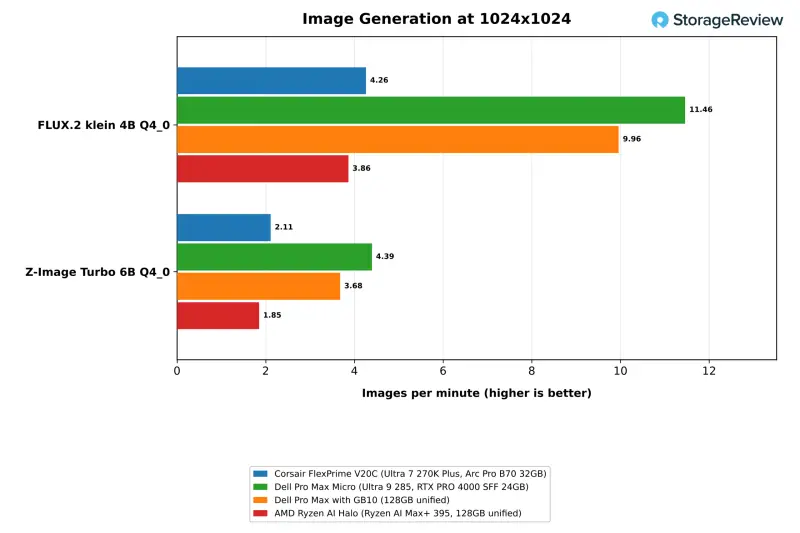
| stable-diffusion.cpp, 1024×1024 (images/min, higher is better) | Corsair FlexPrime V20C (Ultra 7 270K Plus, Arc Pro B70 32GB) | Dell Pro Max Micro (Ultra 9 285, RTX PRO 4000 SFF 24GB) | Dell Pro Max with GB10 (128GB unified) | AMD Ryzen AI Halo (Ryzen AI Max+ 395, 128GB unified) |
|---|---|---|---|---|
| FLUX.2 klein 4B Q4_0 (images/min) | 4.26 | 11.46 | 9.96 | 3.86 |
| FLUX.2 klein 4B BF16 (images/min) | 2.40 | 10.93 | 10.28 | 4.17 |
| Z-Image Turbo 6B Q4_0 (images/min) | 2.11 | 4.39 | 3.68 | 1.85 |
| Z-Image Turbo 6B BF16 (images/min) | 0.96 | 3.95 | 3.94 | 0.47 |
| Qwen-Image 20B Q4_0 (images/min) | 0.35 | Did not fit | 0.50 | 0.23 |
| Qwen-Image 20B Q8_0 (images/min) | Did not fit | Did not fit | 0.48 | 0.23 |
Image generation is the V20C's weakest result. On stable-diffusion.cpp through Vulkan, it produced 4.26 images per minute on FLUX.2 klein 4B at Q4_0. The RTX PRO 4000 SFF managed 11.46 and the GB10 9.96 with CUDA. The GB10 also ran this test on Vulkan and produced 8.29 images per minute, so the backend explains part of the gap. Even so, the B70 ran at about half the GB10's rate on the same API. The Halo's 3.86 images per minute on ROCm was the only comparison result the V20C beat at Q4_0, and only narrowly.
Higher precision widens the difference. At BF16 the V20C fell to 2.40 images per minute on FLUX.2 klein and 0.96 on Z-Image Turbo, while both NVIDIA systems held close to their Q4_0 rates. Memory capacity works in the V20C's favor on Qwen-Image 20B, which needs 28GB at Q4_0. The V20C ran it at 0.35 images per minute, against 0.50 on the GB10 and 0.23 on the Halo, and the 24GB card couldn't load it. The Q8_0 version needs 38GB and ran only on the two unified-memory systems.
CPU Performance
7-Zip, Blender, HandBrake, and LLVM
| Test | Corsair FlexPrime V20C (Ultra 7 270K Plus, Arc Pro B70 32GB) | Dell Pro Max Micro (Ultra 9 285, RTX PRO 4000 SFF 24GB) | Dell Pro Max with GB10 (128GB unified) | AMD Ryzen AI Halo (Ryzen AI Max+ 395, 128GB unified) |
|---|---|---|---|---|
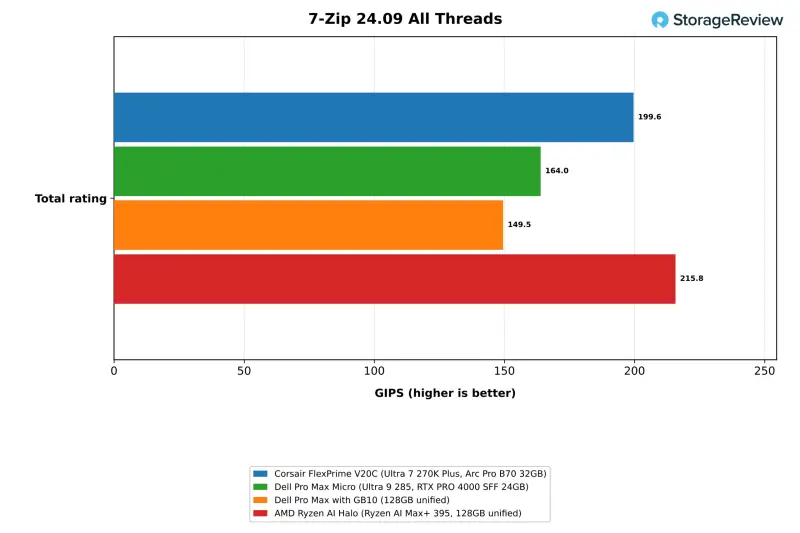
| 7-Zip, all threads, total (GIPS) | 199.6 | 164.0 | 149.5 | 215.8 |
| 7-Zip, one thread, total (GIPS) | 11.26 | 10.90 | 9.68 | 9.66 |
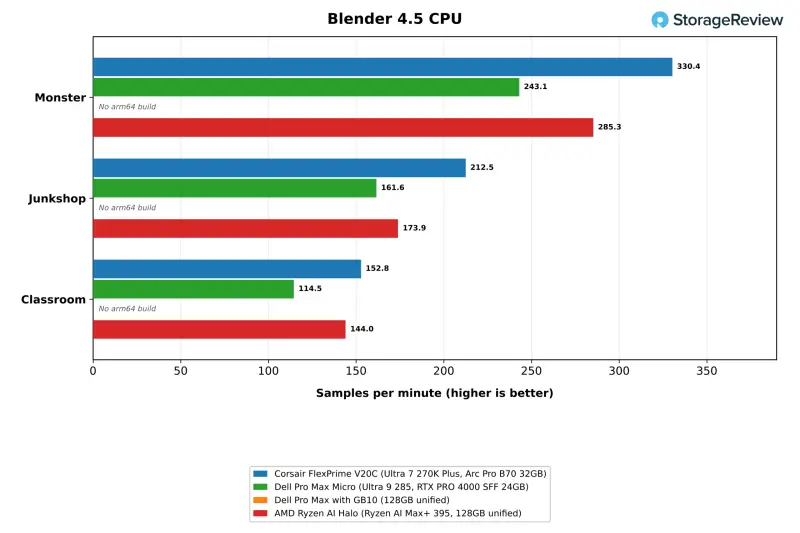
| Blender 4.5 Monster (samples/min) | 330.4 | 243.1 | No arm64 build | 285.3 |
| Blender 4.5 Junkshop (samples/min) | 212.5 | 161.6 | No arm64 build | 173.9 |
| Blender 4.5 Classroom (samples/min) | 152.8 | 114.5 | No arm64 build | 144.0 |
| HandBrake x265 (fps) | 49.6 | 39.7 | No arm64 build | 44.5 |
| HandBrake SVT-AV1 (fps) | 177.4 | 147.9 | No arm64 build | 194.1 |
| LLVM build (s, lower is better) | 136 | 173 | 175 | 149 |
The Core Ultra 7 270K Plus is a 24-core desktop processor under a 360mm liquid cooler, and it led both Dell systems in every row of this table. The V20C scored 199.6 GIPS in 7-Zip, 22 percent ahead of the Core Ultra 9 285 in the Dell Pro Max Micro and 34 percent ahead of the GB10. Blender ran 31 to 36 percent ahead of the Dell across the three scenes, and its x265 and SVT-AV1 encodes were 25 and 20 percent faster. Blender and HandBrake have no arm64 Linux builds in our suite, so the GB10 has no results there.
The Halo's 16-core Ryzen AI Max+ 395 split these tests with the V20C. It scored 215.8 GIPS in all-thread 7-Zip, 8 percent ahead, and encoded SVT-AV1 at 194.1 fps against 177.4. The V20C led Blender by 6 to 22 percent and x265 by 11.5 percent. The LLVM build finished in 136 seconds on the V20C, compared with 149 on the Halo, 173 on the Dell Pro Max Micro, and 175 on the GB10. For a developer workstation, that compile time is the result most people will feel day to day.
Single-thread 7-Zip was closer. The V20C was 3 percent ahead of the Core Ultra 9 285 and 16 percent ahead of the GB10. Both Intel chips have 24 cores, so the multi-thread gap in 7-Zip points to the power and cooling headroom of a tower compared with a compact chassis, rather than to the core count alone.
Stockfish, primesieve, Python, and the Browser
| Test | Corsair FlexPrime V20C (Ultra 7 270K Plus, Arc Pro B70 32GB) | Dell Pro Max Micro (Ultra 9 285, RTX PRO 4000 SFF 24GB) | Dell Pro Max with GB10 (128GB unified) | AMD Ryzen AI Halo (Ryzen AI Max+ 395, 128GB unified) |
|---|---|---|---|---|
| Stockfish, one thread (Mnps) | 2.08 | 2.02 | 1.66 | 2.15 |
| Stockfish, all threads (Mnps) | 40.55 | 31.58 | 23.86 | 38.74 |
| primesieve to 10^12, all threads (s, lower is better) | 6.48 | 8.72 | 9.16 | 6.29 |
| primesieve to 10^11, one thread (s, lower is better) | 9.03 | 9.07 | 12.32 | 6.76 |
| PyPerformance go (ms, lower is better) | 56.0 | 57.8 | 85.5 | 69.1 |
| PyPerformance nbody (ms, lower is better) | 36.3 | 38.9 | 55.0 | 43.1 |
| Speedometer 3.1 (score) | 51.8 | Not run | 37.2 | 38.7 |
All-thread Stockfish reached 40.55 Mnps on the V20C, 28 percent ahead of the Dell Pro Max Micro and 70 percent ahead of the GB10. primesieve to 10^12 finished in 6.48 seconds, against 8.72 and 9.16. One-thread results between the two Intel systems were within 3 percent in Stockfish and level in primesieve. The V20C scored 51.8 in Speedometer 3.1 against 37.2 on the GB10, and its PyPerformance go result of 56.0ms compares with 85.5ms on the Arm system. The Halo ran close behind in all-thread Stockfish at 38.74 Mnps, finished primesieve in 6.29 seconds, and scored 38.7 in Speedometer.
GROMACS and OpenBLAS
| Test | Corsair FlexPrime V20C (Ultra 7 270K Plus, Arc Pro B70 32GB) | Dell Pro Max Micro (Ultra 9 285, RTX PRO 4000 SFF 24GB) | Dell Pro Max with GB10 (128GB unified) | AMD Ryzen AI Halo (Ryzen AI Max+ 395, 128GB unified) |
|---|---|---|---|---|
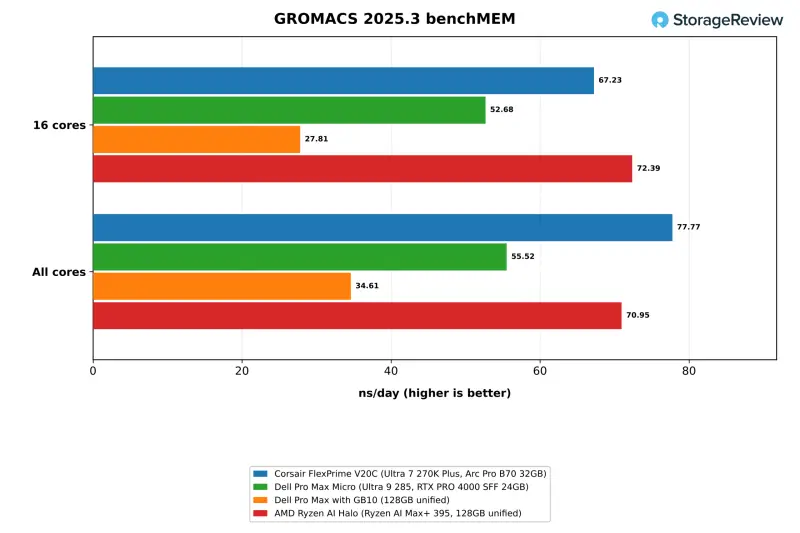
| GROMACS benchMEM, 16 cores (ns/day) | 67.23 | 52.68 | 27.81 | 72.39 |
| GROMACS benchMEM, all cores (ns/day) | 77.77 | 55.52 | 34.61 | 70.95 |
| OpenBLAS DGEMM, all cores (GFLOPS) | 1,100.0 | 791.6 | 418.0 | 1,610.3 |
| OpenBLAS LU solve N=20000, all cores (GFLOPS) | 938.6 | 717.0 | 393.0 | 1391.3 |
| Memory latency, 4KiB pages (ns, lower is better) | 105.2 | 129.0 | 123.8 | 162.2 |
GROMACS benchMEM ran at 67.23 ns/day on 16 cores and 77.77 on all 24. That's 28 and 40 percent ahead of the Dell Pro Max Micro, and more than double the GB10's 27.81 and 34.61. OpenBLAS DGEMM reached 1,100.0 GFLOPS on all cores, up from 791.6 on the Dell and 418.0 on the GB10. The LU solve at N=20000 reached 938.6 GFLOPS. Memory latency on 4KiB pages measured 105.2ns on the V20C's DDR5-6400, the lowest in the group.
The Halo led the 16-core GROMACS run at 72.39 ns/day and OpenBLAS DGEMM at 1,610.3 GFLOPS, 8 and 46 percent ahead of the V20C. It reached 1,391.3 GFLOPS in the LU solve. With every thread in use, the V20C stayed ahead in GROMACS at 77.77 ns/day against 70.95.
Server and HPC Workloads
These results come from our benchmark harness and server suite, which run on Linux only. They treat the V20C as a general compute node: compiling, compressing, serving web and cache requests, running analytics queries, and solving a CFD case. Because each system runs a different Linux distribution and compiler, the V20C and the Dell Pro Max Micro, which share Ubuntu 26.04.1, form the tightest pairing.
| Phoronix Test Suite and y-cruncher (higher is better unless noted) | Corsair FlexPrime V20C (Ultra 7 270K Plus, Arc Pro B70 32GB) | Dell Pro Max Micro (Ultra 9 285, RTX PRO 4000 SFF 24GB) | Dell Pro Max with GB10 (128GB unified) | AMD Ryzen AI Halo (Ryzen AI Max+ 395, 128GB unified) |
|---|---|---|---|---|
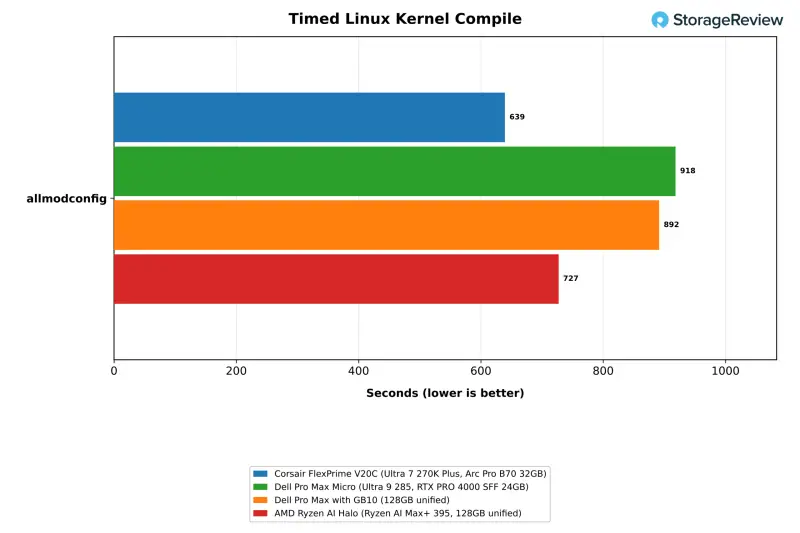
| Timed Linux kernel compile, allmodconfig (s, lower is better) | 639 | 918 | 892 | 727 |
| 7-Zip compression rating, all threads (MIPS) | 186,668 | 150,543 | 154,634 | 178,530 |
| 7-Zip decompression rating, all threads (MIPS) | 128,723 | 88,641 | 106,148 | 143,464 |
| 7-Zip compression rating, one thread (MIPS) | 10,260 | 9,351 | 7,474 | 8,019 |
| OpenSSL AES-256-GCM, all threads (GB/s) | 171.4 | 110.0 | 97.1 | 298.6 |
| nginx, 1,000 connections (requests/s) | 225,708 | 155,203 | 114,909 | 223,433 |
| nginx, 4,000 connections (requests/s) | 155,146 | 109,352 | 101,613 | 190,454 |
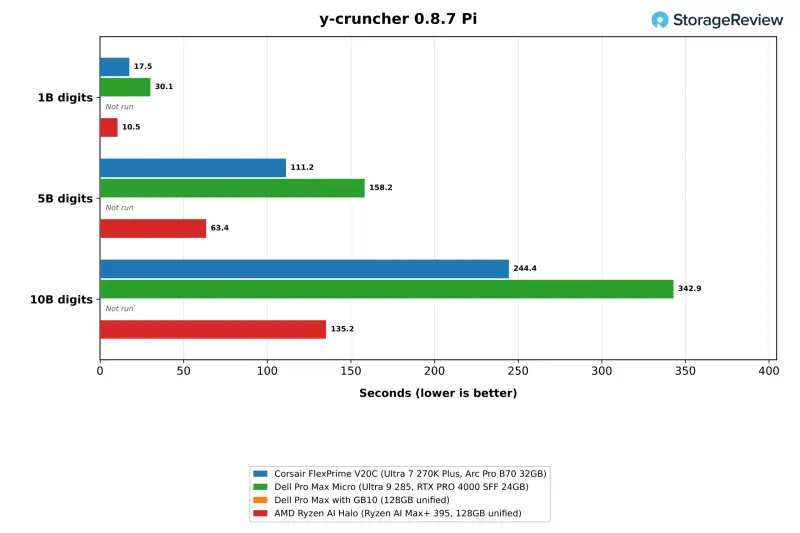
| y-cruncher Pi, 1B digits (s, lower is better) | 17.54 | 30.10 | Not run | 10.46 |
| y-cruncher Pi, 5B digits (s, lower is better) | 111.17 | 158.24 | Not run | 63.45 |
| y-cruncher Pi, 10B digits (s, lower is better) | 244.44 | 342.87 | Not run | 135.18 |
The V20C compiled the Linux kernel in 639 seconds, compared with 918 on the Dell Pro Max Micro and 892 on the GB10. It also led both in 7-Zip, OpenSSL, and nginx. The Halo came closer than its 16 cores suggest. It compiled the kernel in 727 seconds, tied the V20C in nginx at 1,000 connections, and led by 23 percent at 4,000. It ran OpenSSL AES-256-GCM at 298.6GB/s against 171.4GB/s on the V20C. In all-thread 7-Zip it trailed the V20C by 4 percent in compression and led by 11 percent in decompression, while the V20C was 28 percent faster in single-thread compression.
In y-cruncher, the Halo computed five billion digits of Pi in 63.45 seconds, compared with 111.17 on the V20C and 158.24 on the Dell Pro Max Micro. The gap widened to 135.18 seconds against 244.44 at ten billion digits. The test is sensitive to memory bandwidth and vector width, and the Halo brings AVX-512 and a wider memory bus, while the V20C runs two channels of DDR5. The GB10 hasn't run y-cruncher, so it has no entry in those rows.
| Server suite (higher is better unless noted) | Corsair FlexPrime V20C (Ultra 7 270K Plus, Arc Pro B70 32GB) | Dell Pro Max Micro (Ultra 9 285, RTX PRO 4000 SFF 24GB) | Dell Pro Max with GB10 (128GB unified) | AMD Ryzen AI Halo (Ryzen AI Max+ 395, 128GB unified) |
|---|---|---|---|---|
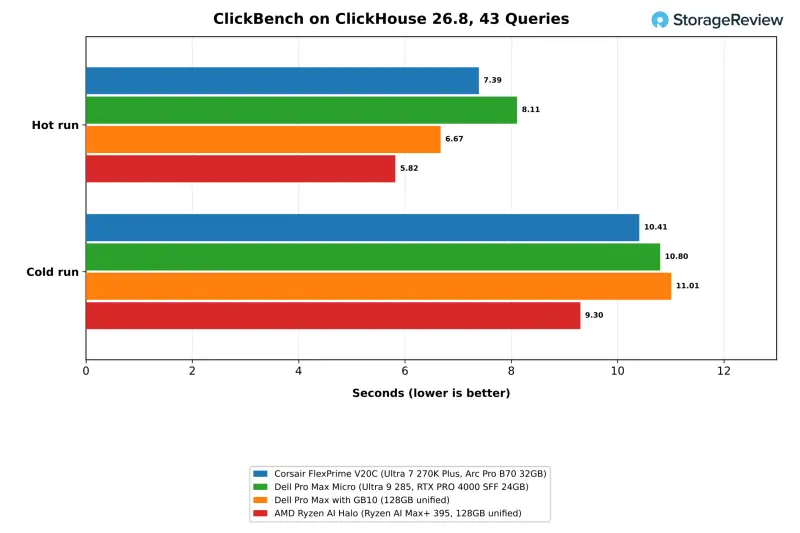
| ClickBench hot run, 43 queries (s, lower is better) | 7.39 | 8.11 | 6.67 | 5.82 |
| ClickBench cold run, 43 queries (s, lower is better) | 10.41 | 10.80 | 11.01 | 9.30 |
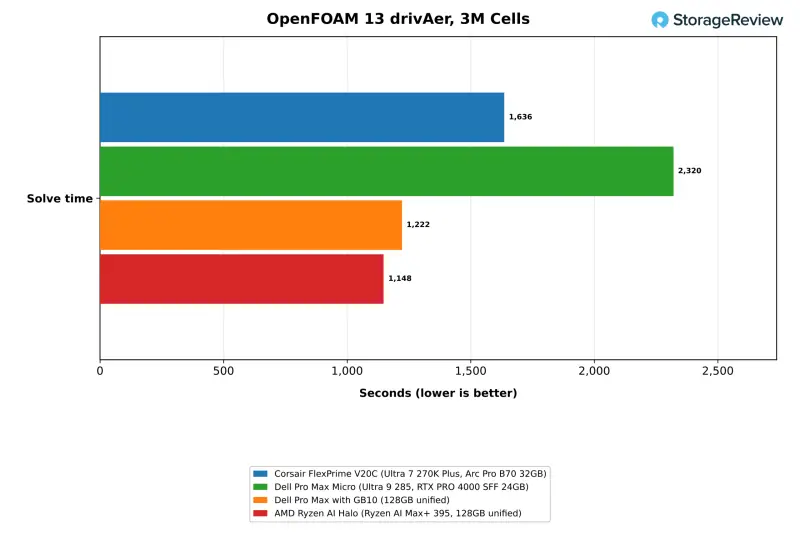
| OpenFOAM drivAer, 3M cells, solve time (s, lower is better) | 1,636 | 2,320 | 1,222 | 1,148 |
| STREAM Triad (MB/s) | 68,252 | 65,802 | 121,313 | 114,007 |
| Valkey cache, SET (requests/s) | 1,852,556 | 1,389,084 | 810,246 | 1,211,538 |
| Valkey cache, GET (requests/s) | 1,866,031 | 1,398,409 | 884,644 | 1,271,481 |
Memory bandwidth explains most of the server suite results. STREAM Triad hit 68GB/s on the V20C's two DDR5 channels, against 121GB/s on the GB10 and 114GB/s on the Halo. The OpenFOAM drivAer case, a 3-million-cell solve, finished in 1,636 seconds on the V20C, against 1,222 on the GB10 and 1,148 on the Halo. The ClickBench hot run took 7.39 seconds on the V20C against 6.67 and 5.82. The Dell Pro Max Micro took 42 percent longer than the V20C in OpenFOAM and 10 percent longer in ClickBench.
The V20C's faster cores gave it the lead in Valkey's cache profile, with 1.85 million SET requests and 1.87 million GET requests per second. Those rates were 33 percent higher than the Dell Pro Max Micro's and more than double the GB10's 810K SET and 885K GET requests per second. The Halo handled 1.21 million SET and 1.27 million GET requests per second, about two-thirds of the V20C's rates. A workstation that also hosts a vector store, a cache, or a small database beside the model server leans on per-core speed, and the 270K Plus leads this group on most of our per-core tests.
Graphics and GPU Encoding
| SuperTuxKart 1.5 and FFmpeg (higher is better) | Corsair FlexPrime V20C (Ultra 7 270K Plus, Arc Pro B70 32GB) | Dell Pro Max Micro (Ultra 9 285, RTX PRO 4000 SFF 24GB) | Dell Pro Max with GB10 (128GB unified) | AMD Ryzen AI Halo (Ryzen AI Max+ 395, 128GB unified) |
|---|---|---|---|---|
| SuperTuxKart 1080p, average FPS | 345.7 | Not run | 277.1 | 274.7 |
| SuperTuxKart 1080p, steady FPS | 249 | Not run | 195 | 166 |
| SuperTuxKart 4K, average FPS | 174.0 | Not run | Not run | 90.8 |
| SuperTuxKart 4K, steady FPS | 137 | Not run | Not run | 66 |
| FFmpeg 8.1 hardware HEVC encode (fps) | 154 (Quick Sync) | 123 (NVENC) | 134 (NVENC) | 204 (VAAPI) |
SuperTuxKart at the highest preset is the suite's one-game test. The V20C averaged 345.7 fps at 1080p and 174.0 fps at 4K on Mesa's OpenGL driver. The GB10 averaged 277.1 fps at 1080p, which puts the Arc Pro B70 25 percent ahead. The test didn't run on the Dell Pro Max Micro. The GB10 has no 4K result because its display was limited to 1080p. The Halo averaged 274.7 fps at 1080p and 90.8 fps at 4K, about half the V20C's 4K rate.
For GPU encoding, FFmpeg 8.1 with HEVC Quick Sync ran at 154 fps on the suite's 4K Big Buck Bunny clip, and the VAAPI path ran at 152 fps. The NVIDIA systems use NVENC with different encoder settings, so their 123 and 134 fps are shown for reference and don't rank the three encoders. The Halo's Radeon ran FFmpeg's VAAPI path at 204 fps. Both Intel encode paths failed to initialize on the first run and worked on the second, which is worth knowing if you script encodes against them.
Thermals Under Load
| Corsair FlexPrime V20C | CPU Max (C) | CPU Mean (C) | GPU Max (C) | GPU Mean (C) |
|---|---|---|---|---|
| 7-Zip | 91 | 67.8 | 50 | 47.5 |
| Blender | 88 | 77.7 | 50 | 49.2 |
| LLVM build | 88 | 77.8 | 48 | 48.0 |
| GROMACS | 97 | 77.5 | 48 | 48.0 |
| MLPerf Client | 69 | 41.6 | 72 | 62.7 |
| Coding agent | 66 | 43.1 | 74 | 71.5 |
| LLM serving | 68 | 46.1 | 84 | 80.1 |
| RAG at scale | 81 | 49.4 | 80 | 78.5 |
| Image generation | 89 | 43.8 | 82 | 76.5 |
| SuperTuxKart | 61 | 44.1 | 76 | 70.6 |
The liquid cooler kept the 270K Plus between 88C and 91C at peak in most all-core tests, with means in the high 70s during Blender, the LLVM build, and GROMACS. GROMACS produced the single higher reading at 97C. The CPU idled at 37C to 38C between tests and averaged 42C to 49C during GPU-heavy work such as MLPerf Client, LLM serving, and the million-passage RAG run.
The Arc Pro B70 idled near 48C and ran hottest during LLM serving, peaking at 84C and averaging 80.1C across a 26-minute test. Image generation and the large RAG ingest held it at 82C and 80C. Those sustained GPU loads are where the irregular fan ramping we saw earlier would hurt most, so it's worth resolving before you run long jobs on the box.
Storage Performance
| fio, 25GiB footprint (higher is better) | Corsair FlexPrime V20C (Ultra 7 270K Plus, Arc Pro B70 32GB) | Dell Pro Max Micro (Ultra 9 285, RTX PRO 4000 SFF 24GB) | Dell Pro Max with GB10 (128GB unified) | AMD Ryzen AI Halo (Ryzen AI Max+ 395, 128GB unified) |
|---|---|---|---|---|
| Sequential read 128K (MB/s) | 7,311 | 9,433 | 6,947 | 7,232 |
| Sequential write 128K (MB/s) | 6,082 | 6,766 | 6,310 | 1,554* |
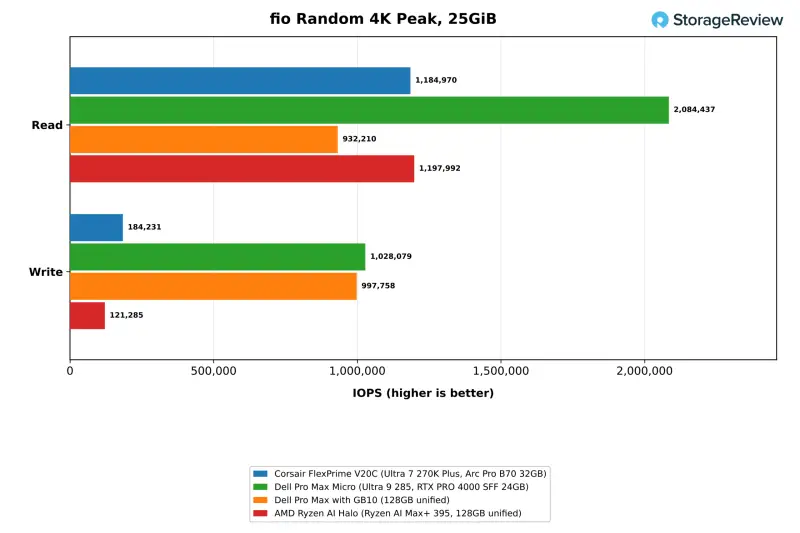
| Random read 4K, peak (IOPS) | 1,184,970 | 2,084,437 | 932,210 | 1,197,992 |
| Random write 4K, peak (IOPS) | 184,231 | 1,028,079* | 997,758 | 121,285* |
| Random read 4K, QD32 x 4 jobs (IOPS) | 1,184,970 | 1,386,889 | 754,896 | 1,001,941 |
| Random write 4K, QD32 x 4 jobs (IOPS) | 178,312 | 1,028,079* | 946,264 | 121,285* |
*Flagged by the suite for run-to-run variance after a rerun.
The 1TB XPG MARS 970 PLUS in our unit links at PCIe Gen5 x4, but it performs like a fast Gen4 drive in sequential work. It read at 7,311MB/s and wrote at 6,082MB/s on the 25GiB footprint, close to the Gen4 drive in the GB10 at 6,947 and 6,310MB/s. The Gen5 Sandisk in the Dell Pro Max Micro read at 9,433MB/s. Peak 4K random read reached 1.18 million IOPS on the V20C, ahead of the GB10 and a little over half of the Dell's 2.08 million. The Halo's Micron 4600 read at 7,232MB/s and reached 1.20 million IOPS in random read, level with the V20C.
Random write is the drive's weak point. It peaked at 184K IOPS on the 25GiB footprint and 350K on the 5GiB footprint, with the two passes within 3 percent of each other. The two Dell systems wrote at about 1.0 million IOPS, and the Halo's drive peaked at 121K with a variance flag. The XPG drive also ran hot, reaching 80.8C with a 75.3C mean across the 99-minute storage test.
Corsair's configurator lists 2TB and 4TB options for the V20 chassis. If you plan to keep datasets or vector indexes on the boot drive, budget for one of those. The drive sits in the M.2 slot between the graphics card and the CPU block, under XPG's heat spreader, with no motherboard heatsink over it.
Who Should Buy This, and What to Check First
The V20C shows that the Arc Pro B70 can anchor a capable local AI workstation, provided the software uses the right backend. Through llama.cpp on SYCL, it outserved the RTX PRO 4000 SFF by 5 to 30 percent on the Ministral models. It also ran a 27B model that the 24GB card couldn't load, and it beat the GB10 by 77 percent for a single user. Around that GPU, the 24-core 270K Plus led every compile, render, and cache-serving test in the comparison set except the ones where the Halo's wider memory bus or AVX-512 took the lead.
At $3,999.99 with 32GB of system memory, the V20C lists level with the AMD Ryzen AI Halo at Micro Center. It sits about $3,500 below the $7,521 Dell.com lists for a 128GB Pro Max with GB10 and a 1TB SSD. Both of those desktops carry 128GB of unified memory, which lets the GB10 run agent and image models the V20C can't load. Both also finished our OpenFOAM case sooner. The V20C's advantage is faster llama.cpp serving on models that fit in 32GB, roughly twice the Halo's rate on the 8B Ministral model, plus a tower built from standard desktop parts that can be serviced or upgraded.
The rough edges are in software and tuning. Ollama and stable-diffusion.cpp fell back to Vulkan and trailed both NVIDIA systems in generation and image tests. Our fine-tuning test had no Intel path. The fans ramped irregularly during testing, and the 1TB SSD is slow in random writes and peaked at 81C. If your team serves models through llama.cpp or OpenVINO and wants a strong x86 build machine under the same lid, this configuration suits you. If your workflow leans on Ollama, image generation, or models beyond 32GB, look at the unified-memory desktops or one of Corsair's NVIDIA configurations.
Before you buy, the practical checks are straightforward. Confirm which inference engine your models run on and test that exact path on the card, because our results moved by a factor of two or more between backends. Run a sustained GPU job and watch fan behavior, since that's where we saw the irregular ramping. Plan for storage upgrades if your datasets are large. Intel's software stack has improved since the B70 review, and this box is the place to see whether it has caught up for your workload.


