Dell Pro Max Micro Review: CUDA Speed and Heat Limits in a 2.9-Liter Workstation
- Brian Beeler
- 941 views
Dell's 2.9-liter Pro Max Micro leads our CUDA AI results outside Dell's line, but its 24-core CPU runs at 98C to 105C and it can't load 27B models.
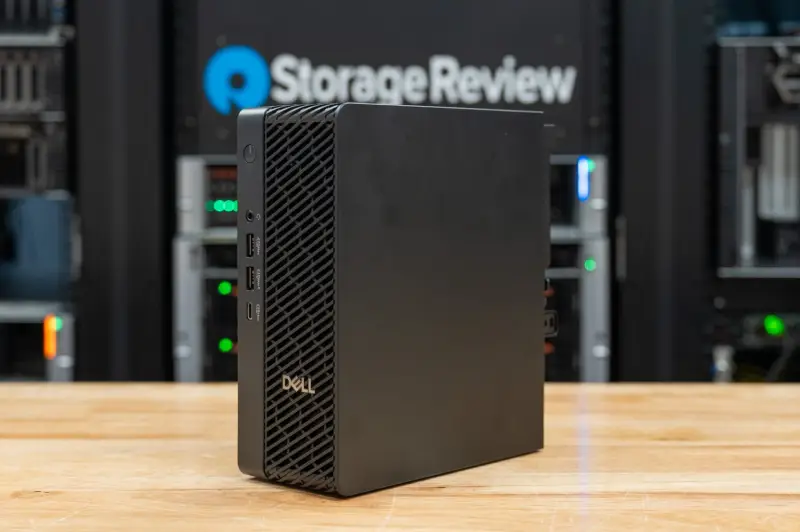
The Dell Pro Max Micro (FCM2250) is the first machine I'd put on a shelf behind a monitor and still call a real AI workstation. It pairs a 24-core Intel Core Ultra 9 285 with a 24GB NVIDIA RTX PRO 4000 Blackwell SFF Edition and 96GB of DDR5-6400 in a chassis Dell lists at about 2.9 liters. It's the smallest machine in the Pro Max desktop line, and it carries the vPro Enterprise management and security features that Dell puts on its commercial desktops. We tested it on Linux against three other ways to buy local AI hardware, including Dell's own Pro Precision 9 T2 tower, to see what a discrete RTX PRO card in this footprint actually delivers.
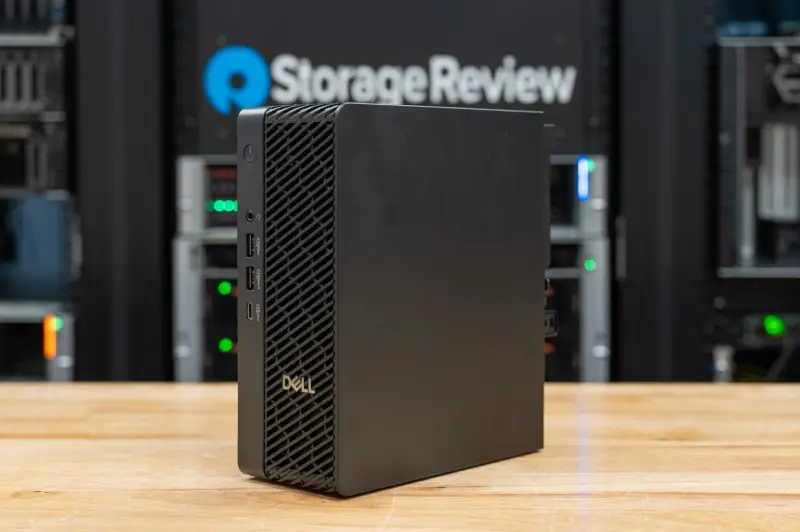
The short version: the Micro wins wherever the software runs on CUDA, and it loses wherever the job needs memory capacity or sustained all-core CPU speed. Those two limits define who should buy it.
Where the Micro Fits in Dell's Line
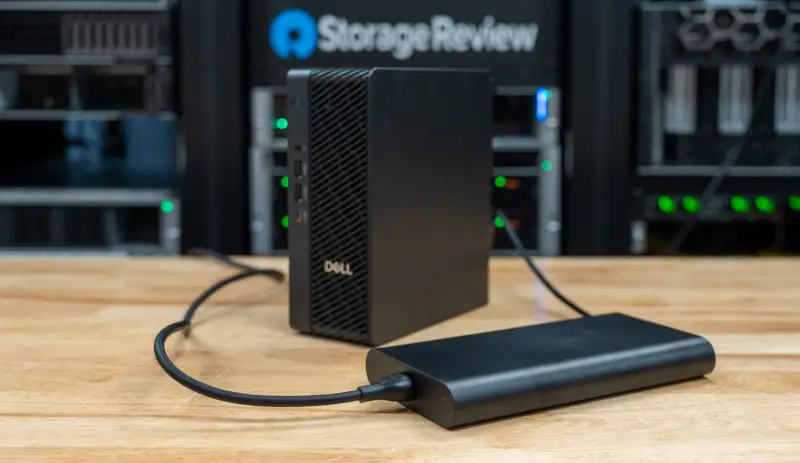
Dell positions the Pro Max Micro as its ultra-compact commercial workstation, the smallest of the Pro Max desktops below the SFF and tower models. It's built for organizations that need workstation performance, discrete professional graphics and ISV certification in tight spaces. Dell says it can be mounted on an all-in-one stand, on a shelf behind a display, on a wall or under a desk.
The platform accepts Core Ultra 5, 7 and 9 processors. Dell runs them at 85W with an enhanced thermal solution, above the chips' 65W rating. That single decision explains a lot of what follows in the CPU and thermal results.
Graphics top out at the card in our unit, the 70W RTX PRO 4000 Blackwell SFF Edition with 24GB of GDDR7 ECC memory. System memory runs to 96GB of DDR5-6400 on two CSODIMMs as tested, or to 64GB of ECC modules with Dell's Reliable Memory Technology Pro, which maps out bad memory regions at the BIOS level. Storage supports up to 8TB across two M.2 2280 slots, one PCIe Gen5 and one Gen4. Our unit shipped with two 1TB Gen5 self-encrypting drives configured by Dell as a RAID 0 volume.
Above it sits the Dell Pro Precision 9 T2, the smallest tower in the Xeon-based Pro Precision 9 line. Our test unit paired it with a 24-core Xeon 658X, a 96GB RTX PRO 6000 Blackwell Max-Q and four channels of DDR5-6400. The Dell Pro Precision 9 T4 goes further and takes up to four GPUs, depending on the card. Including the T2 in the comparison shows how far results scale between Dell's smallest workstation and a single-GPU tower.
Dell lists the Micro from $1,449. The configuration we tested comes to $11,999 for a single unit on Dell.com. That price covers the Core Ultra 9 285, the RTX PRO 4000 SFF, 96GB of memory, the two Gen5 SSDs, a 5GbE module, Wi-Fi 7, and three years of ProSupport with on-site service in place of the one-year base warranty. Dell sells most of these systems through account teams and resellers, where volume pricing applies, so the list price is a starting point rather than what a fleet buyer will pay.
Build, Ports and Serviceability
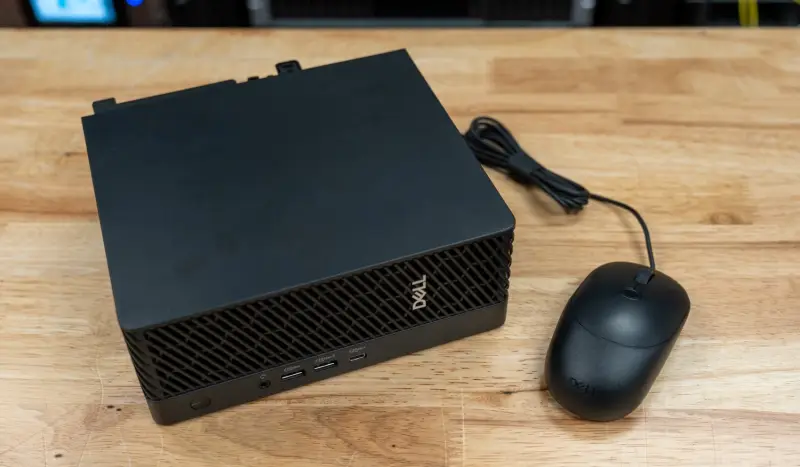
The chassis is black resin and measures 206 x 79.3 x 178mm (8.11 x 3.12 x 7.00 in). Depending on configuration it weighs between 2.34kg and 2.54kg. Dell says the design carries over from the previous generation, so existing mounts and fleet accessories should fit. Power comes from an external 280W adapter with a 7.4mm barrel connector. Dell lists 46.4 percent post-consumer recycled plastic in the materials, and the system is ENERGY STAR qualified and registered EPEAT Gold with Climate+.
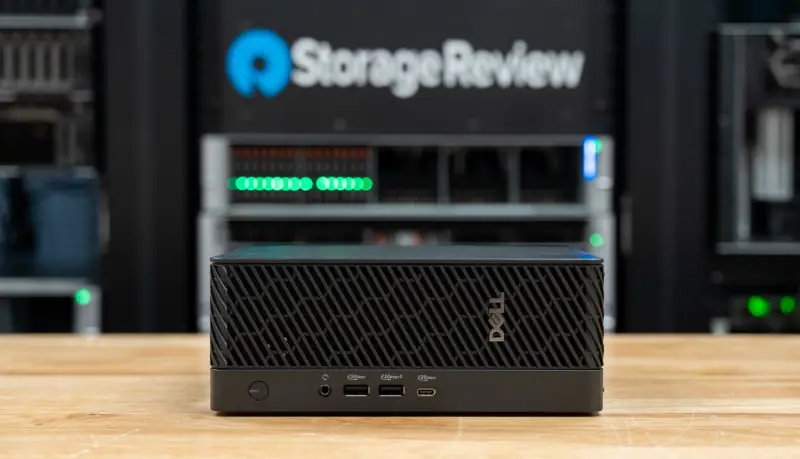
The front panel has a 20Gbps USB Type-C port, two 10Gbps USB Type-A ports (one with PowerShare) and a headset jack. The rear adds a 10Gbps USB Type-C port, two 10Gbps and two 5Gbps USB Type-A ports, three DisplayPort 1.4a outputs from the integrated graphics and a 1GbE RJ45 port. The RTX PRO 4000 SFF adds four mini-DisplayPort outputs, bringing the total to seven display connections. Dell includes four adapters to full-size DisplayPort, which matters if your monitors are older.
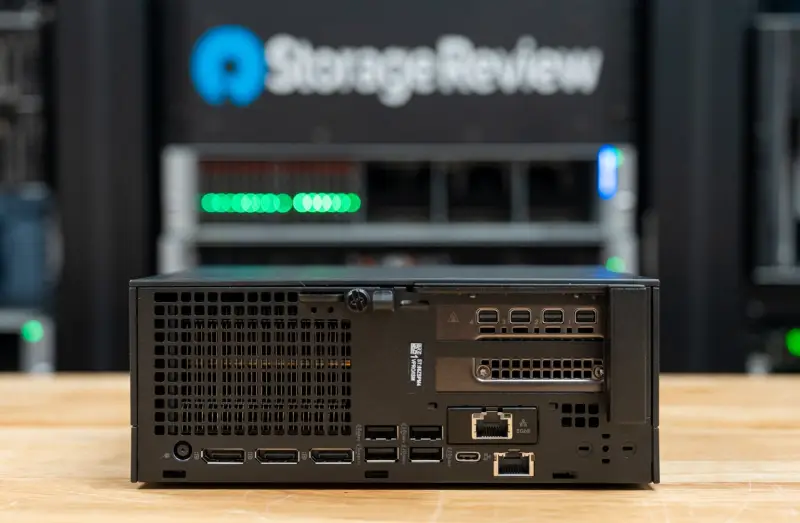
A modular port on the rear takes one of nine options. Our unit held a 5GbE LAN module. The other choices are VGA, HDMI 2.1, DisplayPort 2.1, serial with PS/2, USB Type-C with DisplayPort Alt Mode, two USB Type-A ports, Thunderbolt 4 with USB Type-C, and 5G optical fiber. Dell also lists 2.5GbE and dual-port 10GbE networking for the platform. Wireless is Intel's Wi-Fi 7 BE200 with Bluetooth 5.4.
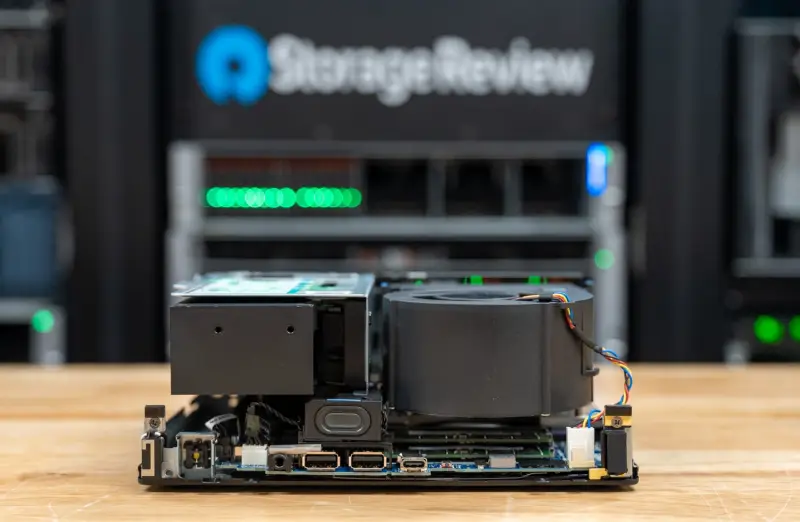
Inside, Dell lists two PCIe Gen4 slots with x8 connectors (one wired x8 for the graphics card, one wired x1), plus an M.2 2230 slot for the wireless card. Both SSDs sit under a shared heatsink with thermal pads, and the memory uses two CSODIMM slots. The chassis is largely tool-less, and the memory and storage can be replaced by the owner.
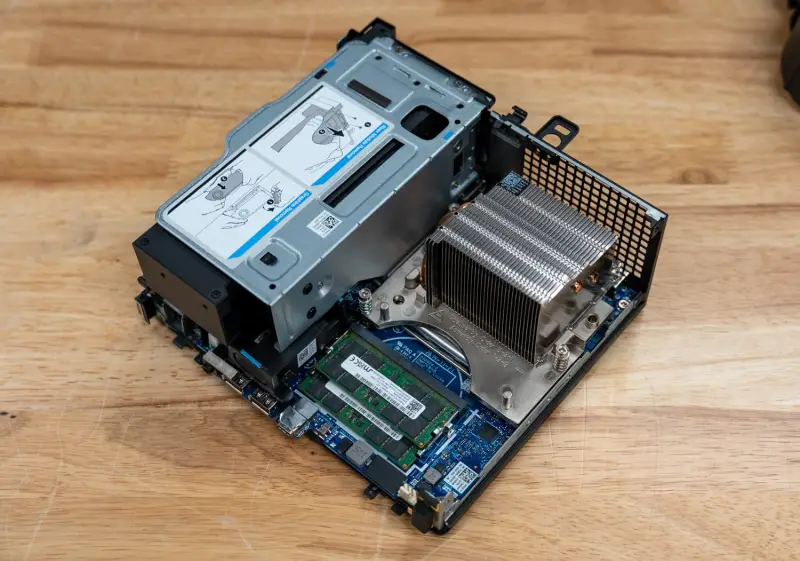
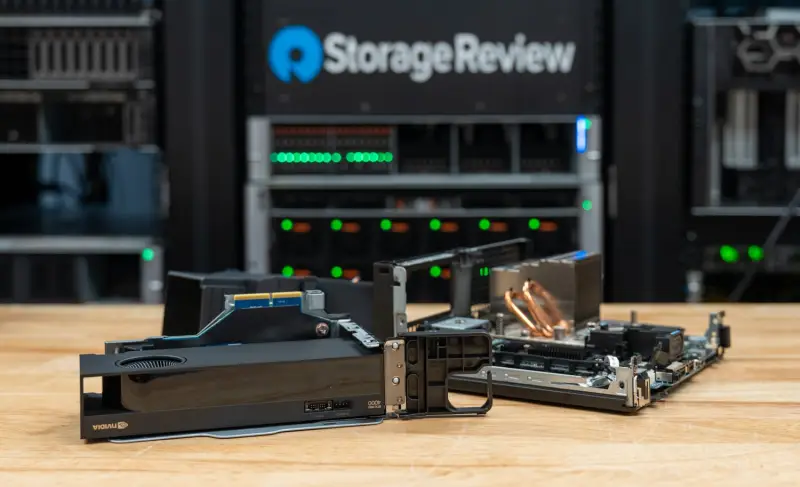
Getting in is easy. The cover came off after one screw. The CPU fan shroud releases with finger clips, exposing the two memory slots, and the PCIe riser comes out after two more screws, which gives access to both expansion slots. For a machine this small, that's a reasonable service story.
Security, Management and the Mouse
Security and management follow Dell's commercial desktop template. That includes SafeBIOS off-host firmware verification, SafeID credential protection, Secured Component Verification, Opal 2.0 self-encrypting drives, a Kensington slot and a padlock ring. The system is configured with Intel vPro Enterprise and works with Dell Client Command Suite. Dell ships it with Windows 11 Pro. The lab replaced that image with Ubuntu for testing.
The unit arrived with Dell's Pro 5 Wired Fingerprint ESS Mouse (MS526C), a $44.99 accessory. Its fingerprint reader provides one-touch sign-in through Windows Hello. It connects over USB Type-A on a 5.91ft cable, tracks at 1,600 dpi by default and up to 6,000 dpi, and weighs 2.57oz. Dell lists support for Windows 10 and Windows 11 only, so the reader sat idle during our Linux testing. For a box that might be mounted behind a display, a wireless version of the mouse would make more sense.
Specifications at a Glance
| Specification | Dell Pro Max Micro |
|---|---|
| Model | Dell Pro Max Micro (FCM2250) |
| Processor | Intel Core Ultra 9 285, 24 cores (8 P-cores, 16 E-cores), 24 threads, up to 5.6GHz, 36MB cache, dedicated NPU, 65W rating, run at 85W by Dell |
| Graphics | NVIDIA RTX PRO 4000 Blackwell SFF Edition, 70W, 24GB GDDR7 ECC |
| Memory | 96GB (2x 48GB) DDR5-6400 CSODIMM, non-ECC; up to 64GB DDR5 ECC optional |
| Storage | 2x 1TB M.2 2280 PCIe Gen5 SED, RAID 0 as shipped; Sandisk SN8050S as tested; up to 8TB across two M.2 slots (one Gen5, one Gen4) |
| Expansion | 2x PCIe Gen4 x8 slots (wired x8 and x1); 1x M.2 2230 (wireless) |
| Operating System | Windows 11 Pro as shipped; Ubuntu 26.04.1 LTS as tested |
| Display Outputs | 4x mini-DisplayPort (RTX PRO 4000 SFF); 3x DisplayPort 1.4a (integrated) |
| Wireless | Intel Wi-Fi 7 BE200 (2x2), Bluetooth 5.4 |
| Management | Intel vPro Enterprise; Dell Client Command Suite |
| Dimensions (H x W x D) | 206 x 79.3 x 178mm (8.11 x 3.12 x 7.00in), about 2.9L |
| Weight | 2.34kg to 2.54kg (5.15lb to 5.59lb) |
| Power | 280W AC adapter |
| Warranty | 3 years ProSupport with on-site service as configured; 1 year base |
| Price | $1,449 base; $11,999 as tested (Dell.com) |
How We Tested
Dell ships the Micro with Windows 11 Pro, but the higher-end workstations in our lab run on Linux with a current kernel, so the Micro got Ubuntu 26.04.1 LTS with the 7.0 kernel on one of its two 1TB SSDs. That means the factory RAID 0 volume is not part of these results. The system ran BIOS 1.19.1 on the default power profile with NVIDIA driver 595.99.02. The suite measured 23.9GB of GPU-usable memory on the RTX PRO 4000 SFF.
Results come from three in-house suites. The first is sr-client_linux 0.1, the Linux build of our client suite, which covers local AI, content creation and storage. The second is our benchmark harness, which wraps Phoronix Test Suite workloads and y-cruncher. The third is our server suite, which runs ClickBench, OpenFOAM, STREAM and Valkey. Each figure is the median of repeated passes. MLPerf Client's Linux release ships only Intel OpenVINO configurations, so it produced no results on the NVIDIA card, and our fine-tuning test wasn't part of this run.
The comparison set includes four systems. The Pro Precision 9 T2 is the tower with the Xeon 658X, the 96GB Max-Q card and 128GB of DDR5-6400. The Corsair FlexPrime V20C is a micro-ATX tower with a Core Ultra 7 270K Plus, a 32GB Intel Arc Pro B70 and 64GB of DDR5-6400. The Dell Pro Max with GB10 runs NVIDIA's 20-core GB10 with 128GB of unified memory on NVIDIA's Ubuntu 24.04 image. The AMD Ryzen AI Halo runs a 16-core Ryzen AI Max+ 395 with 128GB of unified LPDDR5X on AMD's Linux developer image.
Software paths matter here. The Micro, T2 and GB10 ran CUDA throughout llama.cpp, Ollama and stable-diffusion.cpp. The Halo ran AMD's ROCm in all three. On the V20C, llama.cpp used its SYCL backend, while Ollama and stable-diffusion.cpp ran through Vulkan, because Ollama's native path placed none of the model on the Arc card. That gap explains much of the Micro's lead in the Ollama and image tests. The Micro, T2 and V20C share Ubuntu 26.04.1 and form the tightest comparison group. The GB10 and Halo ran earlier harness and server suite releases with different compilers, which affects source-built tests such as the kernel compile.
Local AI: Where the 24GB Ceiling Bites
The RTX PRO 4000 SFF gives the Micro 24GB of graphics memory, and the suite measured 23.9GB as usable. That's enough for the 20B agent model and the Ministral serving models in our lineup. The V20C's 32GB card clears the 30GB the 27B serving model needs. The T2's 96GB card and the 128GB unified-memory systems qualify for larger model tiers that the Micro can't load at all.
LLM Serving
LLM serving ran the llama.cpp server with 4,096-token prompts and 1,024-token outputs on the Ministral 3 models. The Micro served the 3B model to a single user at 80.7 tokens per second. That's 5 percent behind the Arc Pro B70 in the V20C and 52 percent ahead of the GB10. On the 8B model it managed 52.0 tokens per second for one request, 18 percent behind the V20C and 41 percent ahead of the GB10. At four concurrent requests it delivered 201.5 tokens per second on the 3B model and 108.9 on the 8B model, which puts it 44 and 12 percent ahead of the GB10.
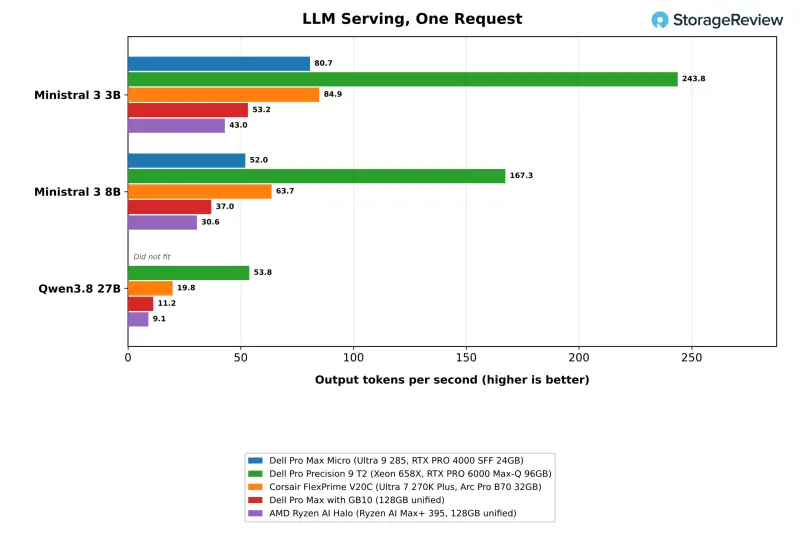
The Halo's integrated Radeon 8060S trailed every other system in this test. It served the 3B model at 43.0 tokens per second for one request and 105.1 across four, roughly half the Micro's rate. Its prompt processing lagged too, with median first-token times of 1.7 seconds on the 3B model and 4.6 seconds on the 8B model, against 0.7 and 1.5 seconds on the Micro.
The T2 is the clear step up. Its 96GB card served the 3B and 8B models at 243.8 and 167.3 tokens per second for one request, 3.0 and 3.2 times the Micro's throughput. With four concurrent requests it reached 602.6 and 384.9 tokens per second. It also ran Qwen3.8 27B at 53.8 tokens per second for one request and 155.8 across eight, with a first token in 2.8 seconds.
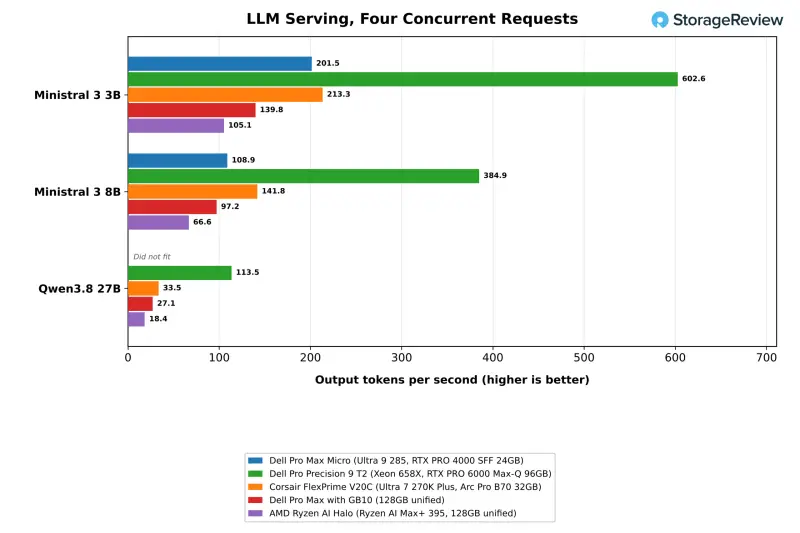
Qwen3.8 27B at Q4_K_M needs 30GB of GPU-usable memory for its weights and one request's KV cache. The Micro's 23.9GB simply couldn't run it. The V20C generated 19.8 tokens per second on that model for one request, the GB10 managed 11.2 and the Halo 9.1. The same limit kept gpt-oss 120B, which needs 90GB, and the 129.3GB MiniMax M2.7 off the Micro. My read: 24GB covers serving through roughly the 20B class at 4-bit quantization. Anything larger means a bigger card or a unified-memory system.
Model Loading and the Coding Agent
The load test times Ollama from launch to first token on gpt-oss:20b, a 12.8GB model, both cold from the SSD and warm from the page cache. The Micro reached first token in 5.11 seconds cold and 3.12 seconds warm, the fastest warm load in the group. The T2 took 5.57 and 3.47 seconds, the V20C 6.29 and 3.18, and the GB10 6.86 and 6.36. The Halo had the fastest cold load at 4.20 seconds and took 4.03 seconds warm. During the cold load, the Micro's Gen5 drive read at 6,636MB/s with a peak of 8,754MB/s, so storage kept pace with the runtime.
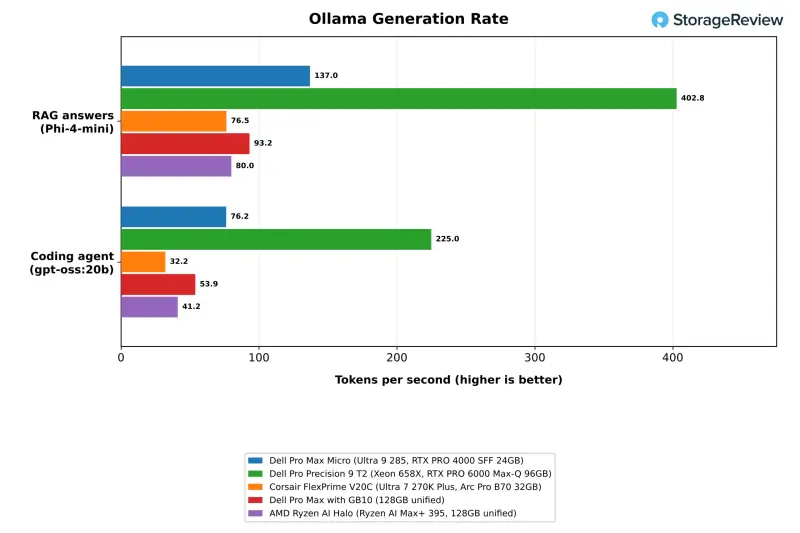
The coding agent test runs Crush against gpt-oss:20b with a 64K context through a fixed programming task, three times over. The Micro generated 76.2 tokens per second, ahead of the GB10 at 53.9, the Halo at 41.2 and the V20C at 32.2. That's about a third of the T2's 225.0. Its one passing run finished in 80 seconds. The other two runs ended with 0 and 1 of 11 tests passing. The T2 and Halo each passed two of three, while the V20C and GB10 passed all three. Pass counts on this model vary from run to run, so the generation rate is the more useful hardware signal.
RAG at Two Scales
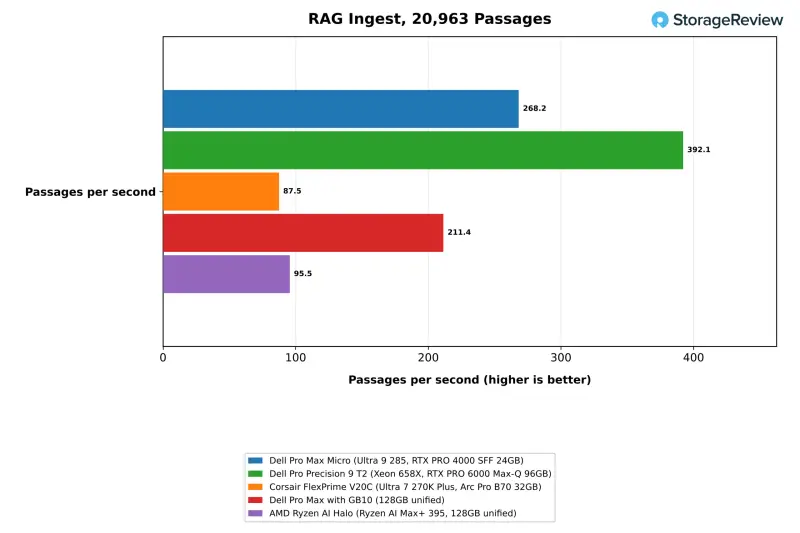
The first RAG test embeds 20,963 SQuAD passages, retrieves the top five for each question and answers with Phi-4-mini, all through Ollama. The Micro ingested 268.2 passages per second, compared with 211.4 on the GB10, 95.5 on the Halo and 87.5 on the V20C. That's a 27 percent lead over the GB10 and roughly three times the Arc card's rate on Vulkan. The T2 reached 392.1. Answer generation ran at 137.0 tokens per second on the Micro, against 93.2, 80.0 and 76.5 on the GB10, Halo and V20C, with the T2 at 402.8. The Micro's median question-to-answer time was 0.22 seconds, level with the GB10.
The second RAG test is the one that stresses the machine. It embeds a million Wikipedia passages through llama.cpp, builds an HNSW index on the CPU and then searches it. The Micro ingested 313.9 passages per second and finished in 53 minutes, 2 percent behind the V20C. The V20C's SYCL backend is far stronger than its Vulkan path, and that shows here. The Micro's embedding rates in the two tests landed within 3 percent of each other, at 43,430 and 44,440 tokens per second. The T2 embedded the same million passages in 878 seconds, under 15 minutes, at 3.6 times the Micro's rate.
The CPU-side work split the same way. The Micro built the index in 78.9 seconds, against 73.4 on the V20C and 46.3 on the T2. It searched at 27,359 queries per second at an ef setting of 64, against 29,643 on the V20C and 45,085 on the T2, with recall against exact search at 91.4 percent. Answer generation returns to Ollama in this test. The Micro's median question-to-answer time of 0.20 seconds was well ahead of the V20C's 0.36. The GB10 hasn't run the million-passage test yet.
The Halo completed the million-passage ingest in 15,230 seconds, about 4.2 hours, at 65.8 passages per second. That's roughly a fifth of the Micro's rate. Its 16-core processor did better on the CPU side, building the index in 68.9 seconds and searching at 34,012 queries per second at ef 64, ahead of the Micro and the V20C in both. Its median question-to-answer time was 0.46 seconds.
Image Generation
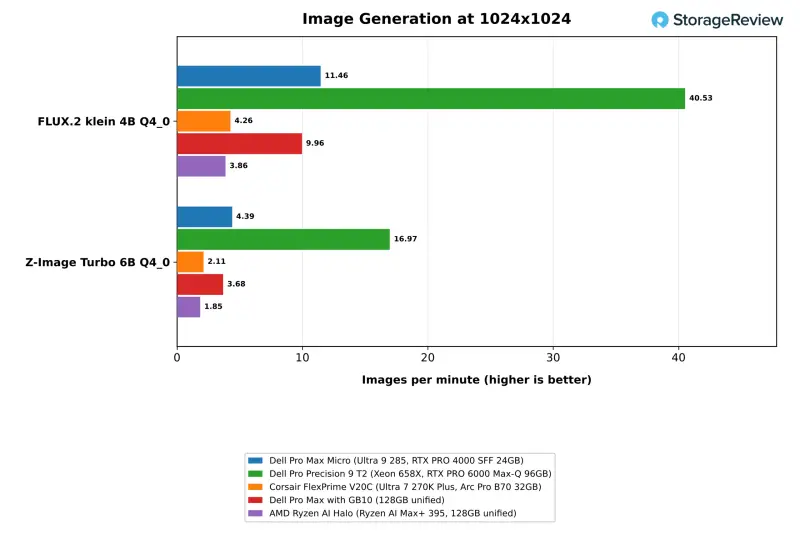
Image generation was the Micro's strongest showing against the three systems outside Dell's line. On stable-diffusion.cpp with CUDA, it produced 11.46 FLUX.2 klein 4B images per minute at Q4_0. That's 15 percent ahead of the GB10's 9.96, 2.7 times the V20C's 4.26 on Vulkan and three times the Halo's 3.86 on ROCm. On Z-Image Turbo 6B at Q4_0 it managed 4.39 images per minute, against 3.68, 2.11 and 1.85 for the GB10, V20C and Halo. Precision barely moved the numbers. BF16 came in at 10.93 on FLUX.2 klein and 3.95 on Z-Image Turbo. The T2's card produced 40.53 FLUX.2 images per minute, 3.5 times the Micro.
Qwen-Image 20B is where memory capacity wins again. It needs 28GB of GPU-usable memory at Q4_0 and 38GB at Q8_0, so it didn't load on the 24GB card. The V20C ran the Q4_0 version at 0.35 images per minute. The GB10 ran both quantizations at 0.50 and 0.48, the Halo at 0.23 for both, and the T2 at 2.42 and 2.39. Teams that need that model class locally should plan for more graphics memory than this chassis holds, since the RTX PRO 4000 SFF is the top card Dell offers in the Micro.
CPU Performance: Fast Cores, Limited Headroom
The Core Ultra 9 285 is a 65W desktop processor, and Dell runs it at 85W in the Micro. It shares its 24-core layout with the Core Ultra 7 270K Plus in the V20C. In 7-Zip's all-thread total, the Micro scored 164.0 GIPS, 18 percent below the V20C's 199.6. It was 24 to 26 percent slower across the three Blender scenes. HandBrake's x265 and SVT-AV1 encodes ran 20 and 17 percent slower than the V20C. The V20C benefits from a tower chassis and a 360mm liquid cooler, which is the difference in the numbers. Blender and HandBrake have no arm64 Linux builds in our suite, so the GB10 has no results there.
| Test | Dell Pro Max Micro | Dell Pro Precision 9 T2 | Corsair FlexPrime V20C | Dell Pro Max with GB10 | AMD Ryzen AI Halo |
|---|---|---|---|---|---|
| 7-Zip, all threads (GIPS) | 164.0 | 285.1 | 199.6 | 149.5 | 215.8 |
| 7-Zip, one thread (GIPS) | 10.90 | 9.27 | 11.26 | 9.68 | 9.66 |
| Blender 4.5 Monster (samples/min) | 243.1 | 400.7 | 330.4 | No arm64 build | 285.3 |
| HandBrake SVT-AV1 (fps) | 147.9 | 198.5 | 177.4 | No arm64 build | 194.1 |
| LLVM build (s, lower is better) | 173 | 106 | 136 | 175 | 149 |
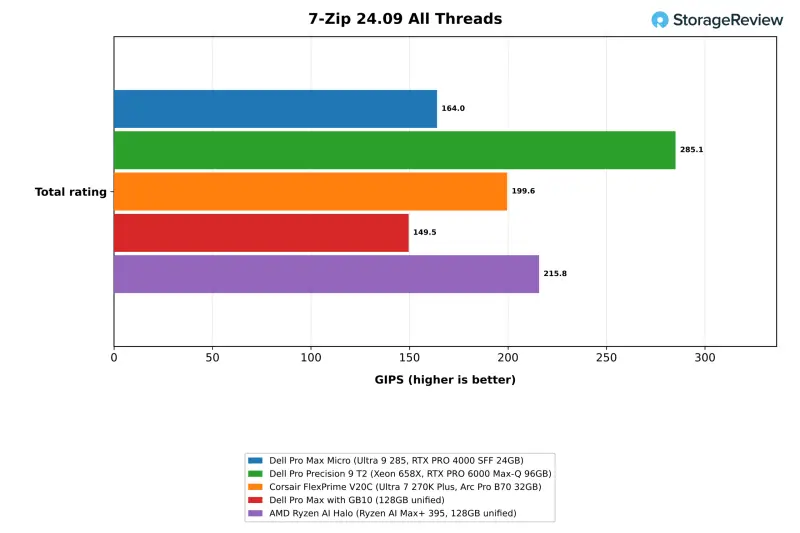
Against the GB10, the Micro came out 10 percent ahead in all-thread 7-Zip and 13 percent ahead with one thread. The LLVM build finished nearly level, at 173 seconds against 175. The V20C completed that build in 136 seconds. For a system this size the results are reasonable, but they show the cost of the form factor. The same core layout delivers 22 percent more 7-Zip throughput, and 32 to 36 percent more Blender throughput, in a liquid-cooled tower.
The Halo's 16-core, 32-thread Ryzen AI Max+ 395 beat the Micro in multi-threaded work. It scored 215.8 GIPS in 7-Zip, 32 percent ahead, ran 8 to 26 percent ahead across the Blender scenes, encoded SVT-AV1 at 194.1 fps against 147.9, and built LLVM in 149 seconds. The Micro kept a 13 percent lead in one-thread 7-Zip.
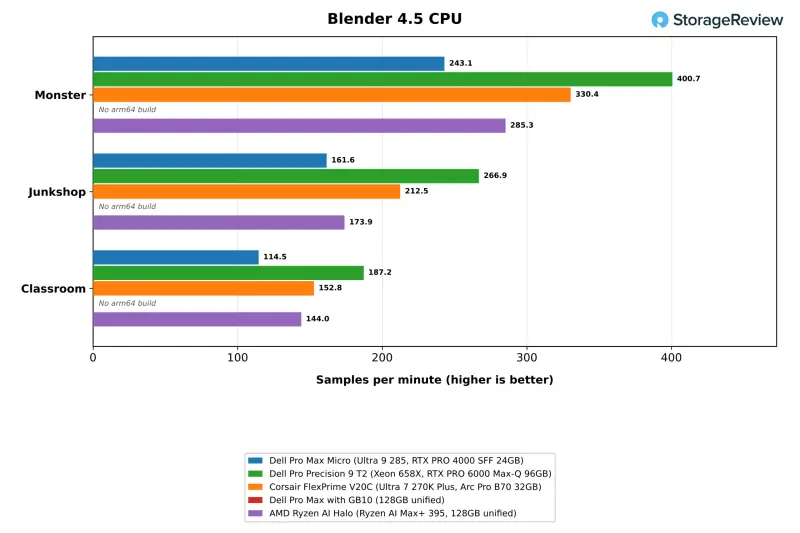
The T2 scales multi-thread work the way a 24-core, 48-thread Xeon in a tower should. It scored 285.1 GIPS in 7-Zip, 74 percent ahead of the Micro, delivered 63 to 65 percent more Blender throughput and finished the LLVM build in 106 seconds. Per-core speed runs the other way. The Micro's Core Ultra 9 285 was 18 percent ahead of the Xeon 658X in one-thread 7-Zip, 14 percent ahead in one-thread Stockfish, and 18 to 20 percent quicker in the single-thread Python tests.
Stockfish and primesieve tell a similar story. All-thread Stockfish reached 31.58 Mnps on the Micro, behind the T2 at 45.44, the V20C at 40.55 and the Halo at 38.74, but 32 percent ahead of the GB10. One-thread results between the two Core Ultra systems were within 3 percent in Stockfish, and primesieve to 10^11 on one thread came out level at 9.07 and 9.03 seconds. The single-thread Python tests ran 3 to 7 percent behind the V20C and about 30 percent faster than on the Arm-based GB10.
GROMACS and OpenBLAS
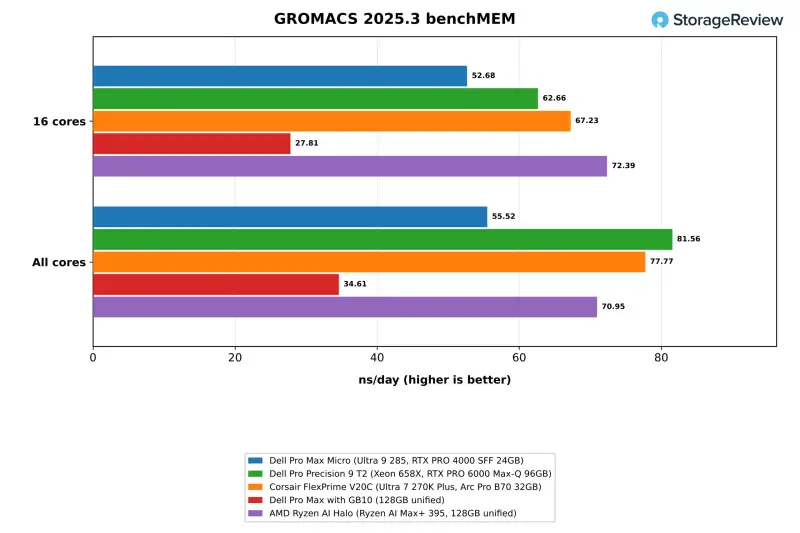
GROMACS benchMEM ran at 52.68 ns/day on 16 cores and 55.52 ns/day on all 24. That's 22 and 29 percent behind the V20C, and 89 and 60 percent ahead of the GB10. OpenBLAS DGEMM reached 791.6 GFLOPS on all cores, against 1,100.0 on the V20C, 418.0 on the GB10 and 2,318.9 on the T2, whose Xeon brings AVX-512 and four memory channels. GROMACS was also the hottest test in the suite for this chassis. The small gain from 16 cores to 24 suggests a processor running into its thermal limit. Memory latency on 4KiB pages measured 129.0ns, against 105.2ns on the V20C and 123.8ns on the GB10.
The Halo posted the fastest 16-core GROMACS result in the group at 72.39 ns/day, 37 percent ahead of the Micro. On all threads it reached 70.95 ns/day, behind the T2 and the V20C. It hit 1,610.3 GFLOPS in OpenBLAS DGEMM, about twice the Micro's rate, though its memory latency was the highest in the group at 162.2ns.
Server and HPC Workloads
The Phoronix and y-cruncher results treat the Micro as a general compute node that compiles, compresses, serves web requests and crunches numbers. The Micro, T2 and V20C share an Ubuntu 26.04.1 base, which makes them the most direct comparison. The other two systems run different distributions and compilers.
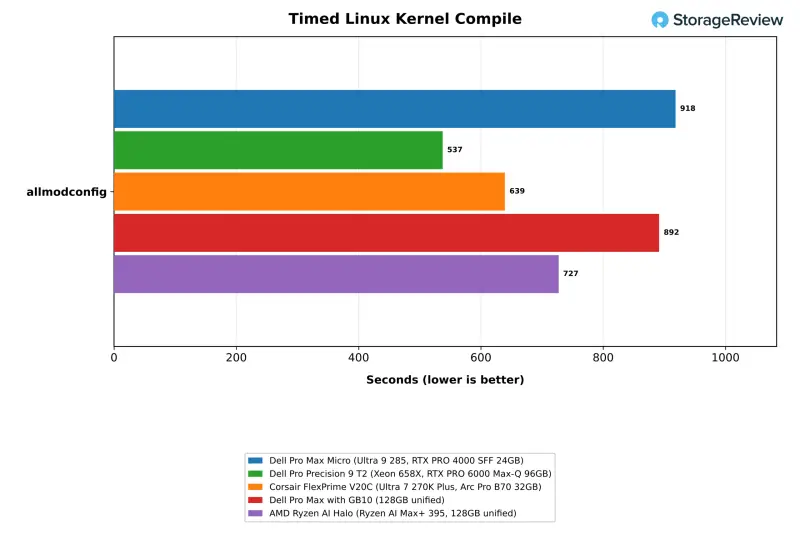
The Micro compiled the Linux kernel in 918 seconds. That's 3 percent behind the GB10 at 892, and well behind the Halo at 727 and the V20C at 639. The T2 finished in 537 seconds. All-thread 7-Zip compression landed within 3 percent of the GB10. The Micro led that system by 25 percent on one thread, by 13 percent in OpenSSL AES-256-GCM and by 35 percent in nginx at 1,000 connections. Across all-thread rows, though, the T2 led everything, running OpenSSL at 371.2GB/s against the Micro's 110.0GB/s.
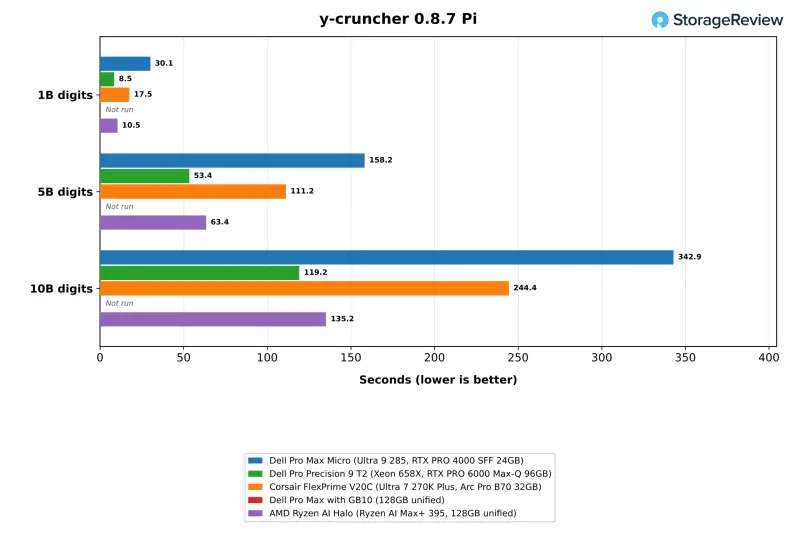
The y-cruncher numbers are more pointed. The Micro computed five billion digits of Pi in 158.24 seconds, against 111.17 on the V20C and 63.45 on the Halo. Ten billion digits took 342.87 seconds, against 244.44 and 135.18. This test is sensitive to memory bandwidth and vector width, and the Halo's wider memory bus and AVX-512 support show. The Micro is running two channels of DDR5-6400. The T2 was fastest at 53.40 and 119.21 seconds. The GB10 hasn't run y-cruncher.
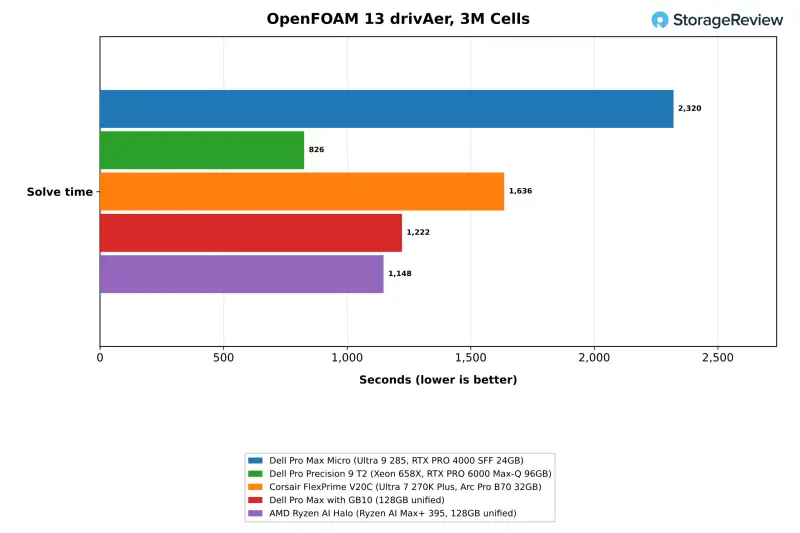
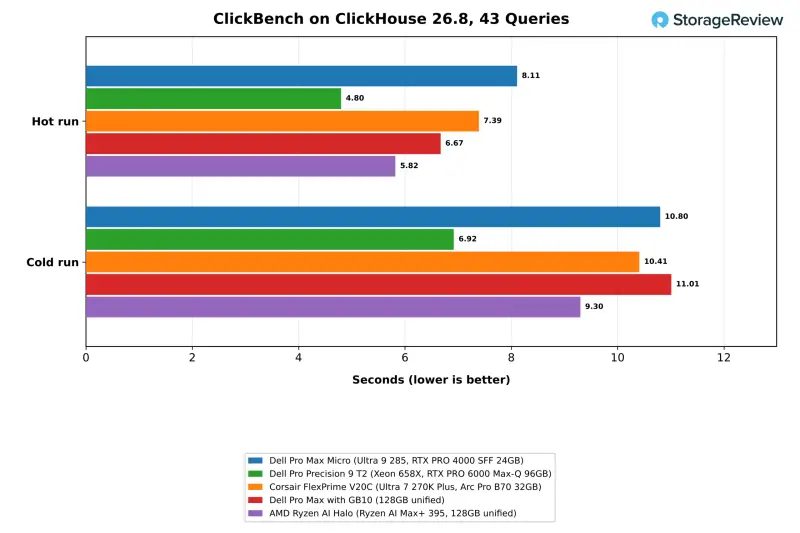
Memory bandwidth explains most of the server suite. STREAM Triad measured 65.8GB/s on the Micro, close to the V20C's 68.3GB/s and about half of the 121.3GB/s and 114.0GB/s measured on the GB10 and Halo. The T2 reached 141.8GB/s. The OpenFOAM drivAer case, a 3-million-cell solve, took 2,320 seconds on the Micro. That compares with 826 on the T2, 1,636 on the V20C, 1,222 on the GB10 and 1,148 on the Halo. ClickBench's hot run took 8.11 seconds on the Micro, against 4.80 on the T2, 7.39 on the V20C, 6.67 on the GB10 and 5.82 on the Halo.
Valkey leans on per-core speed, and that's where the Micro holds up. It handled 1.39 million SET and 1.40 million GET requests per second in the cache profile. That's 25 percent under the V20C, but 15 and 10 percent ahead of the Halo, 71 and 58 percent ahead of the GB10, and 52 and 41 percent ahead of the T2's Xeon. A workstation that also hosts a cache or a small database beside a model server gets real value from the Core Ultra's per-core speed.
GPU Encoding
For GPU encoding, FFmpeg 8.1 with NVENC transcoded the suite's 4K Big Buck Bunny clip to HEVC at 123 fps on the RTX PRO 4000 SFF. The T2 and GB10 ran the same encoder at 124 and 134 fps. The V20C reached 154 fps through Intel Quick Sync and the Halo reached 204 fps through VAAPI, but those two used different encoder settings, so treat them as reference points rather than a ranking. A newer FFmpeg build in the suite requires NVIDIA driver 610.00 or later for NVENC and didn't run on the 595.99.02 driver installed here.
Thermals Under Load
The 285 ran against its thermal ceiling in every all-core test. CPU package temperature peaked at 98C in Blender, 100C in the LLVM build, 101C in 7-Zip, 104C in OpenBLAS and 105C in GROMACS. Means ranged from 79C to 89C across those tests. That's the cost of running a 65W desktop chip at 85W inside 2.9 liters, and it lines up with the multi-thread gap to the tower. The processor idled at about 40C between tests.
| Dell Pro Max Micro | CPU Max (C) | CPU Mean (C) | GPU Max (C) | GPU Mean (C) |
|---|---|---|---|---|
| GROMACS | 105 | 89.3 | 33 | 32.6 |
| OpenBLAS | 104 | 83.5 | 32 | 32.0 |
| 7-Zip | 101 | 78.7 | 32 | 31.7 |
| RAG at scale | 97 | 79.6 | 73 | 71.7 |
| LLM serving | 76 | 73.5 | 73 | 67.2 |
| Coding agent | 83 | 70.0 | 69 | 62.3 |
The graphics card ran much cooler. The RTX PRO 4000 SFF idled at 32C and peaked at 73C during LLM serving and the million-passage RAG ingest, averaging 71.7C across a 57-minute run. Image generation held it at 72C. The 70W card has thermal headroom in this chassis even when the CPU doesn't, and the SSD stayed at 63C or below through the 74-minute storage test.
Storage Performance
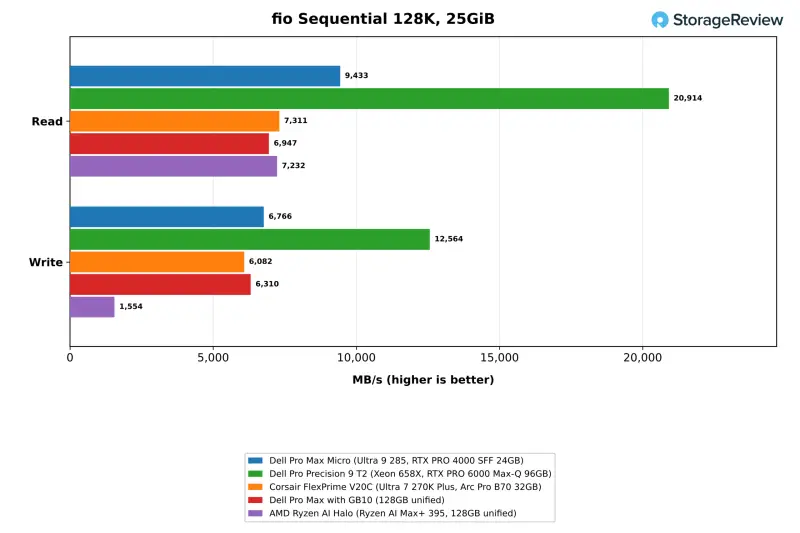
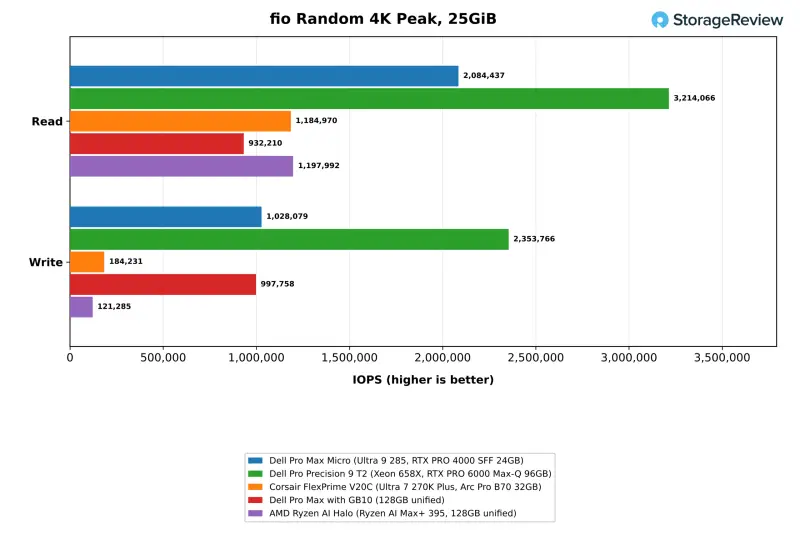
The Ubuntu install sat on one of the two 1TB Sandisk SN8050S drives, which links at PCIe Gen5 x4, so these results describe a single drive and exclude the RAID 0 configuration. It read at 9,433MB/s and wrote at 6,766MB/s. That's 29 percent ahead of the V20C's drive on reads, 30 percent ahead of the Halo's, and 36 percent ahead of the Gen4 drive in the GB10. The T2's 20,914MB/s comes from a striped array of Gen5 drives. Peak 4K random read reached 2.08 million IOPS, against 3.21 million on the T2, 1.18 million on the V20C, 1.20 million on the Halo and 932K on the GB10.
Random write peaked at 1.03 million IOPS, level with the GB10's 998K, under half of the T2's 2.35 million, and more than five times the V20C's 184K and the Halo's 121K. The suite flagged the Micro's and the Halo's random-write results for run-to-run variance after a rerun, so read those with some caution. With a second 1TB drive installed, a buyer can keep the striped volume for scratch space or split the drives into a boot disk and a model library. Dell lists up to 8TB across the two slots.
Who Should Buy This, and Who Shouldn't
The Micro puts a CUDA workstation in 2.9 liters, and that shows wherever the software path is CUDA. It ingested RAG passages 27 percent faster than the GB10 and produced FLUX.2 images at 2.7 times the V20C's rate on Vulkan and three times the Halo's on ROCm. Its Gen5 drive was the fastest single SSD in the group, and the graphics card never passed 73C.
The limits are the 24GB ceiling and the heat. A 27B model at 4-bit quantization and Qwen-Image 20B didn't fit, and the 285 ran between 98C and 105C in every all-core test. The tower with the same core layout finished 7-Zip and Blender work 18 to 36 percent faster, and it compiled the Linux kernel in 30 percent less time than the Micro. The 16-core Halo was 32 percent faster in all-thread 7-Zip. The 128GB unified-memory desktops solved the OpenFOAM case in roughly half the time and hold models several times larger.
Inside Dell's own line, the Pro Precision 9 T2 shows what the next step buys. It delivered about three times the LLM serving rate, 3.5 times the image generation rate and 74 percent more all-thread 7-Zip throughput. Its 96GB card loaded Qwen3.8 27B, Qwen-Image 20B and gpt-oss 120B, none of which fit on the Micro. The Micro's answer is faster individual cores, a footprint a fraction of the tower's and mounting options that put a workstation behind a display or under a desk.
Price is the other question for this configuration. At $11,999 as configured on Dell.com, our unit lists at three times the $3,999.99 price of the FlexPrime V20C and the AMD Ryzen AI Halo, and about 1.6 times the $7,521 Dell.com lists for a 128GB Pro Max with GB10 and a 1TB SSD. That premium buys the commercial package: ISV-certified RTX PRO graphics, vPro Enterprise, ECC memory options and three years of on-site ProSupport. Teams that need a managed, certified workstation in the smallest footprint are the right buyers. Teams choosing on tokens per dollar have cheaper paths to the same models, and the Micro won't win that comparison.
If you're planning a refresh, the question to answer first is model size. If your largest model fits in 24GB at 4-bit, the Micro's CUDA throughput and footprint make a strong case. If it doesn't, the next step is a bigger card or a unified-memory system, and the Micro's Gen5 drive and vPro features won't change that.

Leaderboard: The Dell Pro Max Micro holds Best Mini Workstation with Discrete Graphics on our Best Desktop Workstations leaderboard.


