Druva Adds Agent Recovery for Copilot Studio, Power Apps and Power Automate
- Harold Fritts
- 599 views
Druva's Agent Recovery backs up Copilot Studio agents and restores them individually, with new Power Apps and Power Automate coverage and Azure SRE Agent and Microsoft 365 Copilot integrations.
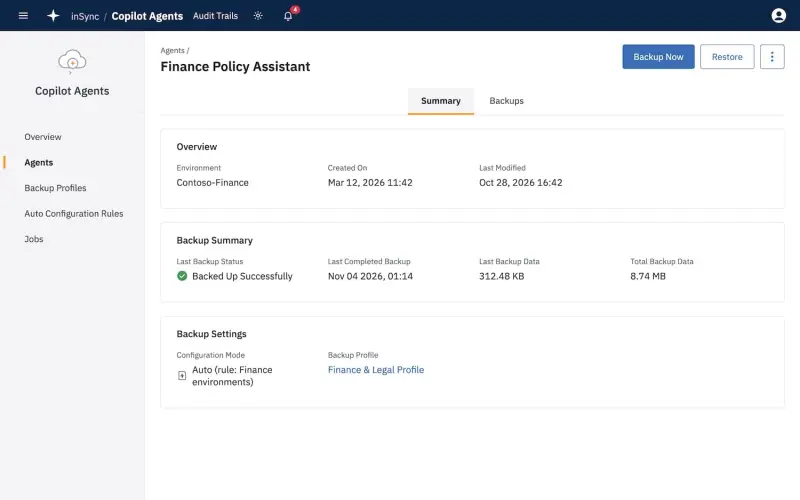
Custom AI agents have quietly moved from pilot projects into daily operations, and that changes what a recovery plan has to cover. Druva's new Agent Recovery is aimed squarely at that gap. It backs up agents you've built and restores them when they're deleted or changed in ways nobody intended. The first product in the set targets Microsoft Copilot Studio, and Druva is widening its Power Platform coverage at the same time.
Restoring One Agent Without Rolling Back the Environment
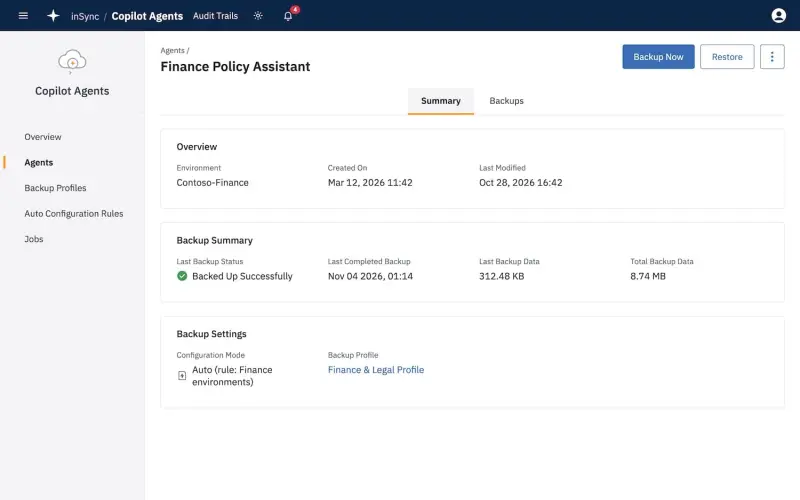
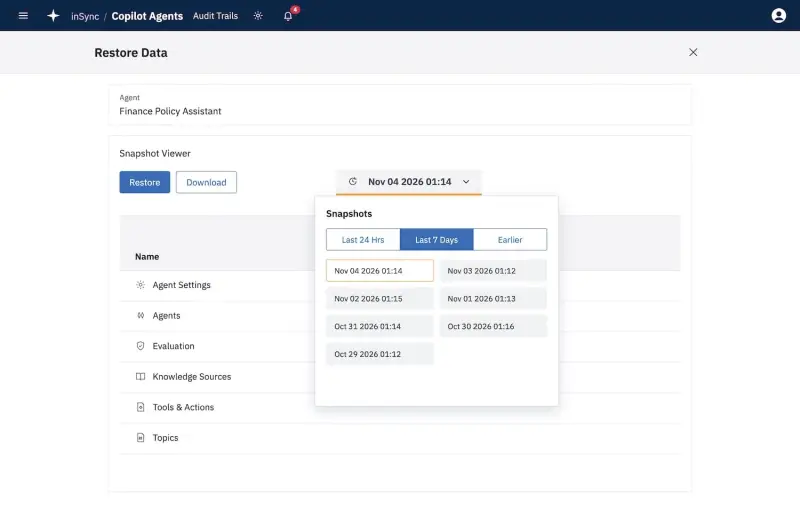
The first product, Copilot Studio Agent Backup & Recovery, protects the agents and configurations that customers build themselves. It finds Copilot Studio agents across Power Platform environments as people create them, so you aren't maintaining a manual inventory that's always one step behind. Backup schedules follow policy, and the copies are written as immutable backups to The Resilience Cloud. Each agent gets its own version history.
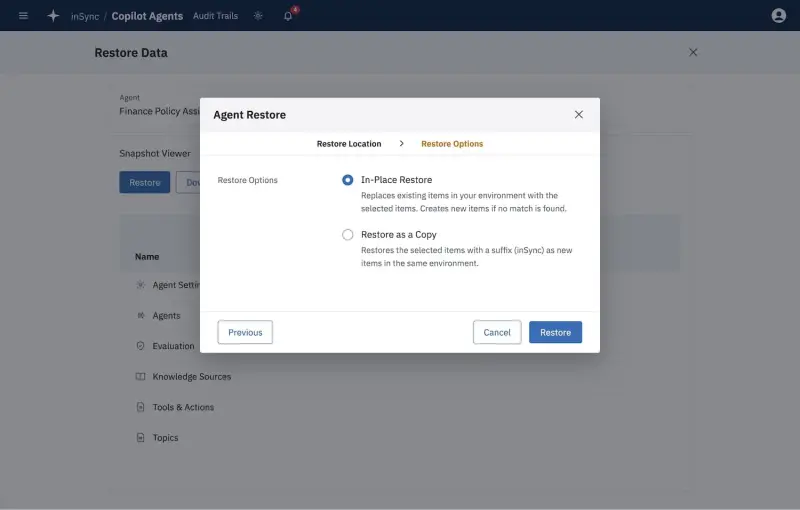
The restore side is where this gets interesting for operations teams. Druva says that recovering a broken agent today usually means restoring an entire Power Platform environment or rebuilding the agent by hand. Both options carry collateral damage. A full environment rollback undoes changes to everything else in that environment, and a rebuild depends on someone remembering every topic, tool and knowledge source the agent used. With Agent Recovery, administrators restore a single agent and its configuration. The restore workflow can either put the agent back in place or create a copy in the same environment, which is useful when you want to compare the broken version against a known-good one before deciding what to keep.
Druva cites Microsoft figures showing that more than 80 percent of Fortune 500 companies use AI agents built with low-code or no-code tools. That number is the company's framing, but it explains why the vendor sees agent recovery as a mainstream requirement rather than a niche one. Druva introduced its AI Resilience portfolio earlier this year, with a stated goal of helping organizations recover, govern and defend AI-powered work. Agent Recovery is the first part of that portfolio built specifically to restore agents.
Ranga Rajagopalan, Chief Products and Marketing Officer at Druva, put the reasoning plainly: "More business processes now run through AI agents, which makes those agents essential to how the business operates. That puts them on the same list of critical systems every IT team backs up and recovers. With Agent Recovery, we're now protecting the agents themselves, building on what we already safeguard across Microsoft 365 and Copilot conversations."
Protecting the Dependencies Around the Agent
An agent is rarely one object. Copilot Studio agents depend on connected apps, flows, data and identities, and any one of those can break the agent's behaviour. Restoring the agent alone won't help if the Power Automate flow it calls has been deleted. That's the reasoning behind the expanded Power Platform support.
Druva now protects Microsoft Power Apps and Power Automate, building on the Power BI protection it already offered. Teams can restore an individual app or flow from air-gapped, immutable backups without rebuilding it or rolling back the whole environment. For anyone who has tried to reconstruct a flow from memory after an accidental deletion, that's the scenario that matters most.
Druva's coverage list also spans Power Platform, Microsoft 365, Copilot Chat conversations, Microsoft Entra ID, Microsoft Dynamics 365 and Salesforce. The idea is that a failure can surface in any of those systems and still break an agent's workflow, so recovery has to cover the whole chain. That sits alongside the Azure workload protection Druva already sells, including the Azure VM backup Druva added in 2023.
Backup Status Inside Azure SRE Agent and Microsoft 365 Copilot
The more unusual part of this announcement is that Druva is pushing backup telemetry into the tools Microsoft administrators already use during incidents. Here's the thing: when something breaks at 2 a.m., nobody wants to switch to a separate backup console to find out whether the affected workload was protected in the first place.
The Azure SRE Agent integration uses Druva MCP to feed Microsoft's operations agent with backup health, protection status, recovery points and failed-job diagnostics for any Druva-protected workload. Azure SRE Agent then correlates that information with Azure operational data to spot unprotected workloads and suggest or take next steps during an incident. Druva calls this the first data protection integration with Azure SRE Agent. My read is that the practical value depends on how much your incident process already leans on SRE Agent. If it doesn't, this is a feature to note rather than a reason to change anything this quarter.
The Druva Agent for Microsoft 365 Copilot installs from the Agent Store and runs inside Copilot and Microsoft Teams. It shows a consolidated view of backup health, grouped failure analysis and remediation guidance. Because it draws on Copilot's Microsoft 365 context, it can show which users and groups a backup problem affects. Administrators can retry failed backups directly from Copilot. Druva describes it as the first backup and recovery agent for Microsoft 365 Copilot.
Availability and What to Check Before You Plan Around It
Availability is uneven, so read the status for each component separately. Power Apps support and the Druva Agent for Microsoft 365 Copilot are generally available. Copilot Studio Agent Backup & Recovery and Power Automate support are in limited availability. The Azure SRE Agent integration is scheduled for the end of November. Druva plans to demonstrate Agent Recovery at Microsoft Ignite in San Francisco, November 17 to 20, at booth 5328.
If you're evaluating this, treat the announcement as a checklist for your own environment rather than a finished migration path. Start by working out which Copilot Studio agents already exist across your Power Platform environments and who owns them, since many of them will have been built outside IT's view. Next, look at what each agent depends on: the connectors, flows, data sources and identities it calls. Those are the things a single-agent restore can't fix on its own, so they need their own protection and ownership. Finally, check which parts are generally available and which are still in limited availability before you commit them to a recovery runbook. Limited availability features can change before they reach general release, and that's a reasonable thing to confirm with Druva directly.
The broader signal is that agent recovery is moving from a feature request to a line item in backup planning. Teams that already back up Microsoft 365 and Entra ID will likely find the integration questions familiar. The hard part is governance: deciding who is allowed to build agents, which ones count as critical, and how quickly a broken one needs to come back. Druva's tooling gives you the restore mechanics. The policy decisions still belong to your team.


