MSI EdgeMesa N AI+ Tested: RTX Spark N1X and 128GB in a 1.18-Liter Mini PC
- Brian Beeler
- 424 views
MSI's 1.18-liter EdgeMesa N AI+ packs the RTX Spark N1X and 128GB of memory into a mini PC that outpaces tested laptops on sustained CPU loads.
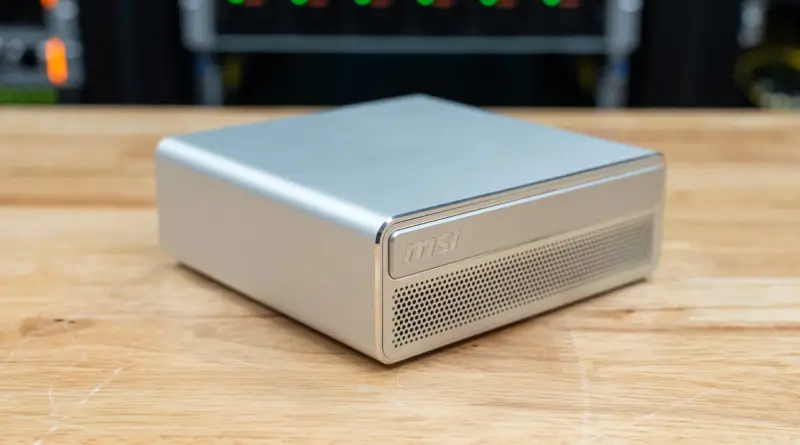
The interesting question about the MSI EdgeMesa N AI+ isn't whether an RTX Spark system can run local models. Laptops already do that. The question is what a desktop chassis buys you when the same silicon is pushed for longer than a laptop's thermal budget allows. Based on the testing, the answer is a few percent in short bursts and considerably more under sustained load, along with cooler average temperatures and room for bigger models. The trade-off is a fixed configuration you can't upgrade later.
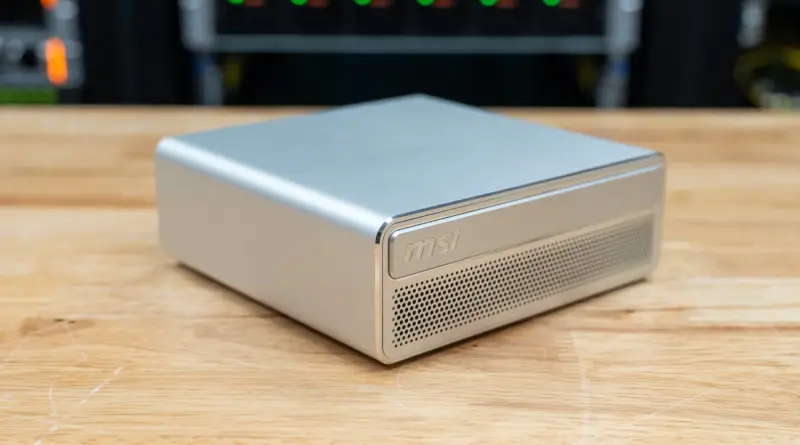
The EdgeMesa is a 1.18-liter aluminum mini PC built on NVIDIA's RTX Spark N1X, a 20-core Arm processor with a 6,144-core Blackwell RTX GPU. Until now, that chip had mostly appeared in laptops. The review unit carried 128GB of unified memory, a 4TB PCIe Gen5 SSD, 10GbE networking, and Windows 11 Pro. It was compared against ASUS's 64GB ProArt GR1X, the other RTX Spark mini PC in the test lab, plus the HP OmniBook Ultra 16 at 128GB and the Dell XPS 16 Creator Edition at 64GB. That pairing isolates the chassis: all four machines run the same 20-core N1X, and the two desktops run it at a higher power limit with bigger coolers.
Where the Desktop Chassis Pays Off
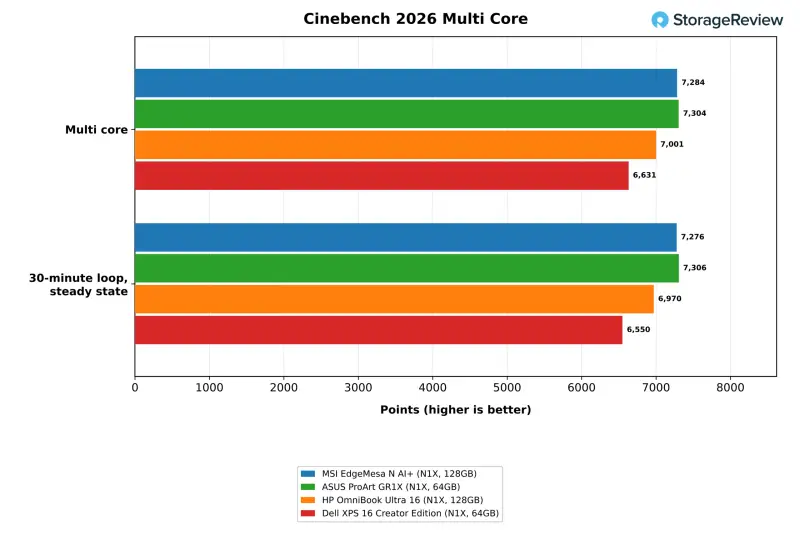
The headline number is sustained multi-core throughput. In the steady state of a 30-minute Cinebench 2026 loop, the EdgeMesa held 7,276 points. The HP OmniBook Ultra 16 held 6,970 and the Dell XPS 16 Creator Edition held 6,550. The ProArt GR1X reached 7,306, so the two desktops were effectively tied. That's roughly a 4 to 11 percent advantage over the laptops, depending on which one you pick.
Short bursts show a much smaller gap. In a single multi-core Cinebench 2026 run, the EdgeMesa scored 7,284 points, 4 percent ahead of the HP and 10 percent ahead of the XPS 16. Single-core scores went the other way by a small margin, with the EdgeMesa at 548 against 561 and 565 on the laptops. That's what you'd expect from a test that loads one core and never stresses the cooler.
Here's the thing: none of the four systems throttled during the loop. Each held its first-pass score, with the steady-state-to-first-pass ratio between 0.994 and 1.008. The desktops simply settled at higher clocks. The EdgeMesa averaged 3,372MHz across the loop, the GR1X 3,385MHz, the HP 3,239MHz and the XPS 16 3,083MHz. For anyone running renders, batch encodes or build farms that run for hours, that clock difference is the real value of a bigger cooler.
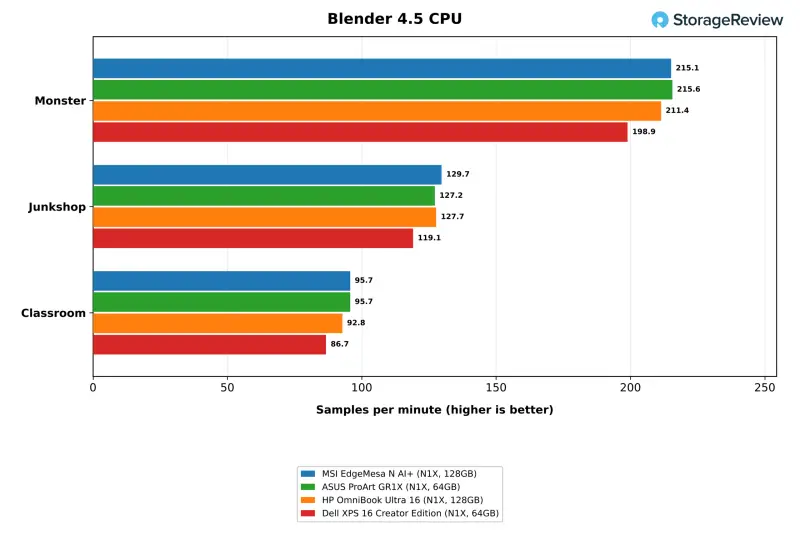
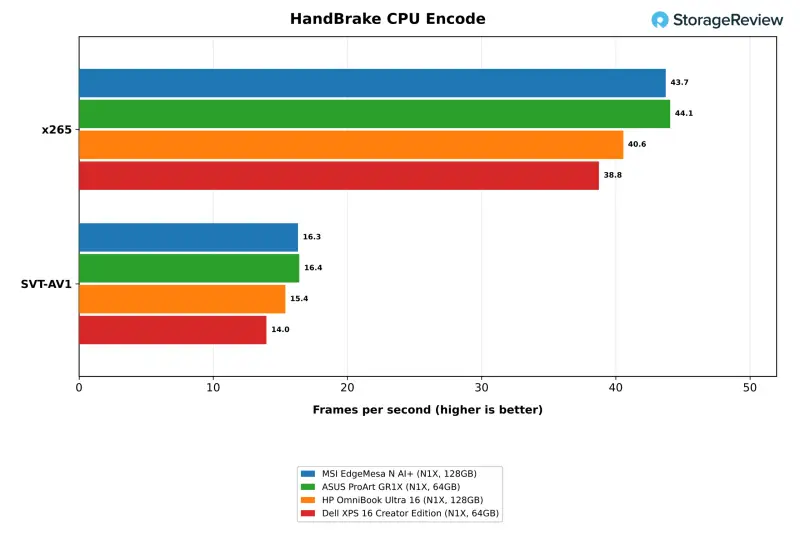
Application results repeat that pattern at smaller sizes. Blender 4.5's Monster scene rendered at 215.1 samples per minute on the EdgeMesa, 2 percent ahead of the HP and 8 percent ahead of the XPS 16, and the Classroom scene widened those leads to 3 and 10 percent. HandBrake's x265 encode ran at 43.7 fps against 40.6 on the HP and 38.8 on the XPS 16, leads of 8 and 13 percent. SVT-AV1 showed the same ordering at 16.3 fps. The GR1X matched or edged the EdgeMesa in most of these, within about 1 to 2 percent.
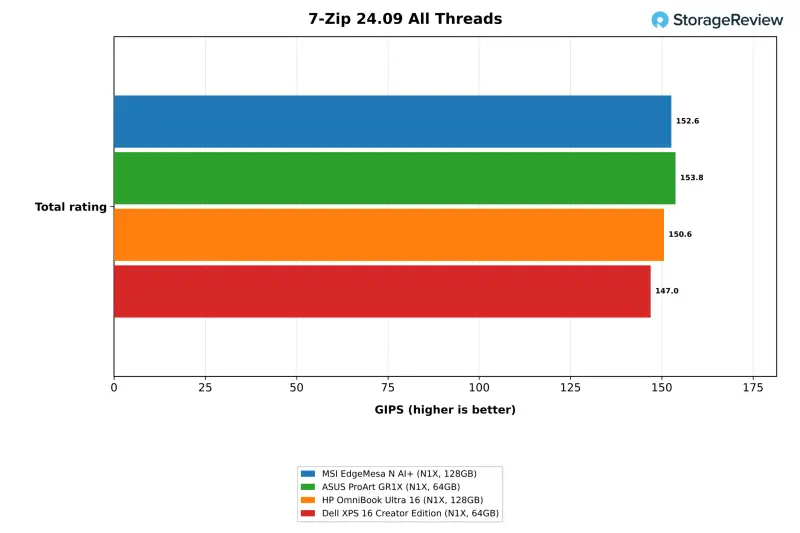
Some workloads show nothing at all. 7-Zip's all-thread total came in at 152.6 GIPS on the EdgeMesa, between 153.8 on the GR1X and 150.6 on the HP. Single-thread 7-Zip, Stockfish on one thread, primesieve on one thread and the PyPerformance tests were all within a few percent of each other, with the laptops occasionally ahead. Memory-bound and lightly threaded code doesn't benefit from a larger cooler, and the numbers say so. The LLVM build finished in 217 seconds on the MSI, level with the HP at 218 and ahead of the GR1X at 225 and the XPS 16 at 232.
Local AI: Concurrency and Model Size
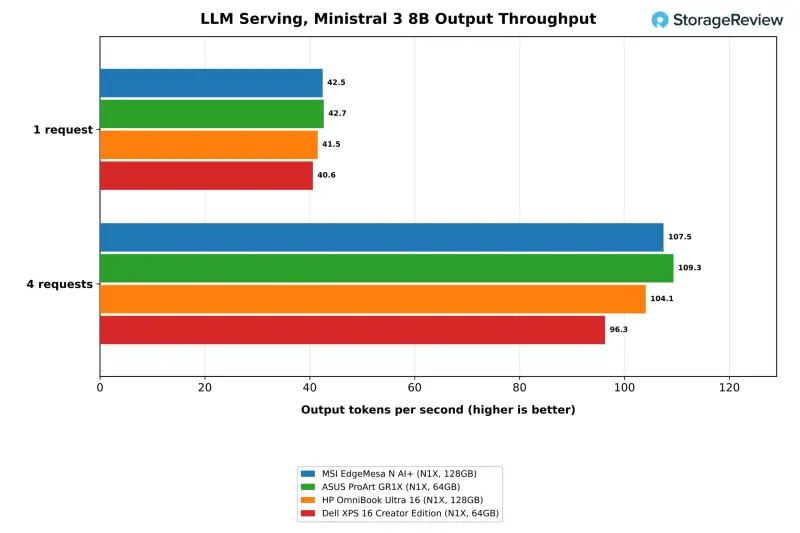
The clearest gap appears in LLM serving when several requests arrive at once, which is how a small team sharing one box would load it. With a single request, all four systems stay within 6 percent of each other on every model. The EdgeMesa produced 58.1 tokens per second on Ministral 3 3B, 42.5 on the 8B model and 13.0 on Qwen3.8 27B. One request leaves most of the chip idle, so single-user chat behaves much the same on any of these machines.
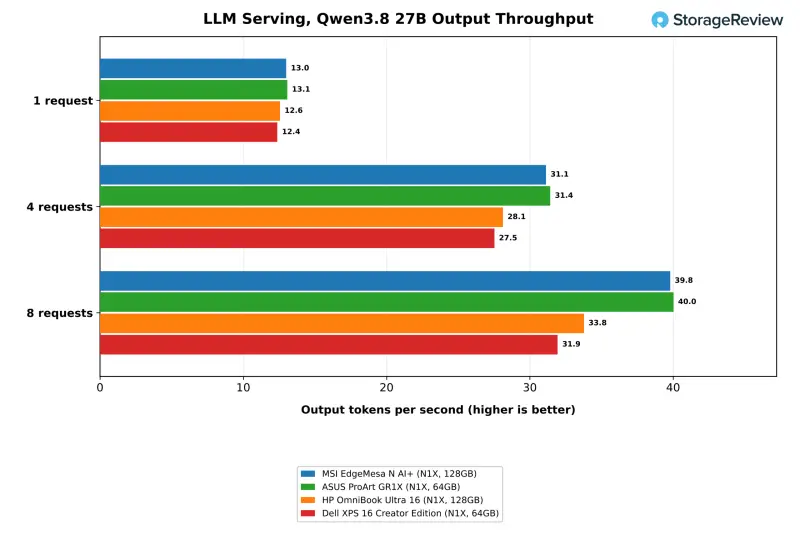
The gap opens as requests stack up. At four simultaneous requests on Qwen3.8 27B, the EdgeMesa generated 31.1 tokens per second against 28.1 for the HP and 27.5 for the XPS 16. At eight requests it reached 39.8 against 33.8 and 31.9, leads of 18 and 25 percent. Time to first token on that model was 8.7 seconds on the MSI and 10.8 to 10.9 seconds on the laptops. The GR1X tracked the EdgeMesa at every step, with 40.0 tokens per second at eight requests and an 8.6-second first token. Its 64GB of memory is enough for every model in the serving table, so the two desktops finished within 2 percent of each other there.
The bigger difference is model tier. The 128GB systems ran Qwen-Image 20B at Q8, and the EdgeMesa completed a 35B coding-agent model on all three attempts. The suite didn't run either model on the 64GB GR1X or XPS 16. Those are workflows that depend on memory capacity, not on how fast the chip is. If your models are in the 27B class or smaller, the 64GB desktop delivers almost the same results for less money.
Model Loading and the Coding Agent
Cold loads track the SSD and memory path more than the chassis. The EdgeMesa took 7.00 seconds to get gpt-oss:20b from a cold start to its first token, between the HP at 6.70 and the XPS 16 at 7.73. It loaded the 21GB qwen3.6:35b model in 8.32 seconds, against 9.33 on the HP. The GR1X needed 10.94 seconds for the same gpt-oss:20b cold load, which fits a Gen4 drive in a system with slower storage throughput.
The coding-agent test asks a model to write and test code over several rounds, three times per configuration. On qwen3.6:35b, the EdgeMesa passed all three attempts in 145 seconds at 86.8 tokens per second. The 128GB HP passed one of three, with a wall time of 1,783 seconds that the suite flagged. On gpt-oss:20b the pass counts were less tidy: the MSI passed two of three, the GR1X one, and the XPS 16 all three, with several runs flagged for not passing every test. Treat the agent pass counts as a rough signal of stability, not a guarantee.
Running a browser benchmark beside the agent showed how much headroom each chassis leaves for everything else on the desk. Speedometer slowed by 1.78x on the MSI and 1.79x on the GR1X, compared with 2.35x on the HP and 2.79x on the XPS 16. If you plan to run an agent on the same machine as your daily apps, the desktops handle that contention better.
RAG and Image Generation
The retrieval-augmented generation test embeds a passage set, retrieves against it and answers questions with phi4-mini. Ingest ran at 114.7 passages per second on the EdgeMesa, 3 percent ahead of the HP and 10 percent ahead of the XPS 16. Answer generation matched the HP at 103.4 tokens per second, and the median question was answered in 0.23 seconds on both 128GB systems. The GR1X posted 115.6 passages per second. Retrieval pipelines at this scale run comfortably on any of the four.
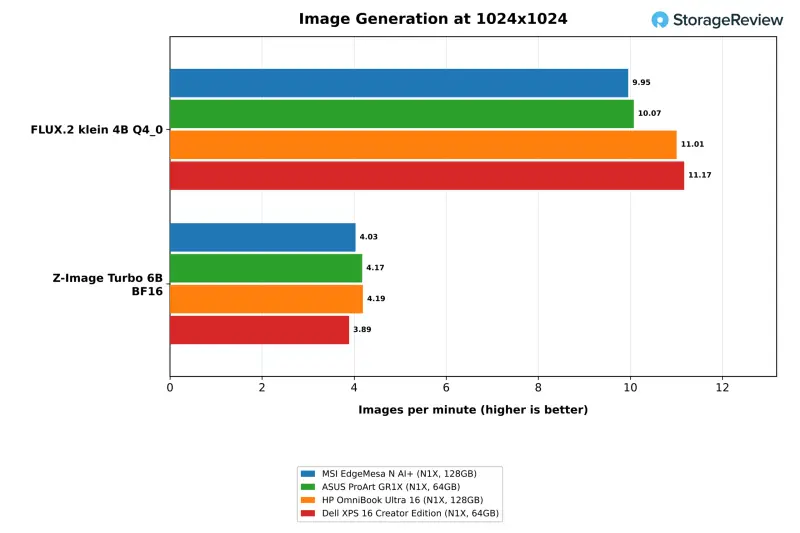
Image generation is the one AI category where the EdgeMesa trailed. FLUX.2 klein 4B at Q4 produced 9.95 images per minute, against 11.01 on the HP and 11.17 on the XPS 16. Z-Image Turbo 6B at BF16 landed between the two laptops at 4.03 images per minute. The laptops ran an earlier release of the test suite, though, and the GR1X, running the current release, produced 10.07 images per minute on FLUX.2, level with the EdgeMesa. That points to the suite version as the likely source of the gap, not the hardware. Qwen-Image 20B ran at about half an image per minute on all four systems at Q4, and at Q8 the EdgeMesa managed 0.51 images per minute against 0.47 on the HP.
Single-User Work and the Missing Cloud of Benchmarks
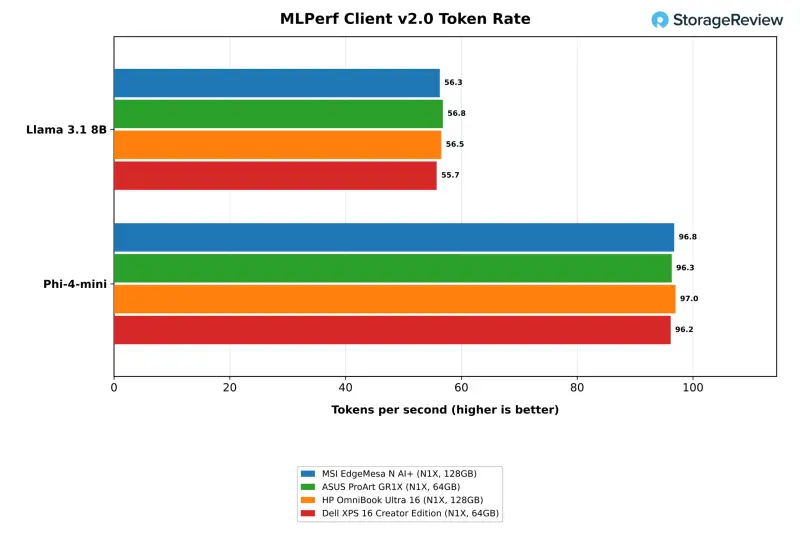
MLPerf Client sends one prompt at a time, and the four systems effectively tie. The EdgeMesa produced 56.3 tokens per second on Llama 3.1 8B and 96.8 on Phi-4-mini, against 56.8 and 96.3 on the GR1X, 56.5 and 97.0 on the HP, and 55.7 and 96.2 on the XPS 16. Time to first token favored the desktops slightly, at 0.25 seconds for Llama 3.1 8B on the MSI against 0.28 and 0.31 on the laptops. For one person chatting with a small model, the form factor makes no practical difference.
MSI's product page claims up to 1 petaFLOP of FP4 AI performance, support for 120B-parameter LLMs with up to 1M tokens of context, and 1440p gaming above 100 fps. The page doesn't list the models, quantization or settings behind those figures. The Windows client suite tops out at the 35B agent model, and 120B-class models run only in the Linux suite, so the 120B claim went untested on this system. Treat those figures as MSI's own numbers.
Build, Ports and Cooling
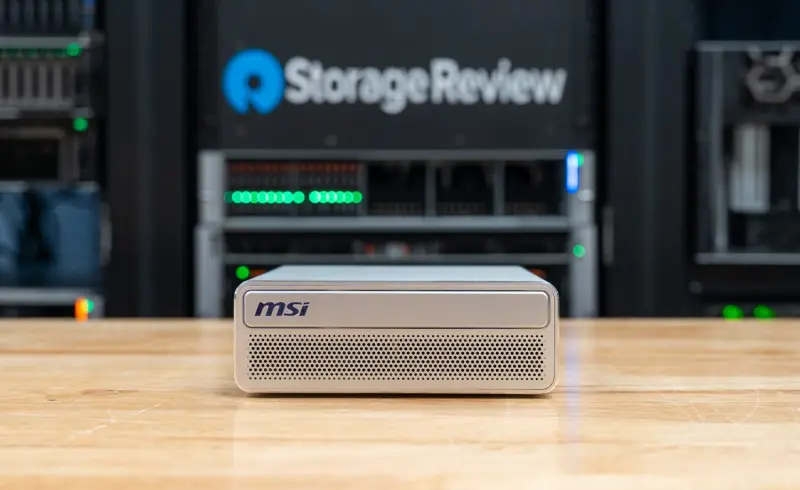
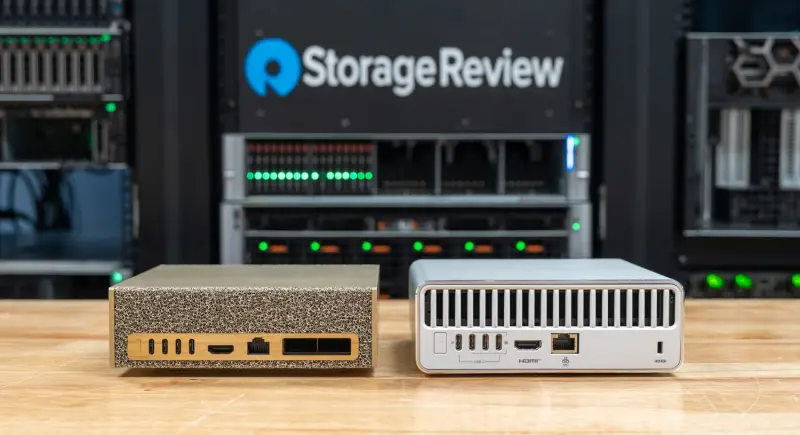
The EdgeMesa uses an aluminum chassis with an anti-fingerprint finish. It measures 152 x 147 x 53mm and weighs 1.32kg, which works out to 1.18 liters, a little under the 1.3 liters MSI advertises and close to the company's 1.2-liter EdgeXpert. The ProArt GR1X is 1.15 liters at 150 x 150 x 51mm, so the two RTX Spark mini PCs take up nearly the same desk space. The front is a perforated grille under an MSI badge with no ports or controls, and power comes from a 240W adapter.
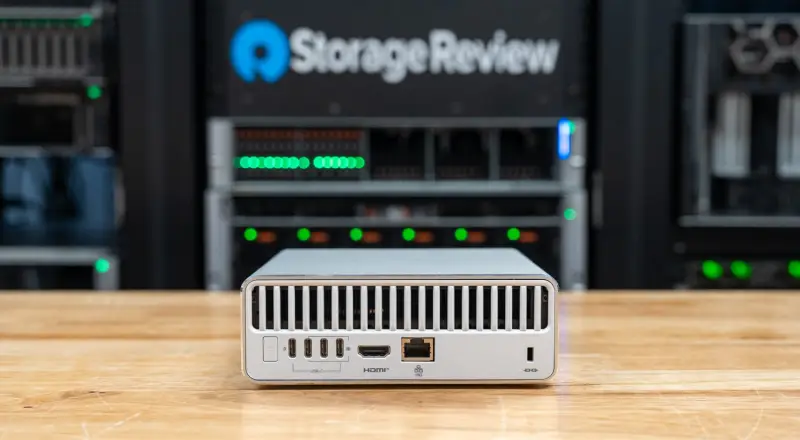
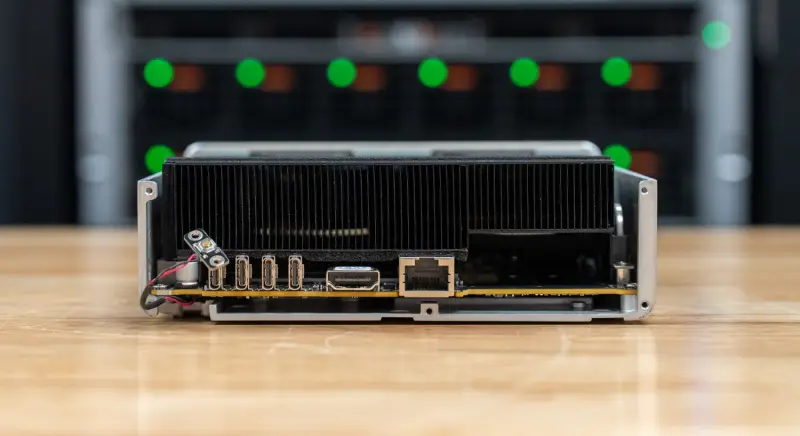
Everything connects at the rear: the power button, four USB Type-C ports at 20Gbps, one HDMI 2.1b output, one 10GbE RJ45 port, and a Kensington lock slot below a full-width vent. Three of the Type-C ports support DisplayPort 1.4 Alt Mode, and the fourth is the power input. With HDMI in use, the system can drive up to four displays. Wireless is Wi-Fi 7 and Bluetooth 5.4. There's no USB Type-A port and no audio jack, so most desks will need a hub or dock.
MSI calls the thermal design the AI Pulse Cooling System, a vapor chamber with two fans that the company rates to sustain 140W. With the outer shell removed, a fin stack runs the full width of the chassis behind the rear vent, above the port row. The Dell XPS 16 Creator Edition fits the same chip into a laptop body, so the cooler is where a mini PC has to earn its keep. The thermal results below show that it does, with a caveat about peak readings.
Thermals Under Load
Mean CPU temperature separates the three chassis types. In the 30-minute Cinebench loop, both laptops sat at a 97C mean, pinned at their 98C ceiling. The EdgeMesa averaged 88.4C and the GR1X 83.3C. In Blender 4.5 the EdgeMesa averaged 76.0C, against 96.7C on the HP and 94.2C on the XPS 16. In the LLVM build it averaged 70.5C, and in the single Cinebench run 69.0C. Those are gaps of 14 to 22 degrees on the same work, which is why the desktop can hold a higher clock.
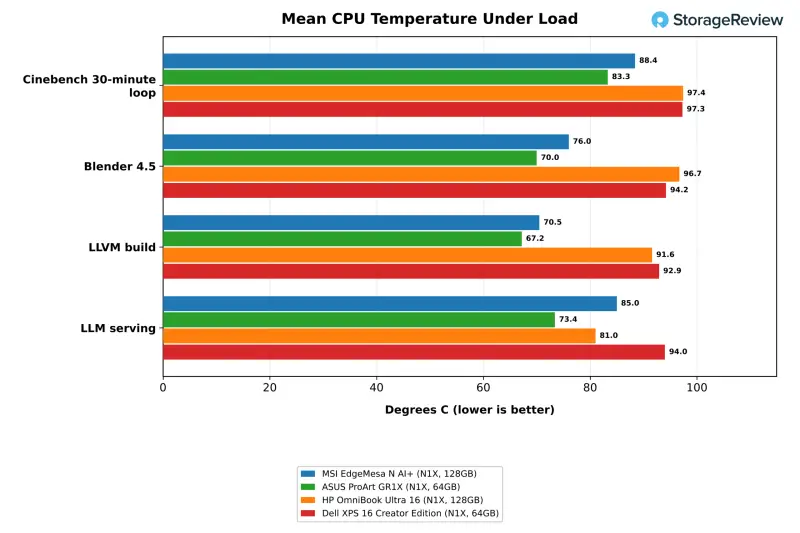
The ProArt GR1X ran cooler again at the same throughput. Its mean CPU temperature was 3 to 8 degrees below the EdgeMesa across the CPU tests, and 11 to 18 degrees below it during LLM serving, RAG and image generation. Its peaks stayed under 90C in nine of the ten tests in the thermal table. If sustained temperatures and fan noise matter in your environment, that's the detail to weigh most.
Peak readings are less tidy. The EdgeMesa logged maximums above the laptops' 98C ceiling in a few tests: 107.3C in the 30-minute loop and 105.3C in Stockfish. It also logged a single 124.7C sample during MLPerf Client, against a 70.4C mean for that test, which reads more like a sensor spike than a real excursion. The MSI's GPU-heavy LLM serving mean of 85.0C sat between the HP at 81.0C and the XPS 16 at 94.0C. The SSD stayed at 62C or below through the storage test.
Memory, GPU Allocation and Storage
The memory is one physical pool of LPDDR5X-9400 shared by the CPU and GPU, and it can't be upgraded later. That makes the configuration decision permanent. On the review unit, Windows presented 62.5GB as dedicated GPU memory and 47.9GB as shared, under the default allocation. NVIDIA's app has a slider that changes the split, and it warns that minimum and maximum settings may cause issues. NVIDIA advises keeping the default unless a workload needs more, and recommends leaving at least 16GB for the CPU. NVIDIA also says agents and LLMs see little performance loss when they spill into system memory, and suggests raising the allocation for image and video generation models that need more than the default provides.
The tests ran at the default, and the suite sizes its model tiers to the dedicated amount. That means a model the suite skipped on the 64GB systems might still run there with spillover or a larger allocation. Keep that in mind when you read the "not run" entries in the tables.
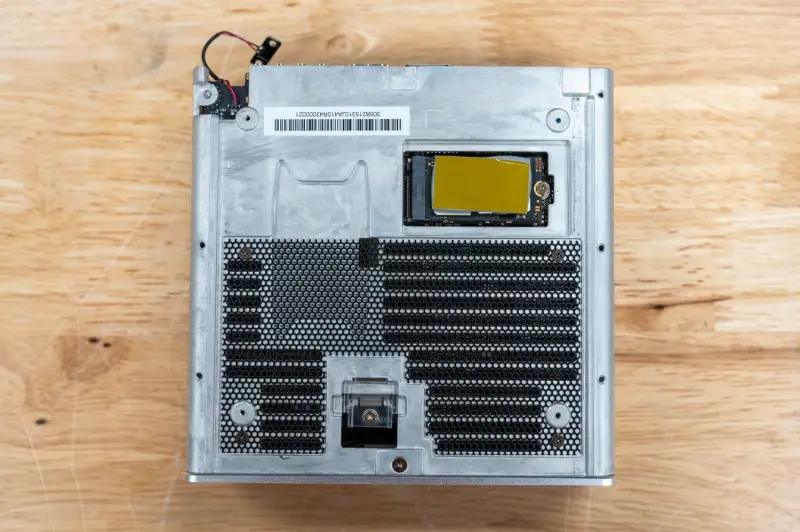
Storage is where the form factor bites. The 4TB Samsung MZALC4T0HBL1 in the unit uses the short M.2 2242 format on a PCIe Gen5 x4 link, and it's the only slot. Reaching it means sliding the inner sled out of the case, and the drive sits under a thermal pad. The 2242 length narrows the replacement market compared with the more common 2280 drives, and it makes the factory capacity choice more important. The ProArt GR1X takes the opposite approach, with two M.2 2280 slots in a 1.15-liter chassis.
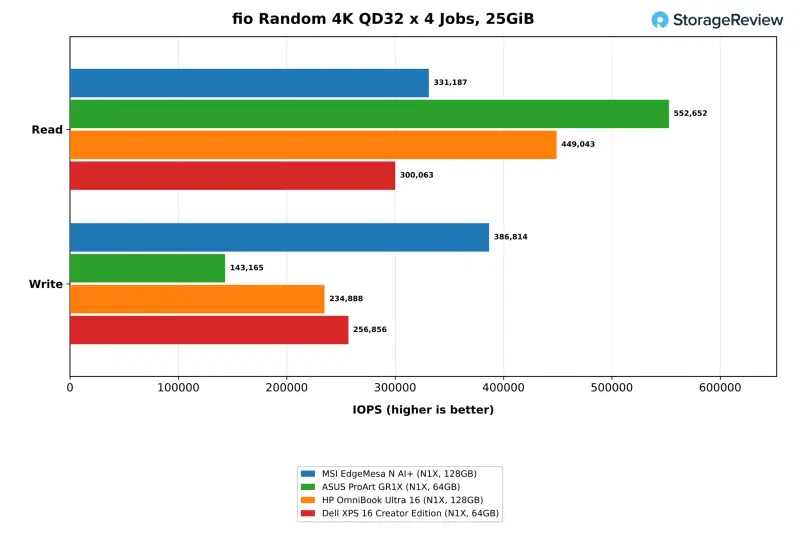
On speed, the EdgeMesa's drive delivered 13,315MB/s read and 12,910MB/s write on a 25GiB footprint. That's effectively level with the 2TB Sandisk Gen5 drive in the HP, at 13,598 and 11,899MB/s, and roughly double the Gen4 drives in the GR1X and XPS 16. Random 4K at queue depth 32 across four jobs was mixed. The EdgeMesa wrote at 386,814 IOPS, ahead of both laptops, and read at 331,187 IOPS, behind the HP at 449,043 and the GR1X at 552,652. Its peak across queue depths reached 674,013 IOPS read and 608,063 IOPS write.
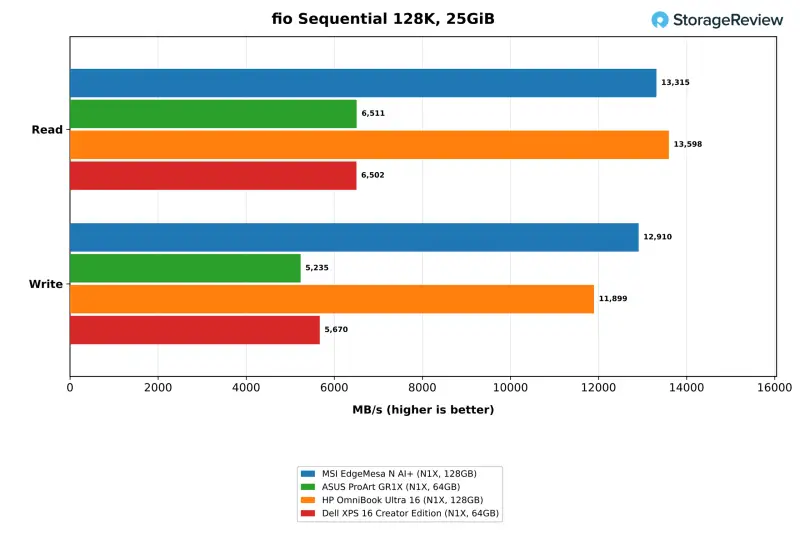
Model loading depends on that read speed and on how many large files you keep on the boot drive. The 4TB capacity matters more than it might seem, because several multi-gigabyte model files add up quickly. If you need more than one drive, the EdgeMesa can't add it, and that's a real constraint for teams that want separate model and data volumes.
Test Setup Behind the Numbers
The unit ran Windows 11 Pro 26H1 on Arm in the Best performance power mode, connected to a 4K external display. Results came from sr-client 1.13, the Windows client suite covering local AI, content creation, CPU, graphics and storage. The AI tests used llama.cpp on CUDA for LLM serving, MLPerf Client and Ollama on CUDA for model loading, the coding agent and RAG, and stable-diffusion.cpp on Vulkan for image generation. Each figure is the median of repeated passes, and runs the suite flagged for variance or failed passes carry an asterisk in the tables. The two laptops were tested earlier on sr-client 1.11, which matters for the image-generation comparison.
An x64 build of Cinebench run under emulation crashed on all four systems, so there are no emulation results. Every number here is native Arm.
What the EdgeMesa Costs, and Who It Suits
NVIDIA quoted the 128GB unit at a $7,499 MSRP and said RTX Spark desktops start at $4,399, with pricing that varies by region, manufacturer and configuration. The MSI listing shows two US versions under the X-005US and X-006US part numbers. Using the prices from the reviews of those laptops, the 128GB EdgeMesa sits about $500 above the 128GB XPS 16 Creator Edition at $6,999.99 and about $1,270 above the 128GB OmniBook Ultra 16 at $6,229.99. The 64GB ProArt GR1X at $4,499 is the cheaper route to the same chip on a desk. Both laptops shipped with 2TB drives, while the EdgeMesa carries 4TB.
My read is that the EdgeMesa makes sense for a specific buyer. If you're a developer or creator working in Windows who wants the RTX Spark platform on a desk, with 10GbE and up to four displays, and you run sustained multi-core or concurrent-request workloads, the desktop chassis earns its premium. If you only chat with small models or do light work, the laptops and the GR1X deliver nearly the same single-user experience. And if you need Linux-first clustering or DGX OS, MSI's EdgeXpert, built on NVIDIA's DGX Spark platform with a 200GbE ConnectX-7 port, is the better fit. That's a different product for a different job.
Before you buy, check three things in your own environment. First, whether your models fit the dedicated GPU allocation at the default setting, or whether you'll need to change the split and leave the CPU at least 16GB. Second, whether a single 2242 slot and no upgrade path will hold up over the machine's life. Third, whether a 240W adapter, a dock and a 10GbE link fit your desk and network plan. Those answers will decide whether the EdgeMesa is a quiet workhorse or an expensive lesson in fixed configurations.
The next thing to watch is whether MSI and NVIDIA publish model-size and quantization details behind the 120B and 1 petaFLOP claims, and whether suite updates close the image-generation gap seen against the current release. Until then, the EdgeMesa's strongest case rests on what the testing did measure: sustained CPU work, concurrent LLM serving and a fast Gen5 drive, in a box about the size of a hardcover book.


